PayPal Cashback World Mastercard not updating transactions or balance since 3/27 (edited)

My PayPal Cashback World Mastercard is updating it's balance, but transactions have not been appearing since 3/27. I tried everything the online chat people and the ai chat bot suggests, including resetting the connection and even deleting the card and institution entirely, waiting a bit, and adding them again. I have no filters or anything, every transaction is showing to the current date in other accounts just fine, and doesn't matter if I use web or mobile.
Comments
-
Hello @annikalily,
Thanks for reaching out! I can see the ticket you worked on with our support team that you mentioned. To better assist with this issue, can you see if these steps work to resolve the issue you are experiencing:
- Make all of the accounts with the bank manual by following the steps here.
- Once you see the account(s) listed in the Manual Accounts section under Settings > Accounts, go back through the Add Account flow to reconnect to the bank.
- If the connection is successful, carefully link the account(s) found to your existing Quicken Simplifi account(s) by following the steps here.
Let us know!
-Coach Jon
0 -
I already did that days ago and it changed nothing.
0 -
Hello @annikalily,
Thanks for the reply! If you have already tried the above steps, and the account balance itself is still updating, can we have you supply the following information?
- The name of the account the transactions are missing from, as it appears in Quicken Simplifi.
- The Date, Payee, and Amount of a few example transactions that are currently missing in Quicken Simplifi.
- A screenshot of the example transactions from the bank's website.
- A screenshot of the corresponding register in Quicken Simplifi showing that the transactions are missing.
- A screenshot of the Accounts Summary page from the bank's website that has a wide enough scope to show the full page URL. This is the landing page after signing in, and typically lists all accounts and balances. You will want to take this from a web browser and not a mobile browser, as well as redact any private info such as account numbers.
We will also need logs to be submitted:
- Log in to the Quicken Simplifi Web App.
- Select the Profile icon in the upper-right corner of the screen.
- With the Profile menu open, hold down the Option key (Mac) or the Alt key (Windows), and then click Send Feedback.
- Leave all boxes checked, add a brief description of the issue, and then click Send.
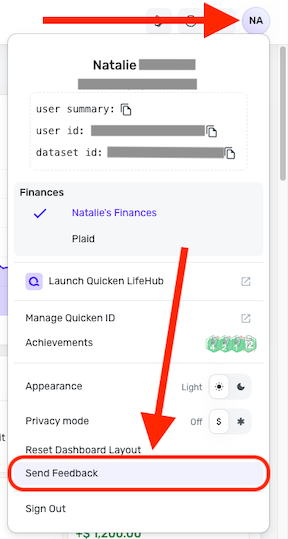
-Coach Jon
0
