Best Of
Re: Help with linking split transactions to recurring (edited)
Thank you…. that worked……
Seems like I am running into a lot of "work arounds" which is not ideal. Especially when they don't work from one month to the next.

Re: Festivus is Over But I Still Have Grievances!
Hello @Tim Etherington,
Thanks for the feedback and for taking the time to detail these out! We usually try to keep posts in the community to an individual issue, but I can certainly understand and appreciate what you listed here.
If you do wish to troubleshoot any of these issues further, you can create individual posts for each issue, and we can help troubleshoot them together.

Re: where is the reports tab on quicken simplifi
Hello @starfish,
Thanks for reaching out! You can locate the Reports tab using the navigation menu on the left-hand side in Quicken Simplifi.
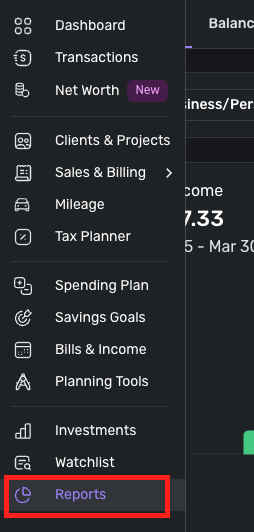
I hope this helps! Let us know if you still cannot locate the Reports tab!
Re: The Split Transaction function does not allow you to split an item across several months
@zooey5253, thanks for reaching out to the Community with your suggestion!
I know that splitting a transaction across multiple months is not something Quicken Simplifi has ever offered, and I don't think Quicken Classic does either. At any rate, I did find this existing Idea post that you may be interested in:
Although not specifically referring to transactions, this ability would allow splitting larger expenses across multiple months in the Spending Plan via Planned Spend. Planned Spend is the typical way to track expenses that fluctuate each month, such as groceries. If this is something you'd like to see, please add your vote and feedback!
There is also the option of using Savings Goals to split large purchases across multiple months. The following Community FAQ has more details on this!
Let us know if these existing topics are what you're looking for!

Re: Help with linking split transactions to recurring (edited)
It looks like you are trying to link from the series to the transaction. That should work, but doesn't always.
Try linking from transaction to series instead. Click the link option on the transaction's three-dot menu:
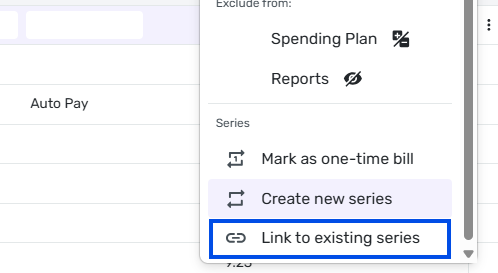
Then choose the transaction from the "Link to existing recurring" pop-up window:
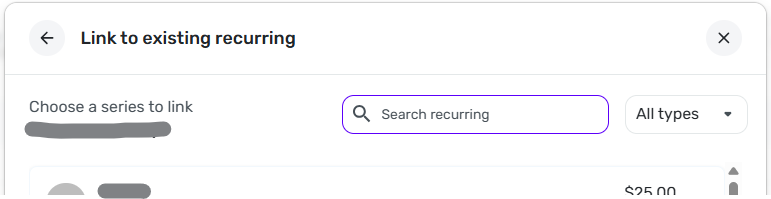
Sometime that works when linking the other direction doesn't.
 DryHeat
Re: Editing a future transaction on mobile doesn't update cash flow right away (edited)
Thanks for acknowledging this, @Coach Jon
 RobWilk
Re: Net Worth Feature: Share your feedback here!
@pterisaur, you can import account balance history to correct historical net worth data:
Re: Credit Card Details: Share your feedback here!
Hey! Thank you both for noticing this. These labels will be added back soon, and they'll reflect the balance setting that you've selected (i.e. "Balance with pending" or "Bank balance"). Thanks again!

When will Nelnet be an available integration?
Great Lakes used to be the account I used for my student loans, and they were either purchased or absorbed by Nelnet. Since then, we have not been able to add Nelnet to Quicken Simplifi without adding it manually. It seems like this has been a known issue given all the posts/threads so is there any plan to figure out how to fix that integration?
I trialed [removed] as a budgeting app for a couple weeks and they are able to integrate with Nelnet so why can't Quicken?
 dunnnw
Re: Hovering over ---Split--- in Transaction List now Shows You the Split Amounts
Didn’t notice this. Thanks @SRC54 for pointing it out!
 Flopbot
