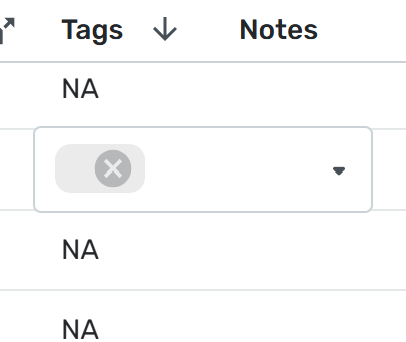
Unknown/NA tags previously removed still show in reports and transaction activity
Comments
-
I ran into this bug this week when I converted some tags to categories. (This isn't an easy thing to do, but going to reports and choosing tags allows you to do this better because it drills down to the individual splits; the transactions view (registry) won't let you do it. I was using tags instead of categories in order to have a subcategory of a subcategory, which is a new feature. However, it is still a bit buggy so I just made them subcategories for now.
Anyhow, once I deleted the old tags, I got NA ghost tags all over the place. No bulk way to get rid of them. I even created an NA tag to delete. LOL Didn't work. Again Reports allowing me to sort by tag made it relatively easy for me to click on all the NA ghost tags and delete them one by one.
I know I could have just waited for the bug to be fixed but even then, it might not clear out the NAs. They're gone now. Unless I've missed a stray one here or there.
Steve
Quicken Simplifi (Safari & iOS) Since 2021
Quicken Classic (MacOS) Since 2009
MS Money (1991-2009) and Dollars & Sense (1987-1991)2 -
Hope this bug is resolved soon. I used tags for categories when I imported data from Mint to see my historical reporting online in Simplifi and some of those deleted tags still show NA on the report page.
Simplifi User Since Nov 2023
Minter 2014-2023
Questionable Excel before 2014 to present
1 -
Agree, with end of year reporting for tax purposes, I hope this can get cleaned up.
0 -
I got all of mine cleaned up manually. The NA tags I had were all for the categories I created and changed, so I knew where to search for them, which may not be the case for you. Usually I could click on NA and hit the X to delete. A few were stubborn, and I had to put in a new tag, which then superseded the NA, which I then could delete.
Steve
Quicken Simplifi (Safari & iOS) Since 2021
Quicken Classic (MacOS) Since 2009
MS Money (1991-2009) and Dollars & Sense (1987-1991)0 -
I am not going to clean the NA from the tags manually. It is a lot of work to clean up several years (09/2014-12/2021). I cleaned up NA tags for 2022, 2023, and 2024. I hope the solution comes so once a user deletes a tag, the tag is deleted and not shown as NA on the report page. The transaction list does not show the NA for tags.
Simplifi User Since Nov 2023
Minter 2014-2023
Questionable Excel before 2014 to present
1 -
It is more convoluted to specify date ranges in the transaction list. I use the "Transaction Activity Showing Transactions since" selector (example since 2024) and then use <10/31/2024 in the search box. That results in transactions for 2024 through October month end. If I want only transactions for October, then I use >10/01/2024 with since 2024. In the resulting download, I delete the transactions I do not need, for example November transactions.
Simplifi User Since Nov 2023
Minter 2014-2023
Questionable Excel before 2014 to present
1 -
Yes, you are correct. I download transactions to Excel each month so I use >mm/01/yyyy in the search box.
Simplifi User Since Nov 2023
Minter 2014-2023
Questionable Excel before 2014 to present
0 -
@UrsulaA Wow, you imported since 2014? I went back to Jan 2021 when I started in November 2021, and that was heck! You are a braver man than I, Gunga Din. 😀
Steve
Quicken Simplifi (Safari & iOS) Since 2021
Quicken Classic (MacOS) Since 2009
MS Money (1991-2009) and Dollars & Sense (1987-1991)0 -
Thanks, I like seeing the reports and spending trends in one place. It took me hours to import and I am not willing to spend more time cleaning NA tags. This issue started a few months ago when the split display was updated in the reports area.
Simplifi User Since Nov 2023
Minter 2014-2023
Questionable Excel before 2014 to present
2 -
Any update on this bug? If someone wants to export transactions from the report page, the various NA clutter the CSV output.
Simplifi User Since Nov 2023
Minter 2014-2023
Questionable Excel before 2014 to present
0 -
@UrsulaA, as soon as we have any news to share, we'll be sure to post back here to let you know. There is no update at this time.
Thank you for your continued patience!
-Coach Natalie
-Coach Natalie
0 -
Between this issue and then not being able to bulk remove a Tag, Tags becomes almost an unusable feature. I can't remove them in bulk via Editing, so if I delete the tag I wanted to change, then I get the Unknown/NA bug, which makes me feel like once a Tag is created, don't change it unless I'm willing to manually update/remove them, which could be hundreds! Kind of stuck in a bad circle of errors.
Is the Unknown issue actually being worked on? I can't tell as it's not a "feature". Re the Bulk remove, I see its "Active" but to me this is a bug and not a feature but it seems its not even being considered to fix.
thanks for listening, please let me know if I'm missing something and if there is a way to make changes to Tags, edit, remove. I've read the help articles :)
1 -
I agree with the poster above. Any updates?
Simplifi User Since Nov 2023
Minter 2014-2023
Questionable Excel before 2014 to present
1 -
I also agree with the poster. I have tried to embrace using Tags, but have also encountered system-created NA tags as residue from deleted Tags. Yes, I can edit a single transaction and manually remove the trash, but doing so for hundreds of transactions would be more than just irritating. Please either correct the system to clean-up the residual trash, or provide a method of mass editing/removing tags. Thank you ...
0 -
Hello @jamesfdavis7,
While there isn't currently a way to mass edit/remove tags, there is an idea post requesting that functionality be added. Please take a look and add your vote plus a comment if it's something you'd like to see implemented.
I checked on the ticket and do not see any updates at this time. As soon as there are updates to share, we'll make sure to post back to let you know.
Thank you!
-Coach Kristina
0 -
How do I vote yes? I definitely in favor of the added functionality. Would it also correct the residue issue from tags already deleted?
0 -
vote yes using the link below
https://community.simplifimoney.com/discussion/3439/ability-to-remove-tags-during-bulk-editSimplifi User Since Nov 2023
Minter 2014-2023
Questionable Excel before 2014 to present
0 -
I am glad to see both this ticket and the idea open. Look forward to an update when it comes.
Simplifi User Since Nov 2023
Minter 2014-2023
Questionable Excel before 2014 to present
2 -
Hello everyone!
We are back with an update on this reported issue. We are still able to reproduce the issue from our side, so we gave the ticket a bump in order to see some movement on the resolution of this issue. Thanks for your patience!
-Coach Jon
-Coach Jon
1 -
Hello everyone!
We are back with an update on this reported issue. We are still able to reproduce the issue from our side, so we gave the ticket a bump in order to see some movement on the resolution of this issue. Thanks for your patience!
-Coach Jon
-Coach Jon
1 -
Thanks for the update, Jon! Looking forward to a resolution.
1 -
Hello everyone,
I'm checking open escalations, and I just wanted to let you know the ticket for this issue is still open and being worked on. We will continue to post back here with any updates.
Thanks for your continued patience!
-Coach Natalie
0 -
Hello everyone,
I'm checking open escalations, and I just wanted to let you know the ticket for this issue is still open and being worked on. We will continue to post back here with any updates.
Thanks for your continued patience!
-Coach Natalie
0 -

I have over 100 of these and I can't find a way to bulk delete them.
The Tag shows as "NA" in the column but shows as an empty space when I click in the field to edit it. There is no such Tab in my tag list in Settings or anywhere else.
I can delete these one by one but it would be a pain.
DryHeat
-Quicken Classic (1990-2020), CountAbout (2021-2024), Simplifi (2025-…)0 -