Two Different Screens - Edge and Chrome

Dick_Davis
Dick_Davis Member ✭✭✭✭
edited July 11 in Troubleshooting

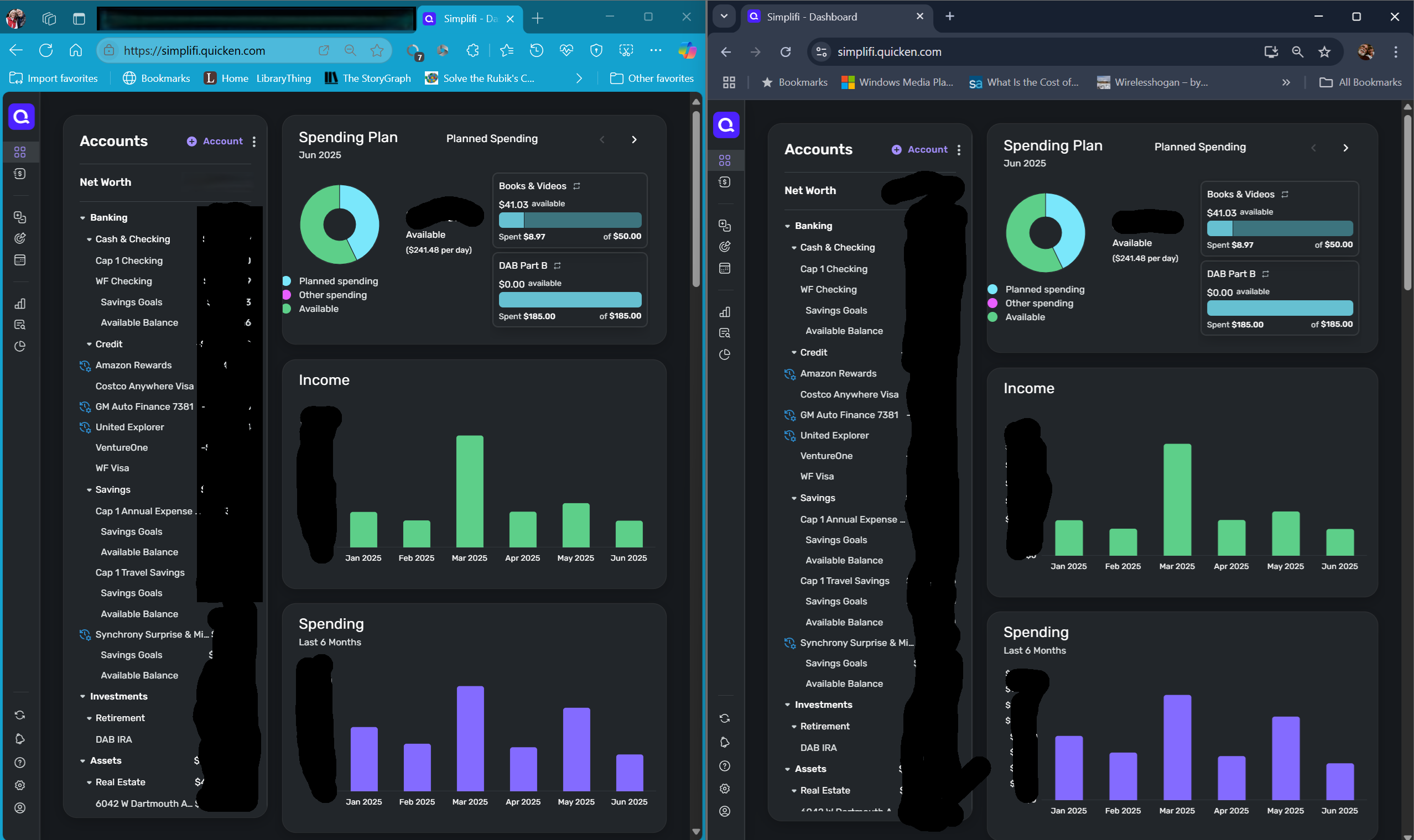
When I use Edge, the image is very large while Chrome is a normal size. Thus is there something with Edge that needs to be changed. Please provide the instructions so that they can be followed as well as what documentation is needed. Reference the images attached. First image is Edge and the second image is Chrome.


Dick Davis

Wanting to Migrate from Quicken Classic Premier to Simplifi

Tagged:

Comments

  • DannyB
    DannyB Member ✭✭✭✭

    @Dick_Davis

    Have you checked your Zoom settings and are they the same for both browsers?

    Danny
    Simplifi user since 01/22
    Budget: a mathematical confirmation of your suspicions.” ~A.A. Latimer
  • Dick_Davis
    Dick_Davis Member ✭✭✭✭

    I checked with zoom. com and both seems to be the same, but is there a better test?

    Dick Davis

    Wanting to Migrate from Quicken Classic Premier to Simplifi

  • Coach Jon
    Coach Jon Moderator admin

    Hello @Dick_Davis,

    Thanks for the reply. I think @DannyB was referencing the Zoom Settings for the web browsers, not the Zoom.com website. This would usually be located in the settings for the browsers.

    -Coach Jon

  • DannyB
    DannyB Member ✭✭✭✭

    @Dick_Davis Sorry about that… yes, I'm referring to the Zoom setting for your browsers.

    Edge: click on the … at the top right at the browser screen. The settings menu will open and you will find the Zoom setting in this menu with a - X% + towards the top of the menu.

    Chrome: The 3 dot menu is vertical but located in the same area at the top right corner of the browser window. The Zoom setting is further down the menu in Chrome but is identical to Edge (Edge is built on the Chrome framework).

    Danny
    Simplifi user since 01/22
    Budget: a mathematical confirmation of your suspicions.” ~A.A. Latimer
  • Dick_Davis
    Dick_Davis Member ✭✭✭✭

    @DannyB My zoom for Edge is at 90% while Chrome is at 100%. When I change the Edge to be 100%, it just gets larger and does not compare with Chrome.

    Dick Davis

    Wanting to Migrate from Quicken Classic Premier to Simplifi

  • DryHeat
    DryHeat Superuser ✭✭✭✭

    @Dick_Davis

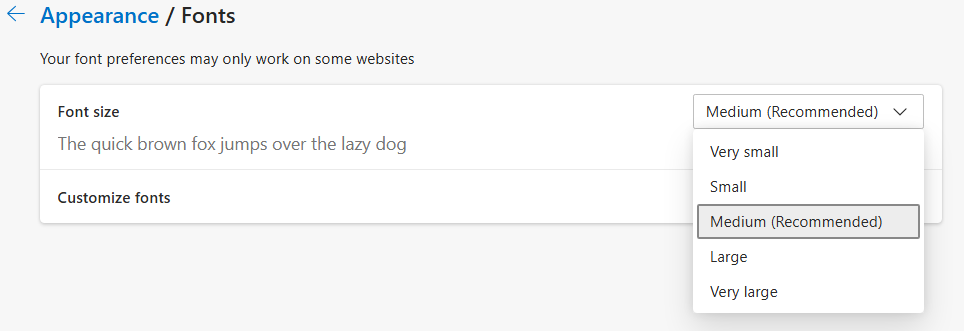
    Edge also has a font size setting that alters the fonts on some — but not all — websites.

    You can access this setting from the Edge Settings menu at Appearance | Fonts. It looks like this:

    image.png

    What is the setting on your browser?

    DryHeat
    -Quicken Classic (1990-2020), CountAbout (2021-2024), Simplifi (2025-…)

  • DannyB
    DannyB Member ✭✭✭✭

    @Dick_Davis

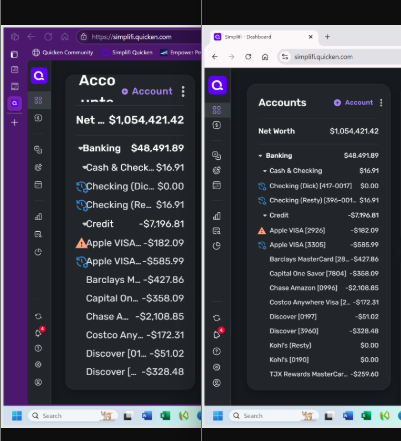
    I don't have any other ideas of how to "fix" what you are seeing. Here is a side-by-side comparison of QS in Edge (left side) and QS in Chrome (right side) on my laptop (LG Gram running Windows 11 Home). Both browsers are set to 80% zoom, and fonts are set to medium (recommended). I'm using 80% in this example but normally I have both browsers set to 100%. Is there a reason you want to open QS in the two different browsers?

    chrome edge compare.png

    I can't tell any real difference between the way the two browsers present QS.

    Danny
    Simplifi user since 01/22
    Budget: a mathematical confirmation of your suspicions.” ~A.A. Latimer
  • DryHeat
    DryHeat Superuser ✭✭✭✭

    @DannyB

    I took another look at @Dick_Davis's images. The icons in the main menu on the left-hand side seem to be about the same size in both browsers, so I don't think it's a zoom issue. The problem seems to be with the font size. So I suspect he has set his font size to "Very large" in Edge and that is causing the difference.

    If so, this really isn't a Simplifi issue, but instead an issue caused by changed appearance settings in Edge.

    image.png

    DryHeat
    -Quicken Classic (1990-2020), CountAbout (2021-2024), Simplifi (2025-…)

  • DannyB
    DannyB Member ✭✭✭✭

    @DryHeat

    It seems that you've nailed it. I have Edge and Chrome open on my screen. I changed the font setting in Edge and pretty much reproduced exactly what @Dick_Davis shows in his screenshots.

    Danny
    Simplifi user since 01/22
    Budget: a mathematical confirmation of your suspicions.” ~A.A. Latimer
  • Dick_Davis
    Dick_Davis Member ✭✭✭✭

    @DryHeat @DannyB Thank you so much, I just did the change in my Edge and it is like Chrome. Thank you.

    Dick Davis

    Wanting to Migrate from Quicken Classic Premier to Simplifi

This discussion has been closed.