Unable to add American Express CD account (edited)

MagosDante
MagosDante Member
edited October 29 in Adding and Updating Accounts

I have added my American Express account. It's been on for a while with no real issue. My Credit card shows and my recently added High Yield Savings also shows after adding it in. I also recently (over a month ago) added a CD to the account. When I add an American Express account or edit the existing, it shows in the items to add, but when I try to add it, Simplfi says all accounts already added and there is no CD showing. I have a CD with another bank and it shows under the accounts and added no problem. This seems to be a problem with AMEX specifically? Anyone else have issues with this showing? I also removed the account and re-added all 3 accounts back, still only shows the CC and HYS.


Comments

  • Coach Jon
    Coach Jon Moderator admin
    edited June 24

    Hello @MagosDante,

    Thanks for reaching out! I would check Settings > Accounts within Quicken Simplifi to see if there are any other instances of American Express that may be causing a problem with trying to add your new account to the program.

    Additionally, your user token may have expired. This can happen after having the account connected for more than 90 days.

    To gain a new token, you will have to revoke Quicken from accessing your bank's website, then reconnect your accounts.

    • Navigate to the bank's website, sign in, and then remove Quicken's access from the bank's third-party linked apps.
    • Make all of the accounts with the bank manual by following the steps here.
    • Once you see the account(s) listed in the Manual Accounts section under Settings > Accounts, go back through the Add Account flow to reconnect to the bank.
    • If the connection is successful, carefully link the account(s) found to your existing Quicken Simplifi account(s) by following the steps here.

    Let us know how this goes!

    -Coach Jon

  • MagosDante
    MagosDante Member

    I tried this and it still only sees the Credit card and HYS accounts. There are no other manual or anything related to the American Express. It just ignores the CD even though the connector shows it as a selectable option and I have it checked.

  • Coach Jon
    Coach Jon Moderator admin

    Hello @MagosDante,

    Thanks for the reply. Did you try revoking the Quicken access and getting a new token from your bank's website before disconnecting and reconnecting? If so, can you provide the following information to better assist us with investigating this issue:

    • Has there been any activity in the account in the last 90 days?
    • Is the account considered an external account (i.e. are you redirected to a different website when selecting the account on the bank's website)? If so, what URL are you redirected to?
    • Is the account a subtype of a different account?
    • Has the bank made any recent changes to its website or sign-in process?
    • Are you the owner of the account?
    • The name of the account, as it appears on the bank's website.
    • If the issue is occurring on an existing Quicken Simplifi account, the name of the account as it appears in Quicken Simplifi.
    • A screenshot of the Accounts Summary page from the bank's website (the page that lists all accounts and balances - feel free to redact any private info) that has a wide enough scope to show the page URL (this must be taken from a web browser and not a mobile browser).
    • A screenshot of the Add Account screen in Quicken Simplifi showing that the account in question is missing at account discovery.

    -Coach Jon

  • MagosDante
    MagosDante Member
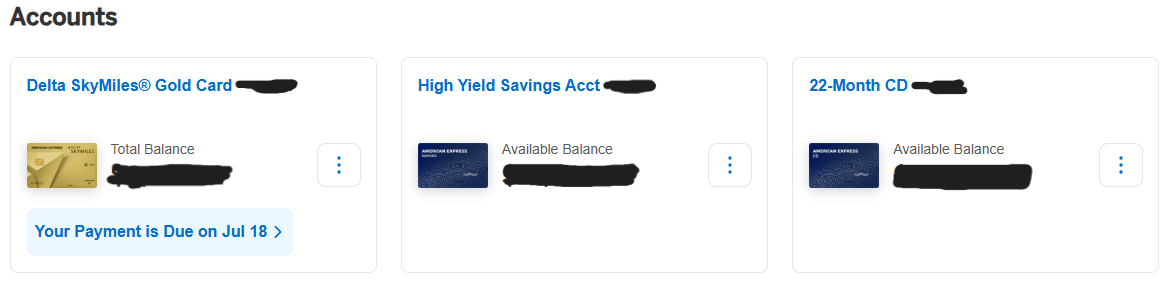
    AMEX_Account_list.png

    List of Amex accounts on the website, all are AMEX native and all have activity in the last 90 days

  • MagosDante
    MagosDante Member
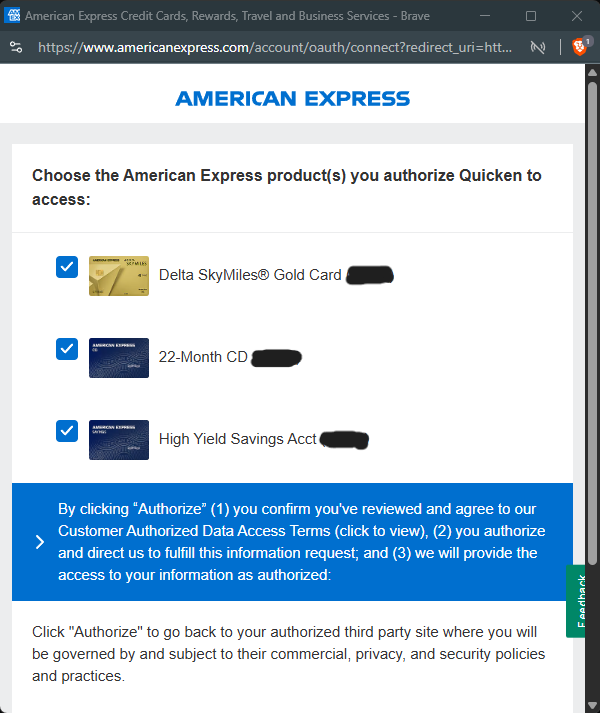
    Simplifi_authorize_AMEX_Accounts.png

    authorize window when adding to Simplifi

  • MagosDante
    MagosDante Member
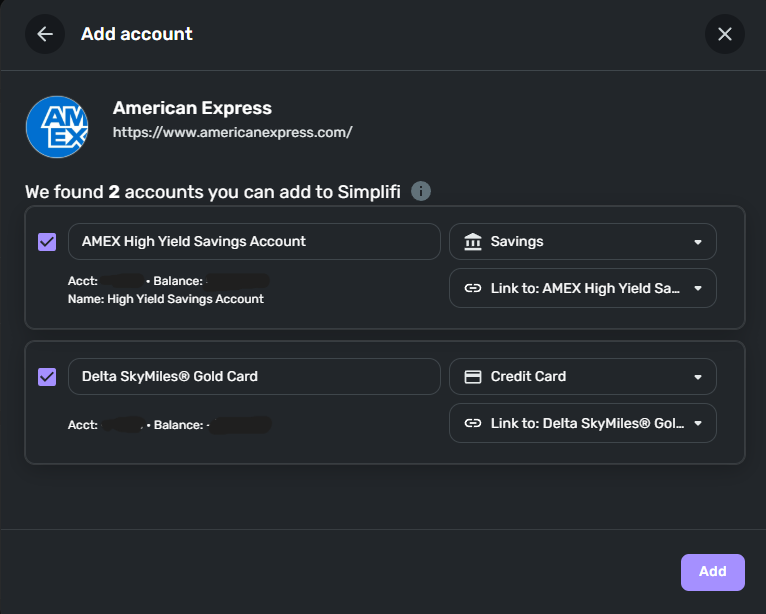
    simplifi_add_accounts.png

    accounts to add to Simplifi. The CD is missing at this point and is never added.

  • Coach Jon
    Coach Jon Moderator admin

    Hello @MagosDante,

    Thanks for providing the requested information! We will still need the following:

    • Has the bank made any recent changes to its website or sign-in process?
    • Are you the owner of the account?

    And finally, we will also need logs to be sent to us; The instructions to do that can be found below:

    1. Log into the Quicken Simplifi Web App.
    2. Select Profile from the left-hand navigation bar.
    3. With the Profile menu open, hold down the Option key for Mac or the Alt key for Windows, and then click Send Feedback.
    4. Leave all boxes checked, add a brief description of the issue, and then click Send.

    -Coach Jon

  • MagosDante
    MagosDante Member
    • Has the bank made any recent changes to its website or sign-in process?

    Not to my knowledge

    • Are you the owner of the account?

    Yes, I'm the sole owner of the account

    sending feedback and mentioning this thread.

  • Coach Jon
    Coach Jon Moderator admin

    Hello @MagosDante,

    I apologize, it looks like the screenshot you sent for the Account Summary is not sufficient. We need it to contain the entire page that lists all accounts and balances (feel free to redact any private info). It needs to be a wide enough scope to show the page URL (this must be taken from a web browser and not a mobile browser).

    -Coach Jon

  • MagosDante
    MagosDante Member

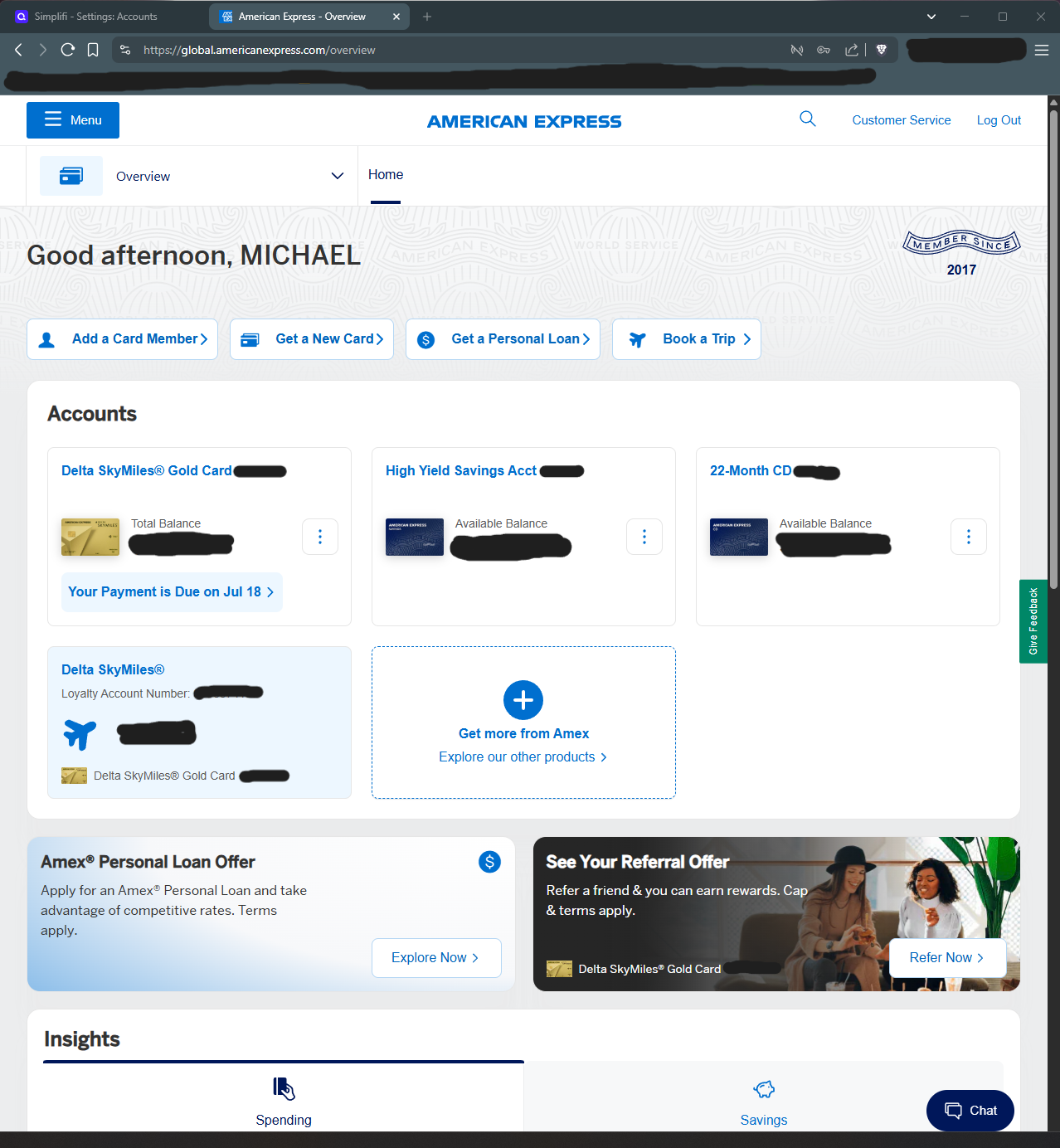
    sorry, I misunderstood the assignment apparently…screenshot with URL

    brave_yrwv3MZi1w.png
  • Coach Jon
    Coach Jon Moderator admin

    Hello @MagosDante,

    Thank you for the information. I did get this reported to my product team and will be sure to follow up here when we have a status update!

    In the meantime, you can track the account manually by adding manual transactions, which will keep your records up-to-date. Here are the steps to do so: Managing Transactions in Quicken Simplifi | Quicken Simplifi Help Center

    -Coach Jon

    CTP-13601

  • Coach Jon
    Coach Jon Moderator admin

    Hello @MagosDante,

    I am following up with a status update from my product team for your issue reported here! They stated the issue should now be fixed and would like you to verify from your side, please. Let us know!

    -Coach Jon

  • Coach Jon
    Coach Jon Moderator admin

    Hello @MagosDante,

    I am following up to verify if you have seen my previous reply about the resolution of this issue from our product team. Please let us know if the issue is fixed for you!

    -Coach Jon

  • Coach Jon
    Coach Jon Moderator admin

    Hello @MagosDante,

    I am following up once more to verify if the issue is resolved for you. Our product team has stated that the issue should be fixed, so please let us know if this is the case for you; otherwise, we will have to close the ticket.

    Thank you!

    -Coach Jon

  • Coach Jon
    Coach Jon Moderator admin

    Hello @MagosDante,

    I am following up to inform you that the ticket has been closed due to a lack of response. The issue should be resolved, but please let us know if you continue to experience it.

    -Coach Jon

This discussion has been closed.