Transactions in liability accounts not included in reports (edited)
If a transaction is recorded in a manual non-linked account in an expense category, those transactions are not included in any reports. They are not included in the net income, which makes it inaccurate because they should be included. If I record the same manual transaction in an account linked to a bank, those transactions are included in the reports and net income. Simplifi should be updated to include transactions from all accounts in the net income and reports regardless of account type or linked status.
Comments
-
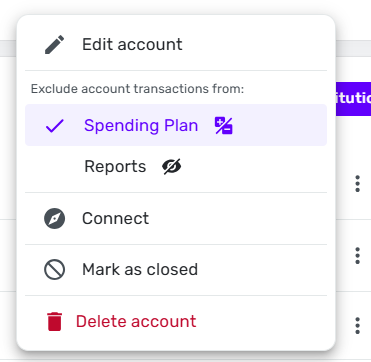
When you look at your manual account in the Settings | Accounts listing, is it marked to be excluded from Spending Plan or Reports?
If so, you can change that by clicking the three-dot menu for that account and changing the setting:
DryHeat
-Quicken Classic (1990-2020), CountAbout (2021-2024), Simplifi (2025-…)0 -
No, I should’ve mentioned that in my original post. I made sure to uncheck both of these options on all of the transactions. It’s very easy to reproduce by creating a manual account, recording a transaction, and checking the reports to see if it’s included.
0 -
I tried to reproduce this as I have several unlinked accounts, and for a moment I thought I had one that wasn't showing up in the Top Spending Categories. It was from this morning, and now it is there in reports. So maybe it takes a few minutes?
Also, just to make sure, this isn't a recurring bill that won't show up in the Planned Spending section of the Spending Plan but rather under the Bills section? I sometimes still get confused by this even after several years if I look for an expense there.
If you are still missing transactions in reports this morning, try another browser. Also try signing out and signing back in. I'm using 4.65 in Safari 18.5.
Steve
Quicken Simplifi (Safari & iOS) Since 2021
Quicken Classic (MacOS) Since 2009
MS Money (1991-2009) and Dollars & Sense (1987-1991)0 -
Correct, the transactions are not from recurring bills.
I tested a bunch of scenarios and found that it only affects specific liability account types.
Account Category
Account Type
Result
Asset
Vehicle
Appears in reports
Banking
Savings
Appears in reports
Credit
Credit Card
Appears in reports
Credit
Other Credit
Appears in reports
Liability
Construction Loan
Does not appear in reports
Liability
Consumer Loan
Does not appear in reports
Liability
Home Equity Loan
Does not appear in reports
Liability
Mortgage
Does not appear in reports
Liability
Other Liability
Appears in reports
Liability
Other Loan
Does not appear in reports
Liability
Student Loan
Does not appear in reports
Liability
Vehicle Loan
Does not appear in reports
Interestingly, transactions recorded in an 'Other Liability' account do appear on the reports. If you choose any other liability account type, they do not appear. Are your accounts set to the Other Liability account type? Or are they set to a specific type?
When I switched my student loan account to Other Liability, all of the interest transactions I recorded in that account immediately appear in Net Income, and they disappear when I switch it back to Student Loan.
0 -
@stevel0821 I have a couple of questions to try to get a better handle on this:
—What sort of transactions are you testing? (transfers? income category? expense category?)
—What sort of reports are you running that don't show those transactions?
I ask because the accounts where transactions are not showing up are loan accounts, and transactions in those types of accounts are usually transfers. (i.e., you are either borrowing money or paying it back, neither of which should show up in and income or expense report.)
You've probably already thought of that, but I just wanted to check.
DryHeat
-Quicken Classic (1990-2020), CountAbout (2021-2024), Simplifi (2025-…)1 -
I'm testing with standard income/expense transactions. So for the Consumer Loan account for example, I recorded a transaction under the Loan Interest category. They're not showing up in the reports related to income/expenses like Total Spending, Spending by Month, Income, Net Income, and Monthly Summary.
0 -
Hello @stevel0821,
Thanks for reaching out! To help clarify your situation, can you please share screenshots showing the mentioned transactions missing from the reports? This will help us determine exactly what is occurring here. I would also check to see if using another web browser or the mobile application ends up showing the same issue.
-Coach Jon
0 -
I created a Consumer Loan and did a few test transactions that fit with what you are seeing.
(1) As I expected, transfers to and from the loan account did not show up as income or expense. That part seems correct as such transfers are simply the movement of assets, not income or expense.
(2) But income and expense transactions entered directly in the consumer loan account (without reference to any other account) did not act as expected. As I would expect, a "Groceries" transaction increased the (negative) amount of the loan and an "Other Income" transaction decreased it. But those transactions do not show up in the income or expense type reports as I thought they would.
This result is anomalous, because similar transactions entered directly in a credit card account (which is simply a different kind of loan) do show up in income and expense reports. It doesn't make sense to me that buying groceries with a credit card is considered an expense but buying groceries using a different kind of loan is not.
DryHeat
-Quicken Classic (1990-2020), CountAbout (2021-2024), Simplifi (2025-…)1 -
Hello everyone,
I was able to reproduce this issue from our side, and we did get this reported to our product team. We will be sure to share updates here going forward!
-Coach Jon
SIMPL-28017
3 -
You know, I thought @DryHeat was probably right that this had something to do with transfers, so, like him, I created a Test Liability account and charged myself $25 mortgage interest fee, and it doesn't show up in any reports. And this after I go in and choose all accounts including the test account.
I even checked the Settings:Accounts to make sure that it hadn't somehow got set to ignore in Reports. This is weird.
Guess what? It does show up in the Planned Spending of the Spending Plan under Fees. (I just called it a fee as I already had an expense category for that.)
P.S. I woke up and played with this some more. I even made a Mortgage Interest category. It all shows up in Spending Plan whether it is recurring or not. But it won't show up in Tax Report or Spending Reports.
I even tried excluding the account and unexcluding the account and doing the same with the transactions, and that made no difference either. I couldn't figure out any workaround other than to reclassify the liability account to a credit account. Then it all worked! (It even works as a bank account or an asset account (just has a negative balance). So there's the workaround, make your liability account for the time-being a negative asset.
I am wracking my brain trying to figure out why Liability Account transactions would be excluded from Reports. So it must be a bug.
Steve
Quicken Simplifi (Safari & iOS) Since 2021
Quicken Classic (MacOS) Since 2009
MS Money (1991-2009) and Dollars & Sense (1987-1991)1 -
Thanks @Coach Jon! I switched all of my accounts to Other Liability in the meantime as a workaround. Keep me updated so I know when I can switch them back, please!
1 -
Glad it got escalated for you @stevel0821. For some reason, I didn't see @Coach Jon's post until this morning or I wouldn't have kept testing it last night. 😀
It is really strange that Other Liability works but the other ones don't.
Steve
Quicken Simplifi (Safari & iOS) Since 2021
Quicken Classic (MacOS) Since 2009
MS Money (1991-2009) and Dollars & Sense (1987-1991)0 -
I track my mortgage balance in a manual mortgage account, which isn't linked to my mortgage company. Mortgage payments are treated as transfers from Checking into the mortgage account, I manually enter the portion that's interest as a category "Mortgage Interest". The category is configured as a Part A deductible expense. The entries are supposed to be viewable by Spending Plan and Reports. Any idea why they don't show up under the Simplifi Tax report?
0 -
Hello @wck_austin,
Thanks for reaching out! The Tax report is based on specific categories selected for transactions being used in the report. If you are seeing any discrepancies in the tax reporting, go through and review all transactions and their associated categories. If you click on an item in the Tax report (like Income), it will show all transactions listed as that category (Income) within the report.
I tested this Mortgage Interest category myself, and can see the transaction within the report under "Home mortgage interest (1098)". Do you not see your Mortgage Interest transaction there as well?
-Coach Jon
0 -
Thanks for trying to help! I've attached 3 pics to show what's happening. First shows the "configuration" for the Mortgage Interest category. 2nd shows that they do show up in the Transactions themselves. 3rd shows that they're not in the Tax report. Am I doing something wrong?
0 -
Hello @wck_austin,
Thanks for the reply and screenshots! I would have you verify if the account itself is set up to exclude transaction from reports:
- Hover over the panel on the left-hand side and select Settings.
- Select Accounts.
- Locate the account and click the three dots at the end of it.
- In the Exclude account transactions from section, verify whether Reports has a checkmark next to it. If it does, uncheck it.
-Coach Jon
0 -
Are your manual interest payments entered as part of a split transaction that also includes a transfer?
I ask because transfers are usually excluded from reports, and if the transaction is excluded then the split values will all be excluded.
DryHeat
-Quicken Classic (1990-2020), CountAbout (2021-2024), Simplifi (2025-…)1 -
No - I do enter the full payment as a transfer. However, I enter the interest as a separate line item, manually.
But thanks for asking!
0 -
I think that the account is configured as you said it should be. Attached a screenshot.
0 -
Thank you for your reply,
When you look at the transaction that is not showing up in the report, do you see the icons indicating that it is excluded from reports?
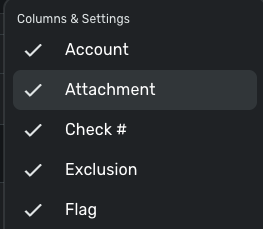
To see if it's excluded or not, you may need to enable that field in the Columns & Settings section (click on the gear icon and make sure Exclusion is selected).
Thank you!
-Coach Kristina
0 -
In a screenshot I sent @Coach Jon , above ("Transaction Report.png"), it shows those flags not set. I reattached here. Is this showing what you're asking?
0 -
OK - this is weird. When I created an artificial "Mortgage Interest" entry in a checking account that's sync'ed to my bank, it shows up! And when I create a "Charitable" donation in the mortgage account, it doesn't (Charitable show up everywhere else). The Mortgage Account is, I think, correctly configured (screen shot attached). Any thoughts?
0 -
Hello @wck_austin,
Thanks for the reply! For one of the transactions not showing up in the report, can you please open up the transaction detail window and provide a screenshot showing these details? You may feel free to DM this screenshot to me if you prefer.
-Coach Jon
0 -
Thanks for your patience with this. Not sure how to DM here, so see attached.
One thing - the Mortgage Interest entries are being posted to a Liability account (that's where I track my mortgage). Is there anything about Liability accounts that's automatically excluded from reports?
0 -
Hello @wck_austin,
Thank you for the reply. I was able to reproduce this behavior and can confirm we are aware of this issue. It appears that transactions recorded in Liability accounts are not being included in reports. I merged your thread with the existing thread here, where this issue was originally reported. We will be sure to follow up here when we have an update!
-Coach Jon
1 -
I was reading these posts and feel stupid for not realizing it was the same issue. Glad it is being worked on.
Steve
Quicken Simplifi (Safari & iOS) Since 2021
Quicken Classic (MacOS) Since 2009
MS Money (1991-2009) and Dollars & Sense (1987-1991)0 -
Thanks for the update. I only recently started using Simplifi (long time Mint & Quicken Classic user), and so far I like it. Hopefully they can get this issue fixed before tax season :) !
2 -
@Coach Jon any updates on this problem? I just realized I'm also having this issue and there's been no update for months…
0