Persistent Filters & Views in Reports: Share your feedback here!

Coach Natalie
Coach Natalie Administrator, Moderator admin
edited September 15 in Feedback

With the recent enhancements that allow filters and views to persist in Reports, we want to hear from you! Let us know what you think, or if you have any issues that arise, by commenting below.

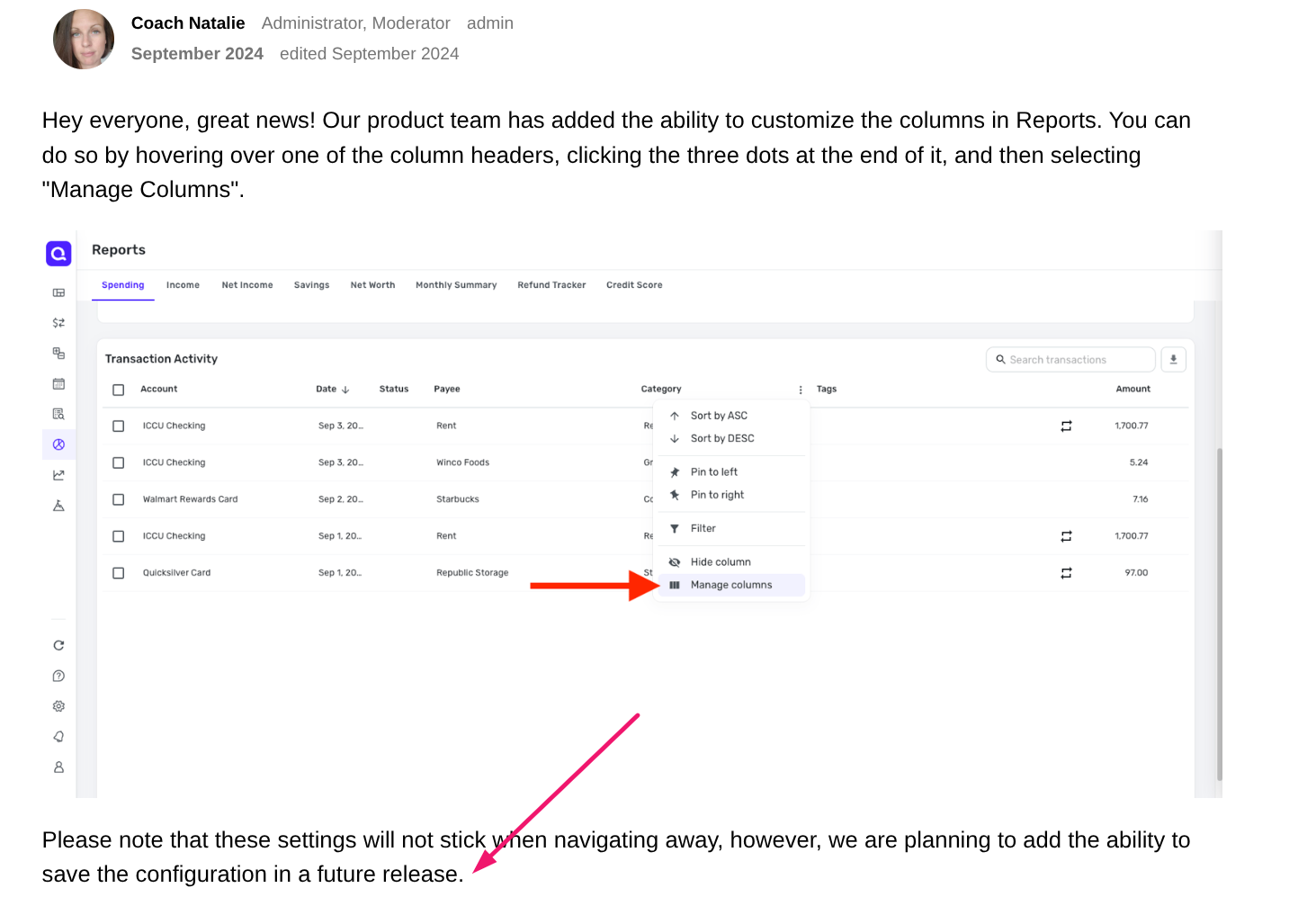
Here is the announcement with more details:

We can't wait to hear from you!

-Coach Natalie

Comments

  • SRC54
    SRC54 Superuser ✭✭✭✭✭
    edited July 11

    I discovered this update last night, and I like the changes. The Persistent filters are a step in the right direction. I would still like to see it display whole months instead of partial months for "Recent 3, 6 or 12 months".

    I notice in the Tax Report that when I collapse the payees (just show the total for each payee instead of all the transactions), that these changes do not persist. So I guess this will require another feature request. When doing one's taxes, the totals are all that you need.

    Kudos. I look forward to what is to come.

    Steve
    Quicken Simplifi (Safari & iOS) Since 2021
    Quicken Classic (MacOS) Since 2009
    MS Money (1991-2009) and Dollars & Sense (1987-1991)

  • DavidB
    DavidB Member ✭✭✭

    I just tried it and it's of limited use because I cannot save the report under a custom name (I.e., "Save report as…). This would let me create a collection of named reports (eg, Total Spend 2023, Total Spend 2024, etc). FWIW, I'm pretty sure that when I added my voice to the new feature request I mentioned it, though I have no idea if anyone else thought to mention it.

  • DavidB
    DavidB Member ✭✭✭

    One other thing, the view that you save with the new feature does not remember changes to any fields you added to the display. IOW, I bring up a report, add filters and such, but want to also see Notes in the detail list. So I click on the 3 dots in the header field (see link below re this feature) and add Notes to the display, and that works.

    But, when I close the report and go back in, it remembers all my settings EXCEPT the change to include the Notes field, although that was supposed to be part of this new feature (see screenshot below, which is the last post in the thread I link to here:

    Screenshot (52).png
  • virshu
    virshu Member

    This enhancement addresses the biggest complaint that I had. In fact, this was the main reason why I considered switching away from Simplify. So, as I list additional requests below, I want to put things in perspective. Also, I only use Net Worth report; others either have a bug (Income & Expense) that results in wrong data; or I just don't have any use for those.

    • As @DavidB mentioned, it would be great to be able to save several reports with different filters or time intervals
    • It would be great to have date range like "Last 30 days" or "Last 3 months" that go until today and not until the end of last month
    • It would really really nice to be able to get the report to the dashboard. Maybe even to take the place of two applets horizontally. This way I can see everything I need at a glance. Current applets are not very useful for me
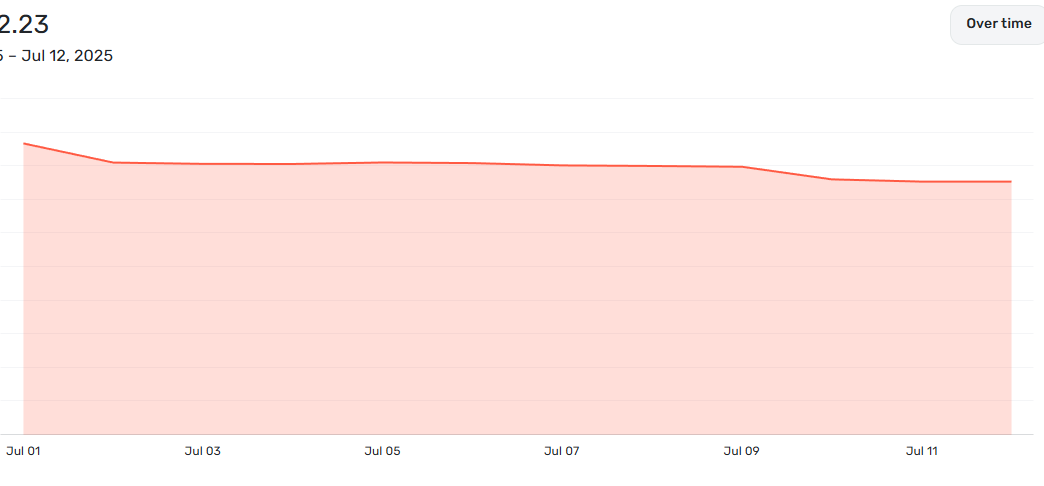
    • Usability of Net Worth graph can be improved. Y-axis always starts at $0; therefore, the changes in actual values are very difficult to discern. The top looks flat because of that. I would prefer Y-axis only shows the lowest value on the chart; not zero. Screenshot 2025-07-12 125949.png

    Hopefully, I am not the only one looking for these improvements, and hopefully it won't take 5 years to implement 🤗

    Professor Felix

  • SRC54
    SRC54 Superuser ✭✭✭✭✭

    @DavidB @virshu Good ideas. At least, this is a step in the right direction. I like that some, not all, reports let you export to Excel, but would still like to see support for PDF.

    I would like to see last 3, 6, 12 months support just full months because a partial month really doesn't tell you anything.

    Steve
    Quicken Simplifi (Safari & iOS) Since 2021
    Quicken Classic (MacOS) Since 2009
    MS Money (1991-2009) and Dollars & Sense (1987-1991)

  • markv
    markv Member
    edited July 14

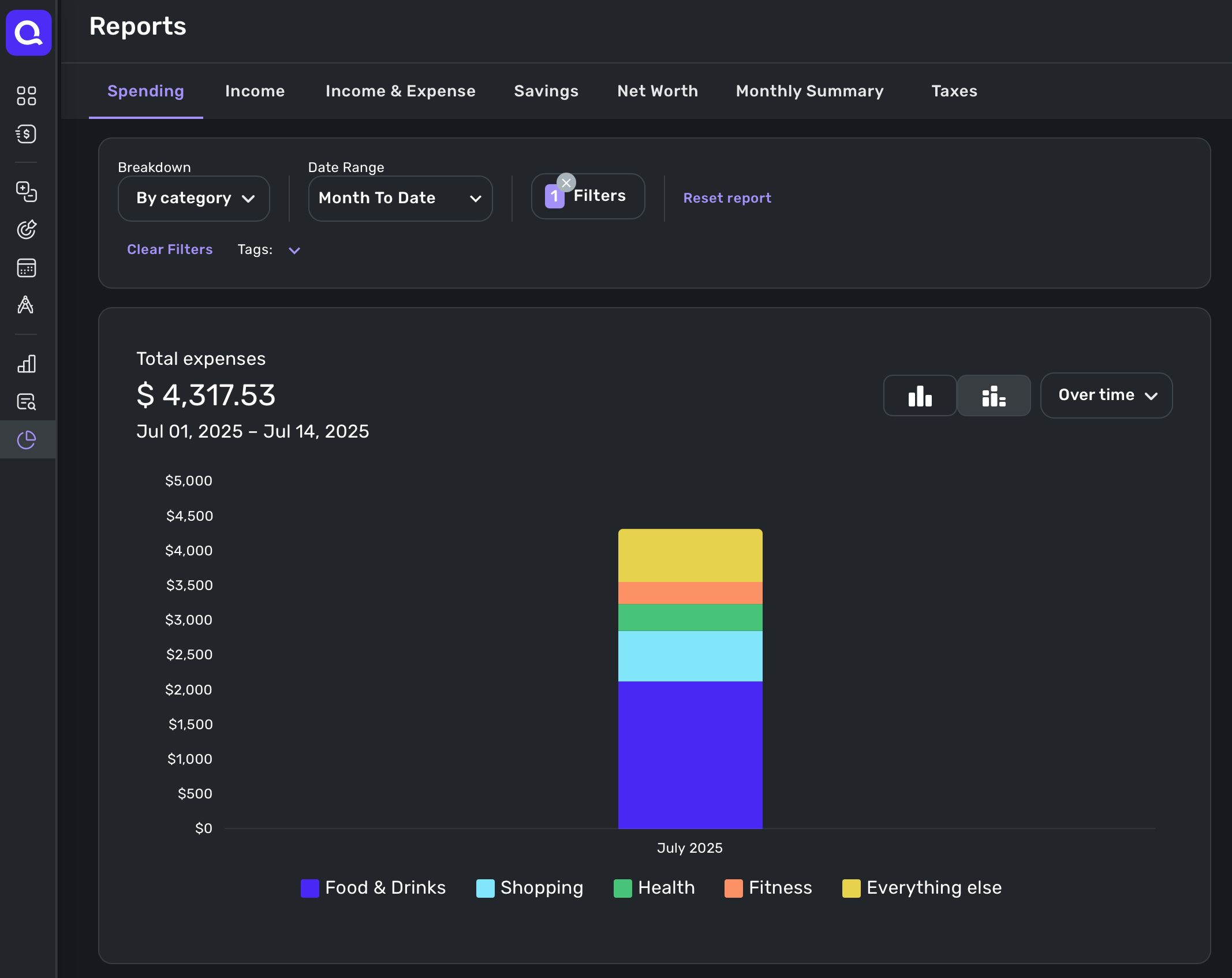
    I’m a heavy user of reports on a daily basis. Before the most recent update, viewing “Reports>Spending>This month” and then clicking on “Over time” from the dropdown would show individual stacked bars indicating the total spending for each day (specifically on the web app).

    Since the update, that report now shows only an individual stacked bar per month, not per day. So there’s no way to see how spending has varied by day.

    Is this a bug, or perhaps an unintended change with the recent update to reports? Ideally I would see 31 individual bars, one for each day, if viewing spending for a single month. Thanks!

    Screenshot 2025-07-14 at 12.18.34 PM.png
  • Coach Jon
    Coach Jon Moderator admin
    edited July 14

    Hello @markv,

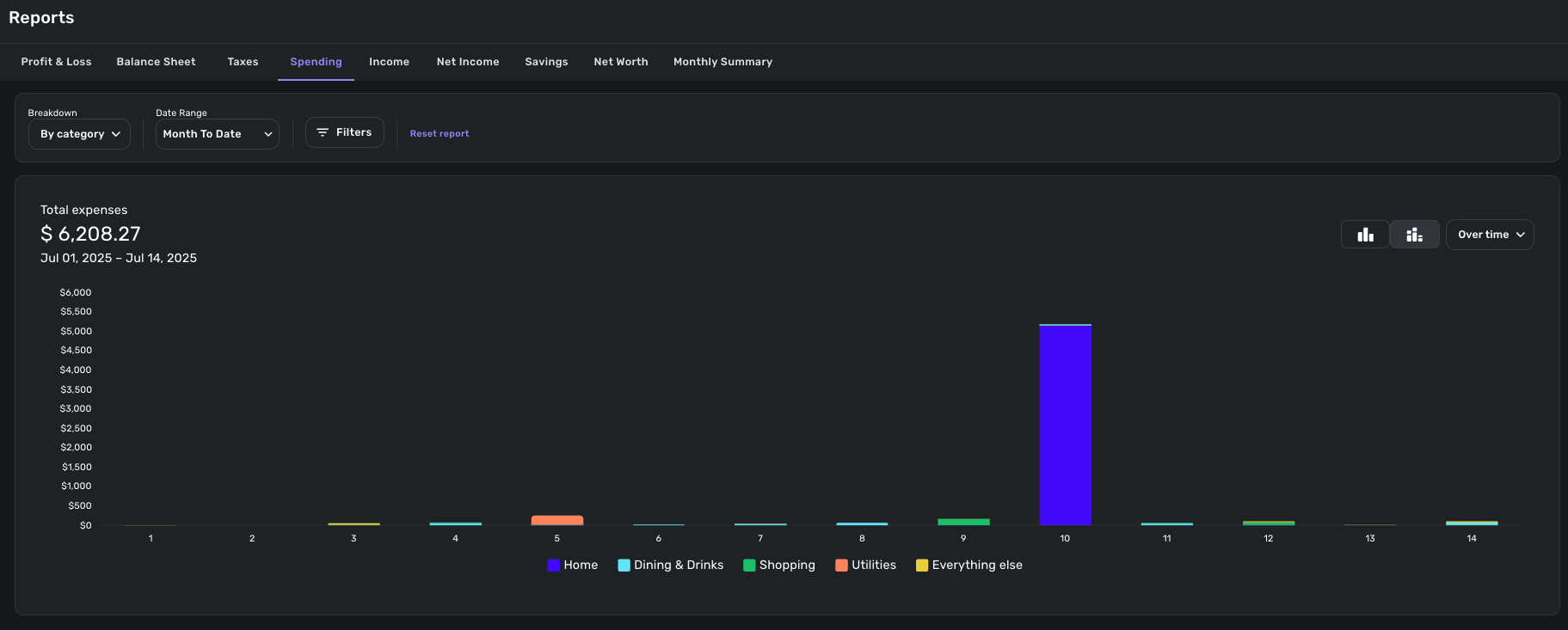
    Thanks for reaching out! When setting my parameters to what you entailed in your post, I can see the bar graph as expected.

    image.png

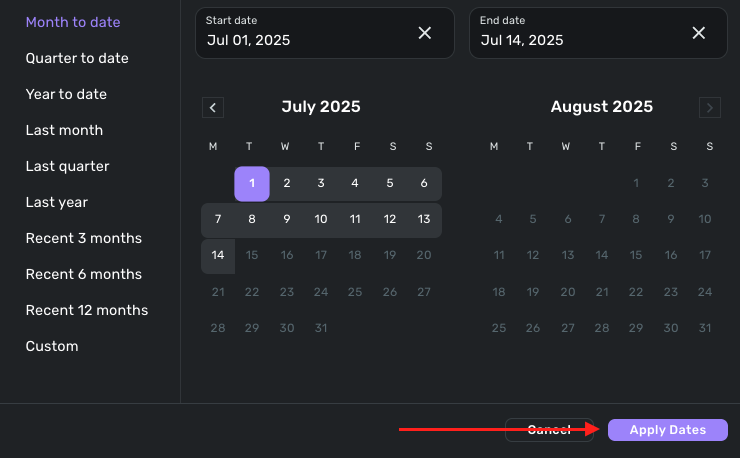
    I would make sure that you select 'Apply Dates' in the Date Range window, and then see if the graph shows as expected. Let us know how that goes!

    image.png

    -Coach Jon

  • markv
    markv Member
    edited July 14

    Thanks Jon. Yes, I'm now able to see the bar graph as expected.

    In case it matters, it looks like it defaults to showing only the single bar for the entire month, even if the date range is pre-set to "Month to date" (like in my screen shot above).

    However, if I choose "Over time", and THEN click on, "Month to date", only then does it show the individual daily bars. Not sure if that's a bug, but it definitely seems unexpected. Either way, thanks for your help!

  • Coach Jon
    Coach Jon Moderator admin

    Hello @markv,

    Thanks for the reply! I went ahead and merged your thread here, as it deals with persistent filters in reports within Quicken Simplifi. I am glad you were able to navigate to the report view you wanted!

    -Coach Jon

  • DannyB
    DannyB Member ✭✭✭✭

    This is a great addition to QS.

    Danny
    Simplifi user since 01/22
    Budget: a mathematical confirmation of your suspicions.” ~A.A. Latimer
  • EL1234
    EL1234 Member ✭✭✭✭

    I agree! I don't know if it's on the roadmap but I'd love to see this (Saved Filters) in the transaction list as well.

  • Coach Marcus
    Coach Marcus Moderator admin

    Thank you for your feedback. We are spending lots of time making our reports better and this is just the first step. Lots more to come.

  • brad08
    brad08 Member ✭✭

    I agree with @SRC54, it really would make sense if there was a way to at least toggle the ability to only include full months in the recent 3, 6, 12 months filters.

    If this gets added (plus a way to show a live average income/expense over the time period/category selected) it would be a nice win!

    -Brad

    Simplifi user since December 2023

  • JAW
    JAW Member

    Thank you for these updates. I use Spending and Income reports to help track my budget. Changing the reports every time was starting to make me grumble. I even sent this in as a suggestion. Thanks for listening. I'm a happier camper now. Thank you!

  • DavidB
    DavidB Member ✭✭✭

    Agree with @EL1234 that I wish I could save selection conditions in transaction list. Every week I go in and have to set a filter to show everything that has not been Reviewed. It would be great if I could have this as a saved condition that I could select.

  • Jenny T
    Jenny T Member ✭✭✭
    edited August 2

    I love the this change overall! However, I ran into a performance issue with this change on the web version. When I select a large custom date range on the Spending Report, the report freezes and eventually crashes with an out of memory error. I checked and my PC still has plenty of memory and is not spiking when the report is trying to load, so it appears to be a throttle on the Simplifi side limiting the resources. Since the date range sticks now, the combination caused the reports to be completely inaccessible in web even after closing the app and relaunching. No other report could be selected, and the Reset button is unclickable as well when it's trying to load. I found a workaround by using the mobile app to reset the date range; mobile was showing the same custom date range I had selected in web (which is wonderful btw) but was functional and allowed me to reset the report. Edit: I wanted to note that I had selected the equivalent of my "all time" date range with the custom date range. I have done this in the past, and while it did take longer to load, it was functional before.

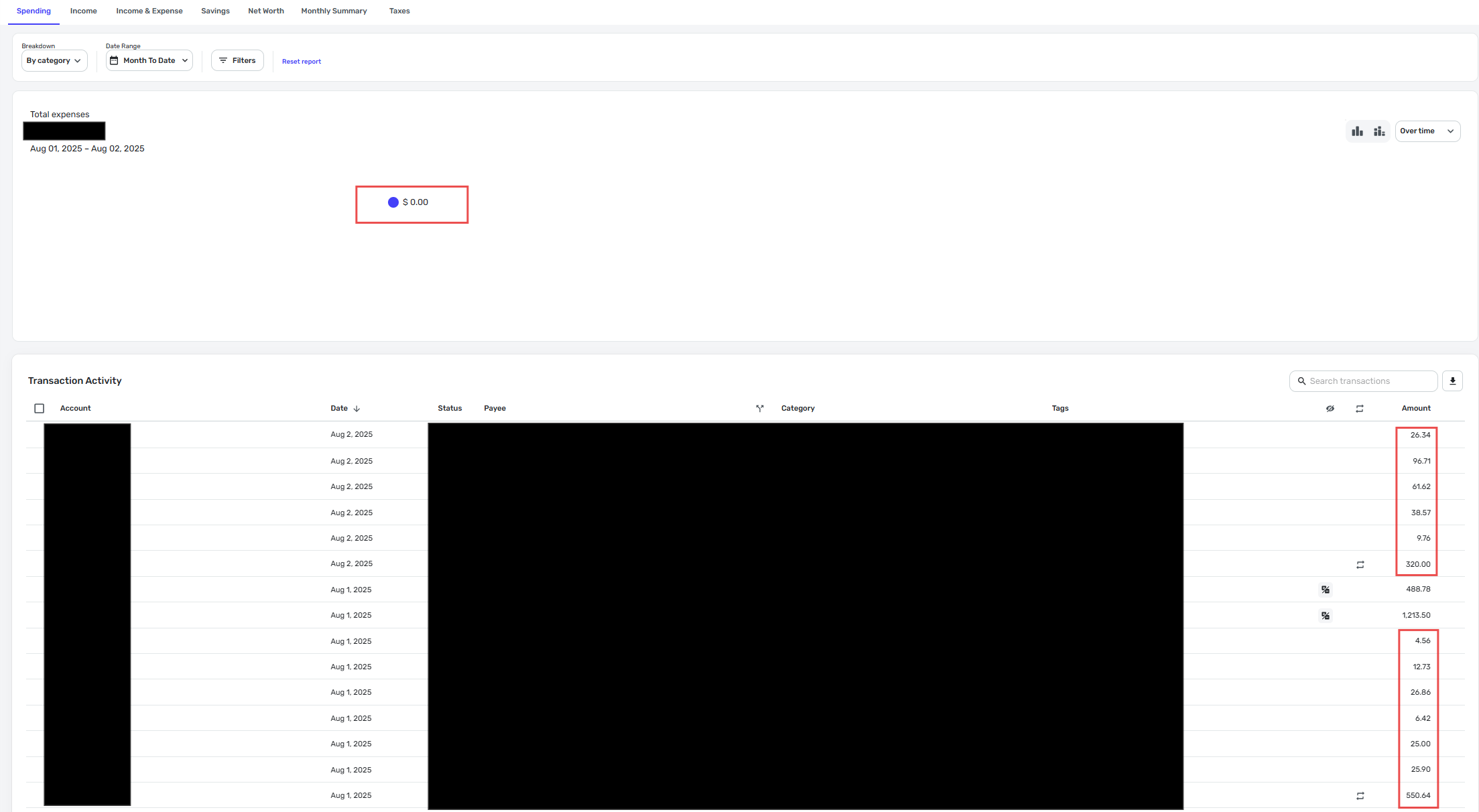
    I have also noticed a few other times where web is not loading the graph section correctly since this change was made. For example, when I went back to web after resetting the filter to MTD, the graph shows $0.00 total when there are clearly transactions for the month. I think last time this happened, I drilled into the graph and then it worked after that. So far, I haven't been able to reset the report this time. The obvious things (clicking in the report, changing report tabs, closing and relaunching) haven't worked today.

    image.png
  • SRC54
    SRC54 Superuser ✭✭✭✭✭

    @Jenny T I just ran a 4 year spending report, and it was sluggish on Safari, but it loaded ok. What browser are you using? Could you try a different one?

    Let us know if this continues. I am glad you were able to clear it out on the mobile app.

    Steve
    Quicken Simplifi (Safari & iOS) Since 2021
    Quicken Classic (MacOS) Since 2009
    MS Money (1991-2009) and Dollars & Sense (1987-1991)

  • Jenny T
    Jenny T Member ✭✭✭

    On my laptop, I typically use Edge and the Desktop app. I just tried Chrome. Same result in all of them.

  • SRC54
    SRC54 Superuser ✭✭✭✭✭
    edited August 3

    Hmm. I suggest, if you haven't already, rebooting your computer. You probably already have. I hope you get it figured out @Jenny T .

    Steve
    Quicken Simplifi (Safari & iOS) Since 2021
    Quicken Classic (MacOS) Since 2009
    MS Money (1991-2009) and Dollars & Sense (1987-1991)

  • lwyman
    lwyman Member ✭✭✭✭

    It's great that the spending report now retains your last filters and selections, but I'm not sure that users (at least me) realize that if your filter is "select all" and you add new categories, those new categories won't show up in your spending report next time you run the report - unless of course you go back into the selection and mark the box of the category you just added. I had assumed that if you originally opted to select all, then any new category added would automatically be picked up in the report. That is NOT the case, and it can be very deceptive if you're used to just jumping in and running the spending report without making modifications to your prior selections.

  • SRC54
    SRC54 Superuser ✭✭✭✭✭
    edited September 4

    Well, there is tiny print to the right in blue that says "Reset Report", which means you have filters applied. I guess it could be larger. It took me a while to learn to look for it.

    Steve
    Quicken Simplifi (Safari & iOS) Since 2021
    Quicken Classic (MacOS) Since 2009
    MS Money (1991-2009) and Dollars & Sense (1987-1991)

  • lwyman
    lwyman Member ✭✭✭✭

    Yeah, I get that, but my point being is that you shouldn't assume that any new categories that you add will automatically be picked up by your previously saved report filters - even if the filter is "select all categories."

  • SRC54
    SRC54 Superuser ✭✭✭✭✭

    Correct. The filters will override the default. Yours is a good reminder. It is easy to forget. So often, I'm not gotten the result I expect, and it comes down to something like that. And I don't think it would hurt for their to be a clearer visual cue in Reports that filters are set.

    Reports are getting better slowly. The Spending Report particularly needs a make-over. I am mostly now using the Income and Expense report.

    Steve
    Quicken Simplifi (Safari & iOS) Since 2021
    Quicken Classic (MacOS) Since 2009
    MS Money (1991-2009) and Dollars & Sense (1987-1991)

  • Coach Natalie
    Coach Natalie Administrator, Moderator admin

    Thank you all for your feedback!

    -Coach Natalie

This discussion has been closed.