New Member - Greetings :)
Hello! I have had Quicken for just a few weeks, this is my first time on the computer, and it's amazing. I am very excited to get my finances in order, and start budgeting better before we start a family.
What would you suggest doing to charges for bulkier groceries/shopping (Sam's Club) items needed every few months? Those trips alone can be more than half of my budget >.<
Thanks!
Comments
-
Welcome to Quicken Simplifi. I hope you will enjoy the app and our community. You mentioned the Spending Plan, which is the unique feature to Simplifi, which doesn't use old style budgeting like Quicken Classic, which is supported on another community.
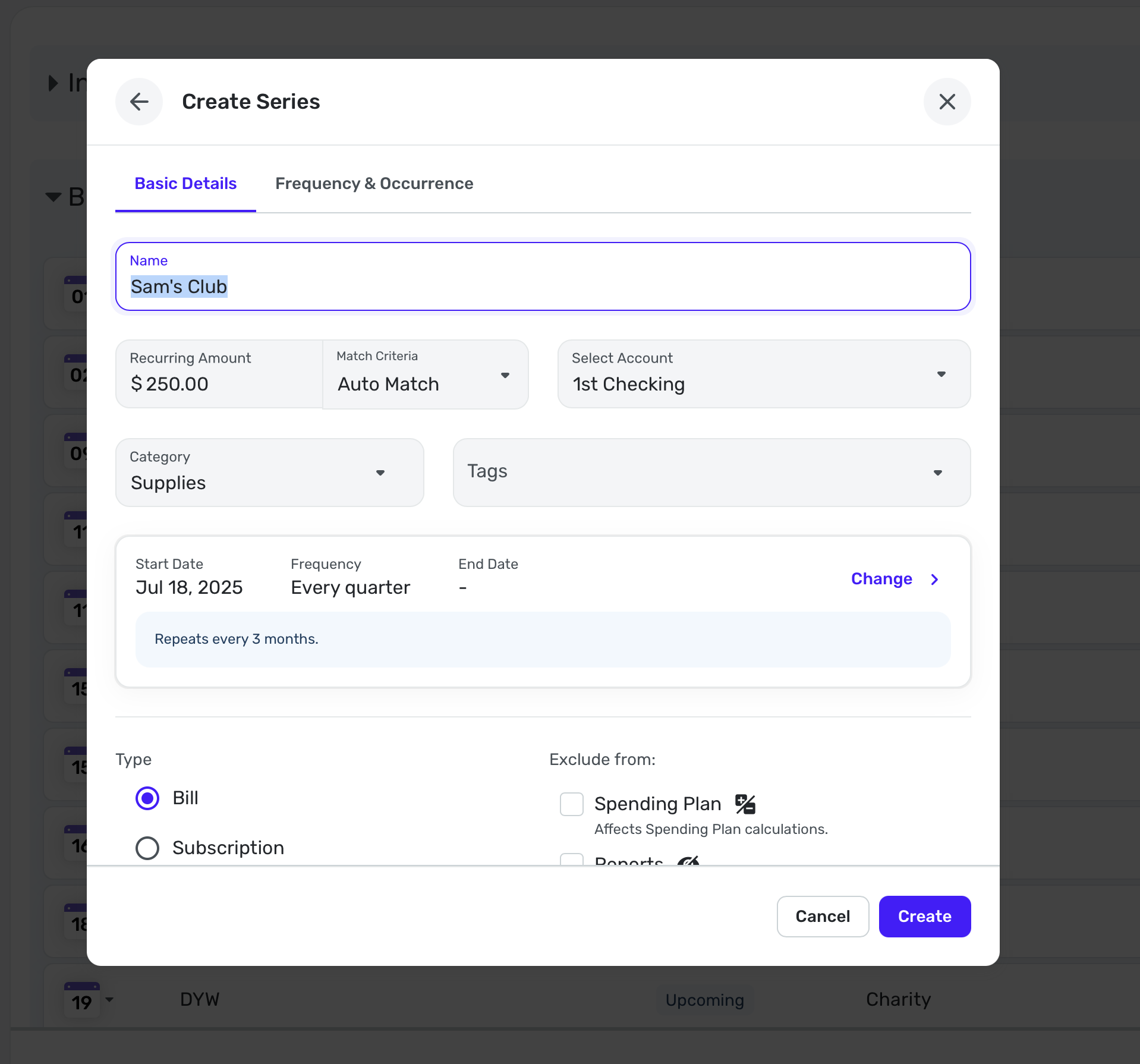
There are myriad ways you can handle these quarterly shopping trips. The simplest way would be to create a Recurring Reminder in the Bills Section of the Spending Plan naming it Sam's Club, entering the amount you expect to spend, say $250. You can categorize it as Supplies or Household Goods or whatever category you use.
You can create this reminder from an actual transaction if you already have one or you can do it manually as I have above.
Then every 3 months (or whatever interval you need), you can know that this is already "budgeted" in your Spending Plan. Then when the transaction comes in from your bank or credit card, Simplifi will link them (if not, you can link them manually).
Anyhow, this is one way you could do it. Other users will likely give you their suggestions. Enjoy!
Steve
Quicken Simplifi (Safari & iOS) Since 2021
Quicken Classic (MacOS) Since 2009
MS Money (1991-2009) and Dollars & Sense (1987-1991)1 -
In addition to what @SRC54 mentions, here are couple of more ways to handle your non-monthly bulk buying expense:
- Create a Planned Spending Category for this expense and set it up as a rollover expense. You will need a unique category for these expenses to assign to this Planned Spending category. You can set the monthly amount for this Planned Spending account for some portion of the expected expense equal to what you typically spend on for these bulk purchases. (Using Rollover in Planned Spending | Quicken Simplifi Help Center and Understanding Your Spending Plan | Quicken Simplifi Help Center )
- You can set up a Savings Goal for your Bulk Shopping expenses. I'd try the Planned Spending with rollover and maybe even Steve's suggestion before using this method.
Either of these methods (Planned Spending expense with rollover and Saving Goal) will make sure you are setting aside funds monthly to cover these non-monthly bulk purchasing trips and make them available when needed. The Recurring expense method will only deduct the expense in the month it is incurred.
Danny
Simplifi user since 01/22
”Budget: a mathematical confirmation of your suspicions.” ~A.A. Latimer2 -
Thank you both so much! That was very insightful and helpful!
1 -
Hi, I am Jerry. I and my wife of 60+years are new users to Simplify and to computer-based household bookkeeping. Judy has been keeping our household budget for all these years doing it with ledger sheets and a calculator. SHE is ready to retire and turn over the work to another family member (me). I agreed but only with a computer program to guide me (us). We are now new members of Simplify and are just getting started. Wish us well! 😁
Jerry&Judy
0 -
@dakrist1962+3=5 Welcome Jerry and Judy to Simplifi. If you are comfortable using technology, you are halfway there. It may seem daunting but just start slow and enjoy the process.
The account transactions are pretty straightforward and you can probably categorize them fairly easy using the built-in categories. As you get more used to it, you can rename and reorganize the categories as it suits you, but will probably want to use them as you start.
Once your accounts are connected, your transactions will download automatically and you can then categorize and even use split categories. Simplifi will try to learn from what you do. Again, as you get more comfortable you can define rules to tell Simplifi how to rename and recategorize your regular transactions.
The Spending Plan is the favorite feature of Simplifi where you schedule your recurring bills (you can call some of them subscriptions if you like, but again they all work the same). You can define the recurring bills manually or wait until you pay one and then make it recurring.
For things like food and supplies, personal items, you can set a target for spending in these categories using Planned Spend(ing). This is a little bit more like a traditional budget but won't include the bills you defined above. For unplanned bills, you can even mark those as a one-time bill if they won't be recurring, and it will show up in the Bills section.
You can check out how things are going in Bills & Income and once you have enough data, you can check out the Reports module.
These are just a few pointers to get you started. There are Support articles here on site as well so you can read up on those when you feel the need.
Also, check out this community often and let us know if we can help. There are lots of coaches and users here at your disposal. Good luck and have fun.
Steve
Quicken Simplifi (Safari & iOS) Since 2021
Quicken Classic (MacOS) Since 2009
MS Money (1991-2009) and Dollars & Sense (1987-1991)0