Unable to access "sign in" from mobile app (edited)
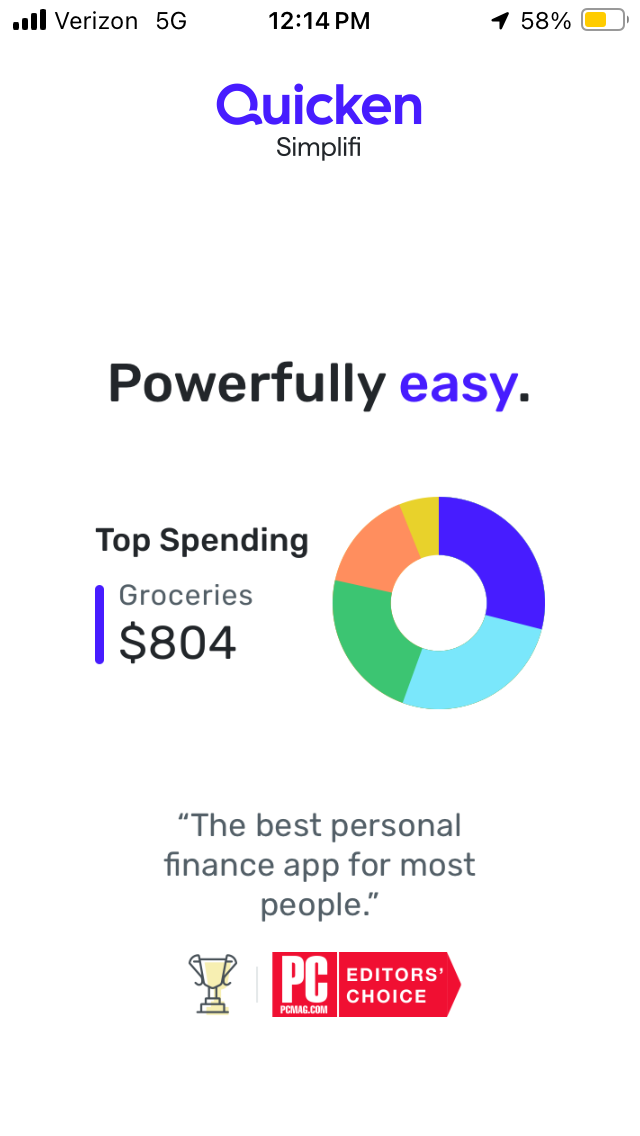
I have an IPhone SE. When I pull up the Quicken Simplifi app I can’t sign in because the app is made for longer phones, and the sign in link is at the bottom of the home page of the app. My housemate opened the app with an IPhone 11 and was able to see the sign in button.
Is there a way for the app to detect the length of the phone and adjust the dimensions? I’m unable to use the app now because I can’t see the sign in on my shorter phone.
Comments
-
Hello @blkrugger,
Thanks for reaching out! Can you please provide a screenshot showing how the Quicken Simplifi mobile application appears for you on your iPhone SE? This will help us better understand the situation!
-Coach Jon
0 -
sure! Screenshot is below:
The landing page comes up and I can scroll through left to right, but the sign in button isn’t visible below
0 -
Hello @blkrugger,
Thanks for the requested screenshot. I can see the issue for sure. I would see if uninstalling the application and reinstalling afterward works to resolve the dimensions issue you are seeing here. Let us know!
-Coach Jon
0 -
Good suggestion — that was actually the first thing I did, and it didn’t make a difference unfortunately.
0 -
Hello @blkrugger,
Thanks for the reply. Let's have you try signing into the Quicken Simplifi web application first. Once you have done that, please go through the Getting Started steps there. Afterward, reload the mobile application to see if this changes the login screen you are seeing for the mobile application.
-Coach Jon
0 -
I already completed the getting started steps on the web application and have set up my spending plan. This hasn’t changed anything about the dimensions on the phone app.
0 -
Hello @blkrugger,
Thanks for following up! Let's have you try uninstalling and reinstalling the application once more, but this time we would like for you to completely remove all data from the device storage for this application while doing so. Can you please clear all Quicken Simplifi application and cached data on your device for this phone and then reinstall the application to see if that works? Let us know!
-Coach Jon
0 -
I went to settings > general > iPhone storage and deleted the data for the quicken app and the app. I redownloaded it and still experienced the same issue. Tried again, same issue.
0 -
I also did these same steps and then turned off my phone, turned it back on, redownloaded the app, and opened it again. Same issue.
0 -
This is apparently a common issue for people using Apple apps with IPhone SEs: https://apple.stackexchange.com/questions/452222/some-apps-dont-accommodate-small-screen-of-iphone-se#452223
Quicken is a huge company and I’m sure I’m not the only customer with an IPhone SE. we should be able to use the app like everyone else. I hope this is passed along to the app developers so that it can be resolved. Not everyone has the same size phone. This is also an accessibility issue if people need to do things like resize text. Honestly it makes me regret my purchase a bit if I can’t access the app, and only can use the web version. I’m unlikely to renew.
0 -
Hello @blkrugger,
Thanks for the replies! We agree that this is indeed a problem and would like to get this issue escalated to our product team. Can you please supply the following information:
- Device Specifications (Model, OS).
- The version and build of the mobile application you are running. If you cannot see this within the application due to the sign-in screen issue, just let us know if it is the most recent installation.
- Have you always noticed this behavior, or is this recent? Have you been able to sign in previously?
We will also need logs to be sent, please!
- Log into the Quicken Simplifi Web App.
- Select Profile from the left-hand navigation bar.
- With the Profile menu open, hold down the Option key for Mac or the Alt key for Windows, and then click Send Feedback.
- Leave all boxes checked, add a brief description of the issue, and then click Send.
-Coach Jon
1