Phantom Transaction in Register and Spending Plan - Transfers & Credit Card Payments
This has happened a couple of times now and I'm not having much luck fixing it. I end up with a "phantom" transaction that shows up in my account register and the Spending Plan. I'm wondering how to deal with the phantom transaction(s) so that only the transactions are bank data.
Spending Plan/Income after bill & saving/Transfers & Credit Card Payments:

Bank Savings Account Register:

Bank Credit Card Account Register:

When looking at the transaction detail it is clear that one transaction is bank generated, and it appears the "phantom" transaction is Quicken Simplifi generated:
Credit Card registry entry:
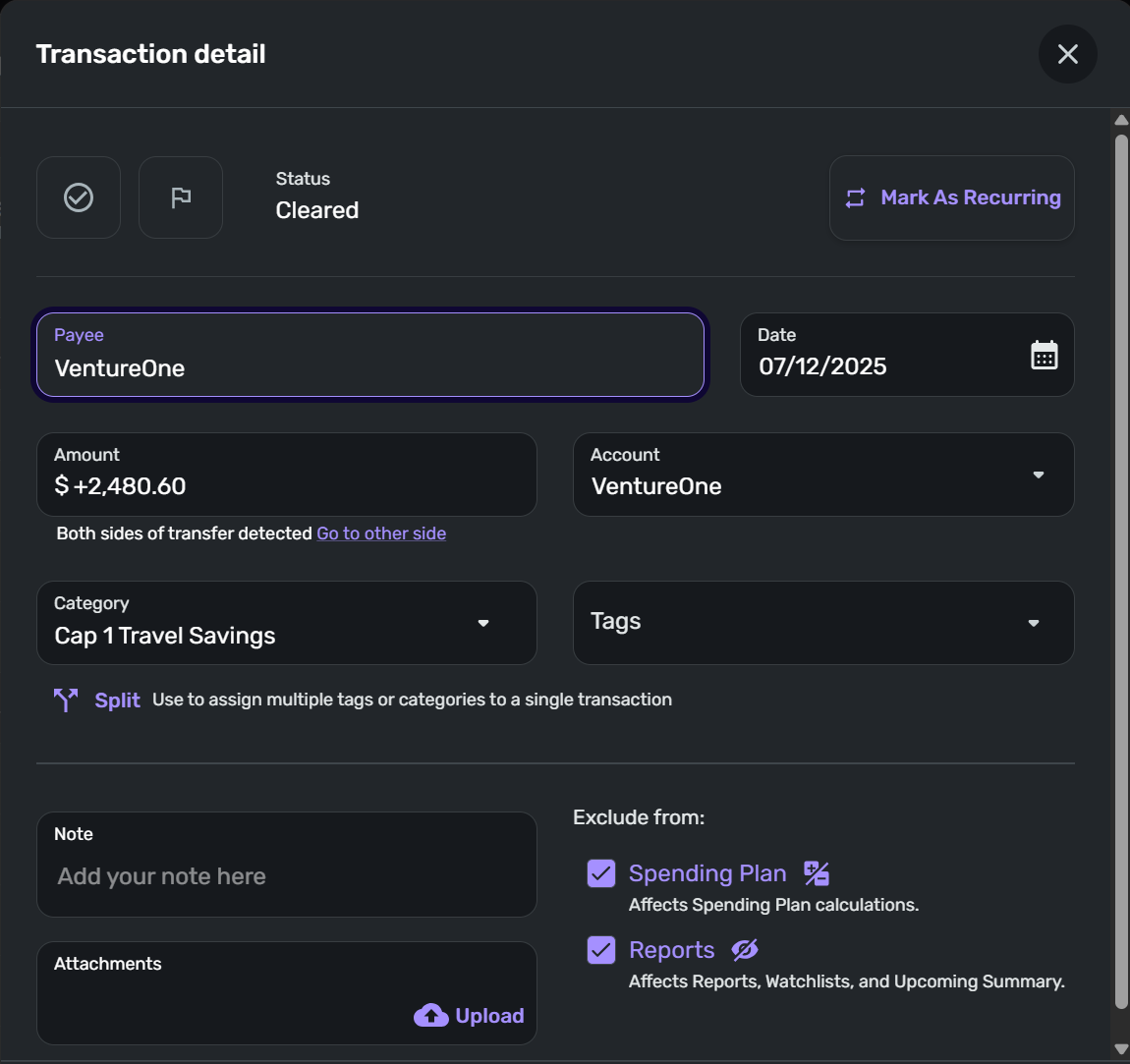
Note that there is no data regarding how this transaction is listed at the bank. This looks like a QS generated entry.
First Savings Account Registry entry:
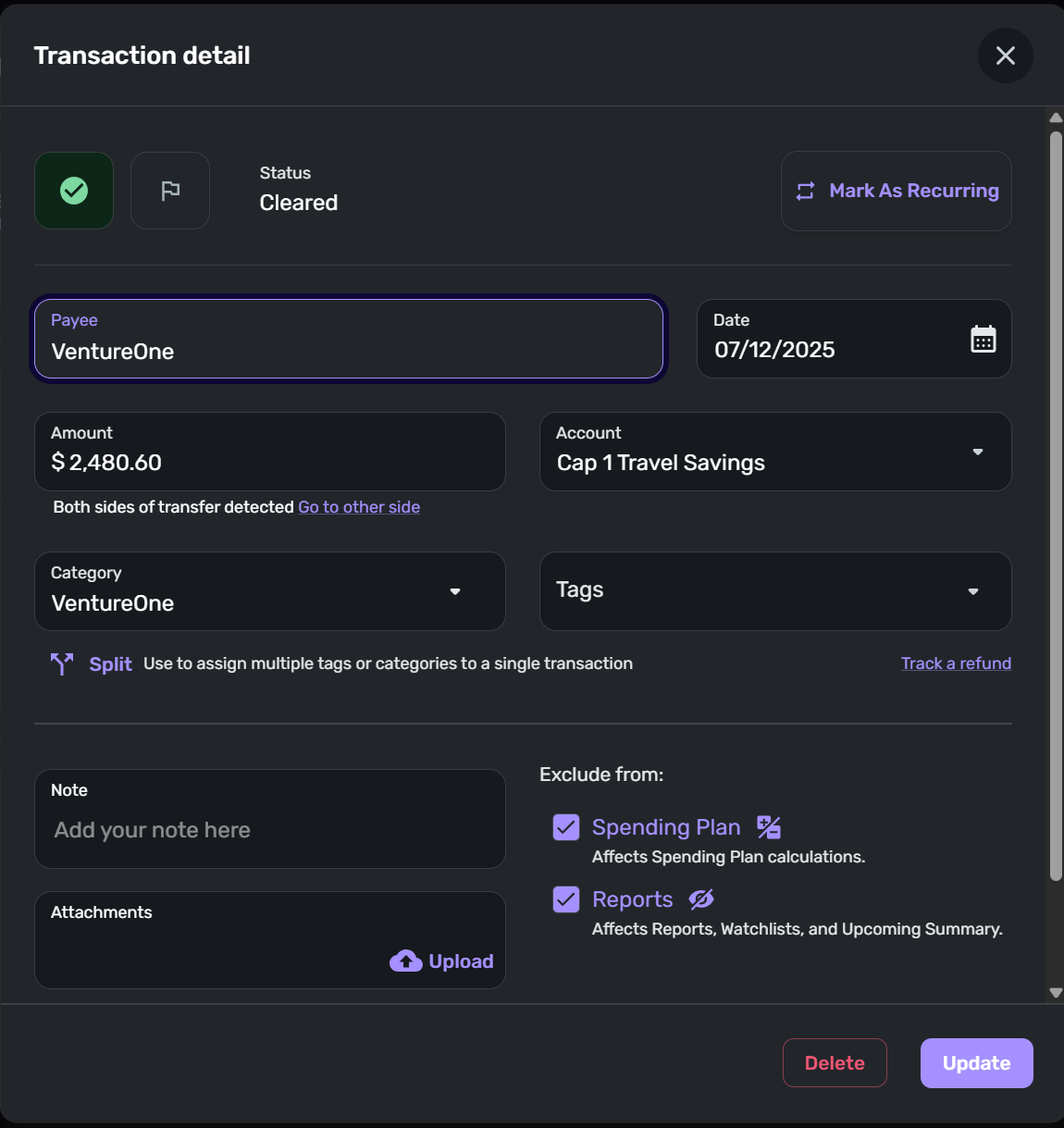
This is the entry detail from the first entry in my savings account registry. Note that this appears to match the detail above with no bank data about how this transaction is identified at the bank.
Second Savings Account Registry entry:
This appears to be the actual bank transaction downloaded to QS based on the "Appears on your Cap 1 Travel Savings statement as…"

Simplifi user since 01/22
”Budget: a mathematical confirmation of your suspicions.” ~A.A. Latimer
Comments
-
Hello @DannyB,
Thanks for reaching out! To clarify, are the "phantom" transactions you mentioned able to be deleted, leaving just the bank downloaded transaction? I agree that the duplicate transfer transaction you showed in your screenshots must have been created within Quicken Simplifi instead of being downloaded due to having no "Appears on your statement" information in the transaction detail window.
You mentioned this has happened a couple of times prior as well. Is it with a specific kind of transaction, like a linked transfer as shown in your screenshot?
-Coach Jon
-Coach Jon
0 -
I don't have an example right now, but I have had this happen before. It involved a transfer and there ended up being two transactions on one side of the transfer and one transaction on the other. But, like yours, all three had the link saying:
"Both sides of transfer detected Go to other side."
Do the links actually work in your transactions?
- do the links in the two savings account transactions both take you to the same credit card transaction?
- where does the link in the credit card transaction take you?
DryHeat
-Quicken Classic (1990-2020), CountAbout (2021-2024), Simplifi (2025-…)0 -
I've had this kind of thing happen as well, I'm pretty sure that the link in one of the duplicated transactions doesn't do anything when you click on it. And the other one is the one you'd get to when clicking on the other side.
0 -
@Coach Jon I have tried deleting the apparent QS entries and when that didn't work I tried deleting all three entries and re-entering the transaction manually. I ended up with the phantom transaction also reappearing. I'm going to try again but thought I'd bring this to the forum for any insights and ideas about what is going on.
@DryHeat and @EL1234 The link to the other side of the transfer transaction does this:
- When I click on the link in the transaction found in the receiving account - the credit card account - it leads back to the transaction in the savings account that is the apparent QS generated transaction based on the absence of any "appears on your Cap 1 Travel Savings statement as" data.
- When I click on the transaction in the savings account that is apparently the QS generated entry (no bank id data present) the link takes me to the one transaction in the credit card register.
- When I click on the apparent bank generated transaction (contains "Appears on your Cap 1 Travel Savings statement as" data) the link also leads to the one transaction in the credit card register.
- Both transactions in the sending account point back to the single transaction in the receiving account but the transaction in the receiving account points ONLY to the transaction in the savings account that has no bank identifying data.
I have tried selecting the "duplicate" transactions in the sending account, but the "merge" icon does not appear in the menu bar at the top of the register. I take from this that QS does not recognize these two transactions as duplicates.
Here is another data point: If I try to delete either one of the transactions in the sending register, I get this…
I get the same warning message if I try to delete the single transaction in the receiving account.
Note: this is a transfer transaction. I believe I had tried the newly released ability to add a credit card via Bill Connect setting it up as a recurring transfer. I have since disconnected this particular credit card from Bill Connect mainly because of the particular and irregular usage of this card but after the payment date and processing.
Danny
Simplifi user since 01/22
”Budget: a mathematical confirmation of your suspicions.” ~A.A. Latimer0 -
Hello @DannyB,
Thanks for the information! I would see if the program allows you to delete all of the transactions mentioned here, the downloaded ones, and the duplicates, and then recreate just the original transfer manually to see if that resolves the issue here.
-Coach Jon
-Coach Jon
1 -
@DannyB - "I tried deleting all three entries and re-entering the transaction manually. I ended up with the phantom transaction also reappearing."
It sounds like you are able to delete all the transactions, which is a good start.
Which side did you enter manually? (In the bank account or credit card account?) Have you tried doing it the other way around?
Another approach would be to enter one side as a non-transfer transaction, then enter the other one as a transfer and see if it will match up with the existing one (instead of offering to create a new one).
I remember trying several permutations of this before I finally got rid of the extra transaction, but I'm sorry to say I can't remember what it was that finally worked.
DryHeat
-Quicken Classic (1990-2020), CountAbout (2021-2024), Simplifi (2025-…)1 -
OK, gang, here is what I have done to resolve this.
- In the sending account where the duplicates exist, I opened the transaction detail for the apparent bank entry and changed it to "Uncategorized."
- When I clicked to save this change, I received the warning about the transaction in the receiving account will be deleted I selected to proceed.
- I checked the receiving account, and the other side transaction was gone.
- I returned to the sending account and deleted the second apparent QS transaction entry - since the other side transaction was already deleted, I didn't receive any warning and the transaction was deleted.
- I recategorized the apparent and only remaining transaction in this trifecta as a transfer to the credit card account.
- I received a warning message that there was no matching transaction in the receiving account and that a transaction would be created. I selected to proceed.
- I switched over to the receiving credit card account and the newly created and linked transaction was present as a manually entered transaction.
- To confirm that this fix stuck I closed QS and reopened it and I now have only one transaction in both the sending and receiving account.
- Finally, I checked the Transfers & Credit Card Payments section of the Spending Plan and once again only one sent and one received transaction appear.
Problem resolved. Thanks all for your input.
Danny
Simplifi user since 01/22
”Budget: a mathematical confirmation of your suspicions.” ~A.A. Latimer2 -
Whew! Now you get to hope that it doesn't happen again :)
1 -
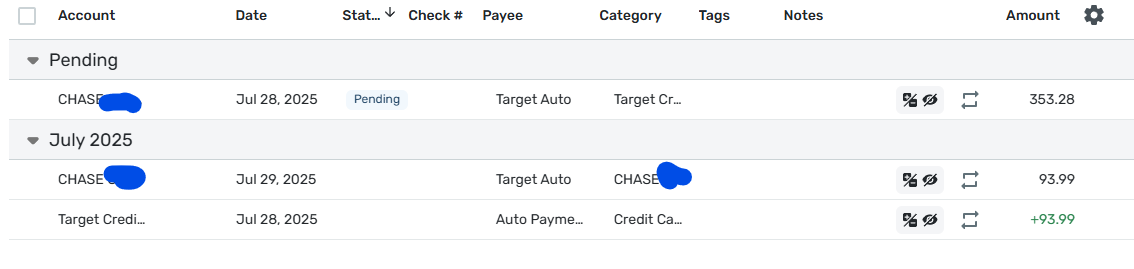
This happened to me just recently. When my target credit card's payment was due, I got a pending transaction with the wrong amount. Not sure where that amount came from. The Account is my checking account and the Category is Target Credit Card. Around the same time, I got a transaction on my checking account for the correct amount of the payment. The Account is my checking account and the category is ALSO my checking account! It's not supposed to let you create that but I didn't create it.
Then a few days later, my target credit card's transactions downloaded for the whole month of July. (This is how it's been working for the last few months, it's a known issue). I then got a transaction for the correct amount, the Account is my Target credit card and the Category is "Credit Card Payment".
This third transaction doesn't show that it's a linked transfer. The other two do, but when you click "go to the other side" nothing happens.
The first transaction, the one with the wrong amount, is still pending and the other 2 are cleared.
I'm sure I can delete/clean it up like I did last month, but I'm saving them for now in case you want any screenshots. I'm pretty sure this happens monthly but can't promise.
Here's one screenshot, let me know if you want more.
Hoping you can fix this!
1 -
Hello @EL1234,
Thanks for following up! I would definitely clean it up this time and make sure to keep an eye on things going forward in case this happens again. If it does happen again, please provide screenshots so we can establish how this issue is continually occurring over time.
-Coach Jon
-Coach Jon
1 -
Sure @Coach Jon
What screenshots would you like if it happens again?
0 -
Okay, I'll stay tuned
1 -
So far this month I have not seen this issue arise.
Danny
Simplifi user since 01/22
”Budget: a mathematical confirmation of your suspicions.” ~A.A. Latimer1