Unable to save changes when editing a series in Simplifi
Hello,
Following the recent Simplifi web app update, I'm unable to save changes when in the "Edit Series" screen because I can't scroll down to the "save" button. Downward scrolling ends with exclusions and before the save button, so series edits cannot be saved.
Here's a screenshot of how far down I can scroll (no access to the save button):
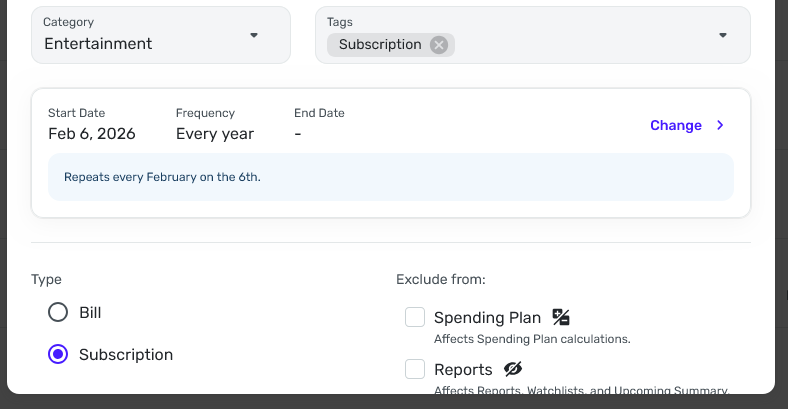
Please investigate and fix as soon as possible.
Thanks!
Comments
-
Hi,
Just to get you started while you wait for the Simplifi coaches to weigh in, have you tried a different browser, checked your zoom settings on the browser, your system font size, rebooted your computer.
I haven't been able to reproduce this on 4.68.0 in my browsers (Safari and Chrome) on Mac but you may be using Windows and Edge. Someone else was having a problem recently but never heard if they rectified it.
Hope you get it fixed soon. Frustrating.
Steve
Quicken Simplifi (Safari & iOS) Since 2021
Quicken Classic (MacOS) Since 2009
MS Money (1991-2009) and Dollars & Sense (1987-1991)1 -
I'm able to almost duplicate what you are seeing by zooming Chrome up to 150%:
Note the rounded corners and lack of a control panel (where the Delete and Update buttons reside).
However, my display still shows the scroll bar on the right, which yours doesn't have. So I'm not sure Zoom factor is the problem.
It would still be worth a try to cut the Zoom down to 80% or so and see what happens.
DryHeat
-Quicken Classic (1990-2020), CountAbout (2021-2024), Simplifi (2025-…)2 -
Thank you @SRC54 and @DryHeat ! You guys had it figured out. FYI, I'm using the Firefox browser on a Windows 11 PC. I changed the zoom from 100% to 90%, and I was then able to see the Delete and Update buttons again.
However, I still don't know what changed that caused this zoom issue. This is the first time I've encountered it, and I've been using Firefox the entire time I've been a Simplifi user.
0 -
Glad you were able to find the culprit. I am not sure why 100% needed to be changed to 90%, but Simplifi is improving on so many fronts, and some of these small changes might cause inadvertent problems.
By the way, you can change your zoom in your browser "on the fly" by using the keyboard shortcut CTRL + or CTRL - in Windows or Command + and Command - on Mac. I use these all the time as I get older.
Steve
Quicken Simplifi (Safari & iOS) Since 2021
Quicken Classic (MacOS) Since 2009
MS Money (1991-2009) and Dollars & Sense (1987-1991)1



