Paycheck Splitting [Edited]
When I go to split a paycheck, the positive amounts (deposits to the VIO Bank and Money Market) show as the Transaction Activity view. With this view, I can select the three dots at the end of the transaction, but I am not able to change the flag or the Status to cleared. When I change the flag, I get the message as shown. I understand what the message is saying but the single transaction is showing and should be able to be change for the flag. Also, the split to Thrift Savings Does not show in the Transaction Activity. This has been constant for the past four paycheck splits. Also, this is the same when I got in to the individual account and want to change the transaction flag or status.
Do I need to make these as single transactions, such as recording the deposit to the three accounts directly with the Category as the Paycheck? I see this as a work around since the split is not working correctly. With this work around, I can make the transaction within the three accounts with the right flag and status of Cleared.
Dick Davis
Wanting to Migrate from Quicken Classic Premier to Simplifi
Comments
-
Here are the screen shots.
Dick Davis
Wanting to Migrate from Quicken Classic Premier to Simplifi
0 -
So you have one paycheck and two of your withholdings are to other savings accounts?
My preferred method:
I would enter the paycheck into the main account (that gets the bulk of the cash) and then make the transfers as splits to the other two accounts and add your other withholdings if any.
If you prefer to have 3 transactions, then I would do this:
I would simply use the generic "transfer" category in the paycheck splits that equals what the amount is to the other two accounts, then I would make two deposits into your Savings accounts using the same generic "transfer" category. This will cancel the transfers out, and you'll end up with three separate transactions.
The warning message you got is simply telling you that you must edit the splits in the account where you entered it, ostensibly your main checking account.
Steve
Quicken Simplifi (Safari & iOS) Since 2021
Quicken Classic (MacOS) Since 2009
MS Money (1991-2009) and Dollars & Sense (1987-1991)0 -
@SRC54, Would you be so kind a detail the entries? I think I understand, but want to be fully sure I do understand what you have recommended.
Dick Davis
Wanting to Migrate from Quicken Classic Premier to Simplifi
0 -
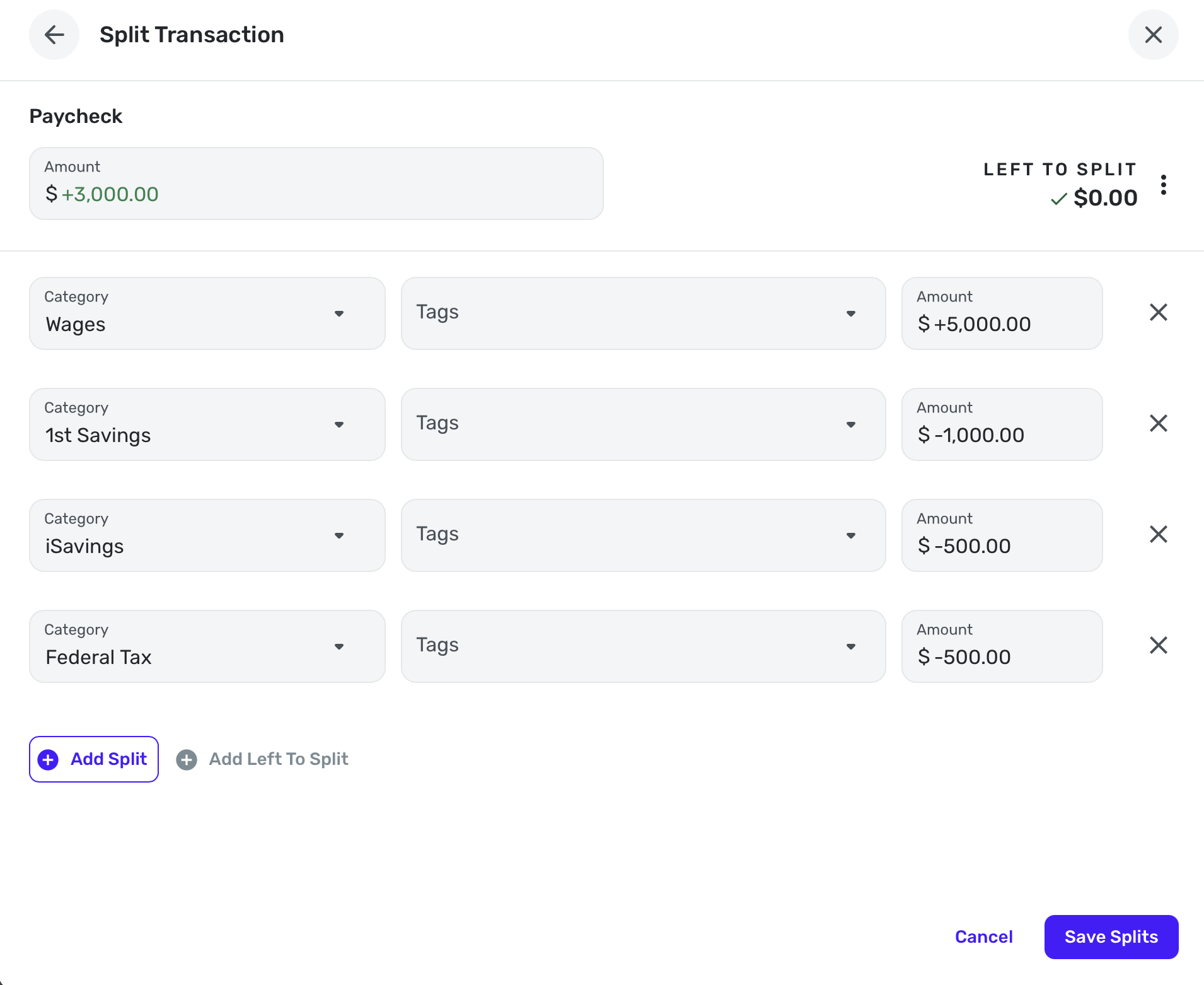
OK, here is what Method 1 would look like using my category of Wages and entering it into my primary checking account. I made two splits for my savings accounts and one for federal tax, just as examples…
Now I have an income for $5000 in Spending Plan, an expense for $500 and two deposits in my other Savings accounts.
Steve
Quicken Simplifi (Safari & iOS) Since 2021
Quicken Classic (MacOS) Since 2009
MS Money (1991-2009) and Dollars & Sense (1987-1991)0 -
@SRC54, then in the transaction view, how would it be displayed.
Dick Davis
Wanting to Migrate from Quicken Classic Premier to Simplifi
0 -
I'll answer your question with another question. Has Simplifi already downloaded these 3 transactions? If so, I would use Method 2 I outlined above, as it will be easier.
Feel free to post screenshots. Don't be afraid to play with it. As long as you don't delete the downloaded transactions, all is fixable. BTW, all this works the same in Quicken Classic, and you should be a pro at that after all these years.
Steve
Quicken Simplifi (Safari & iOS) Since 2021
Quicken Classic (MacOS) Since 2009
MS Money (1991-2009) and Dollars & Sense (1987-1991)1