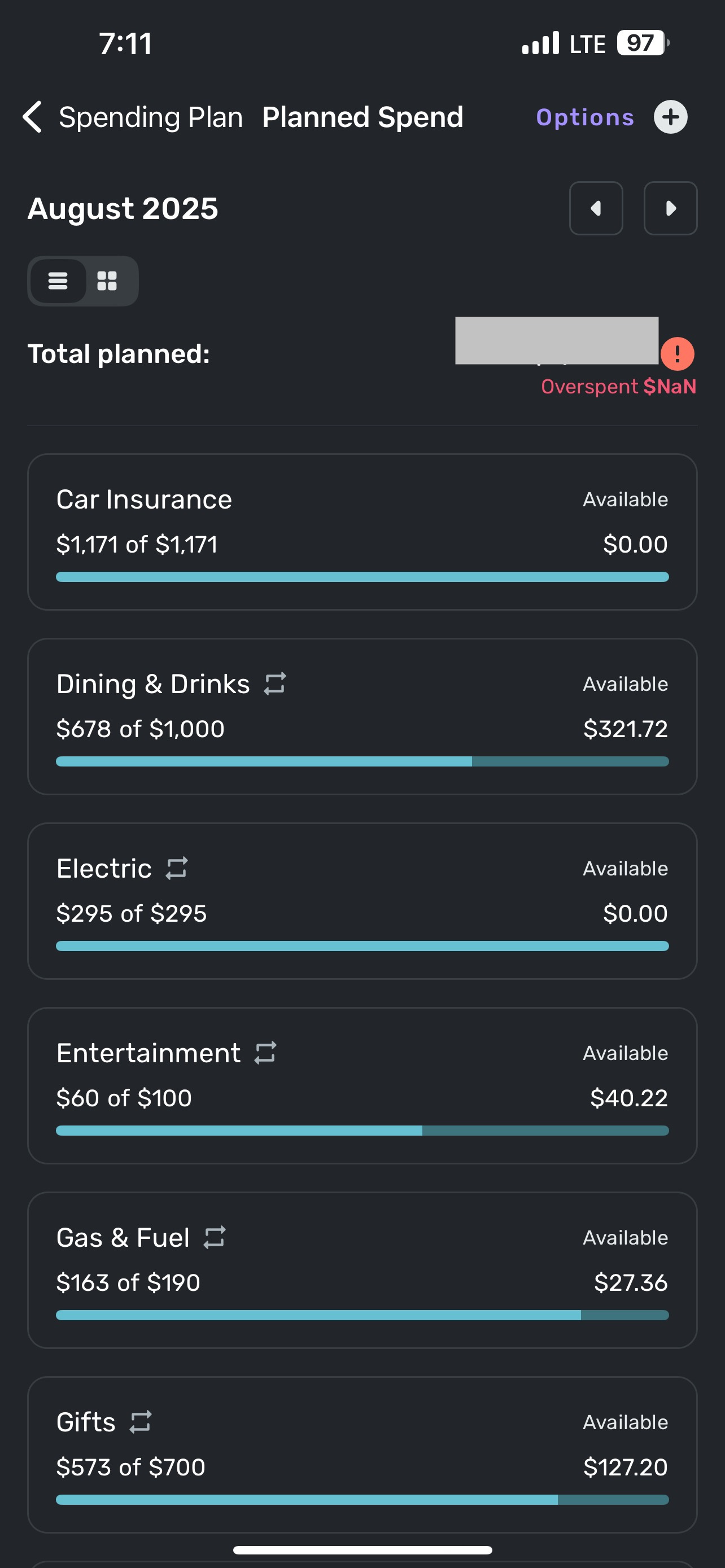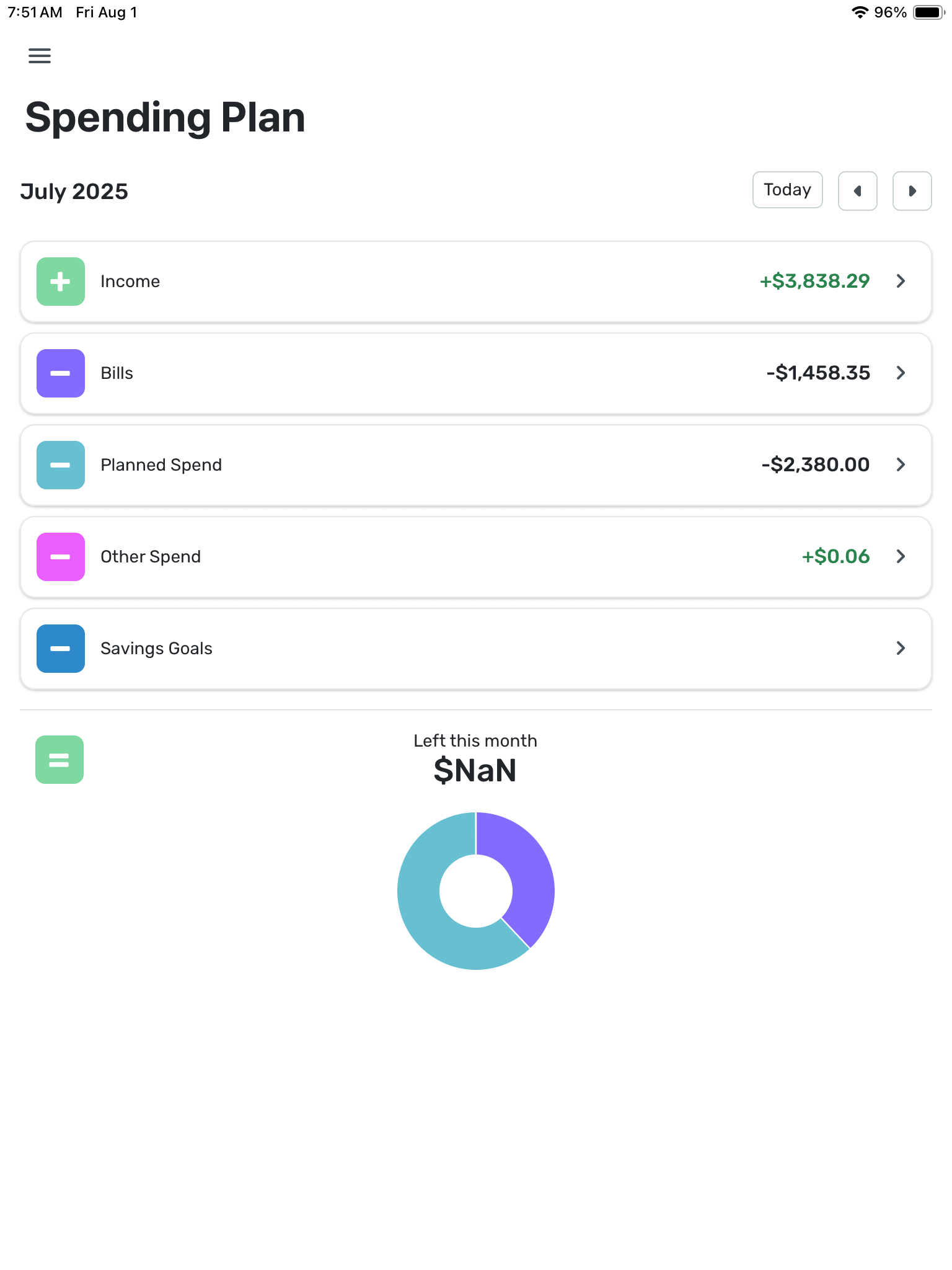
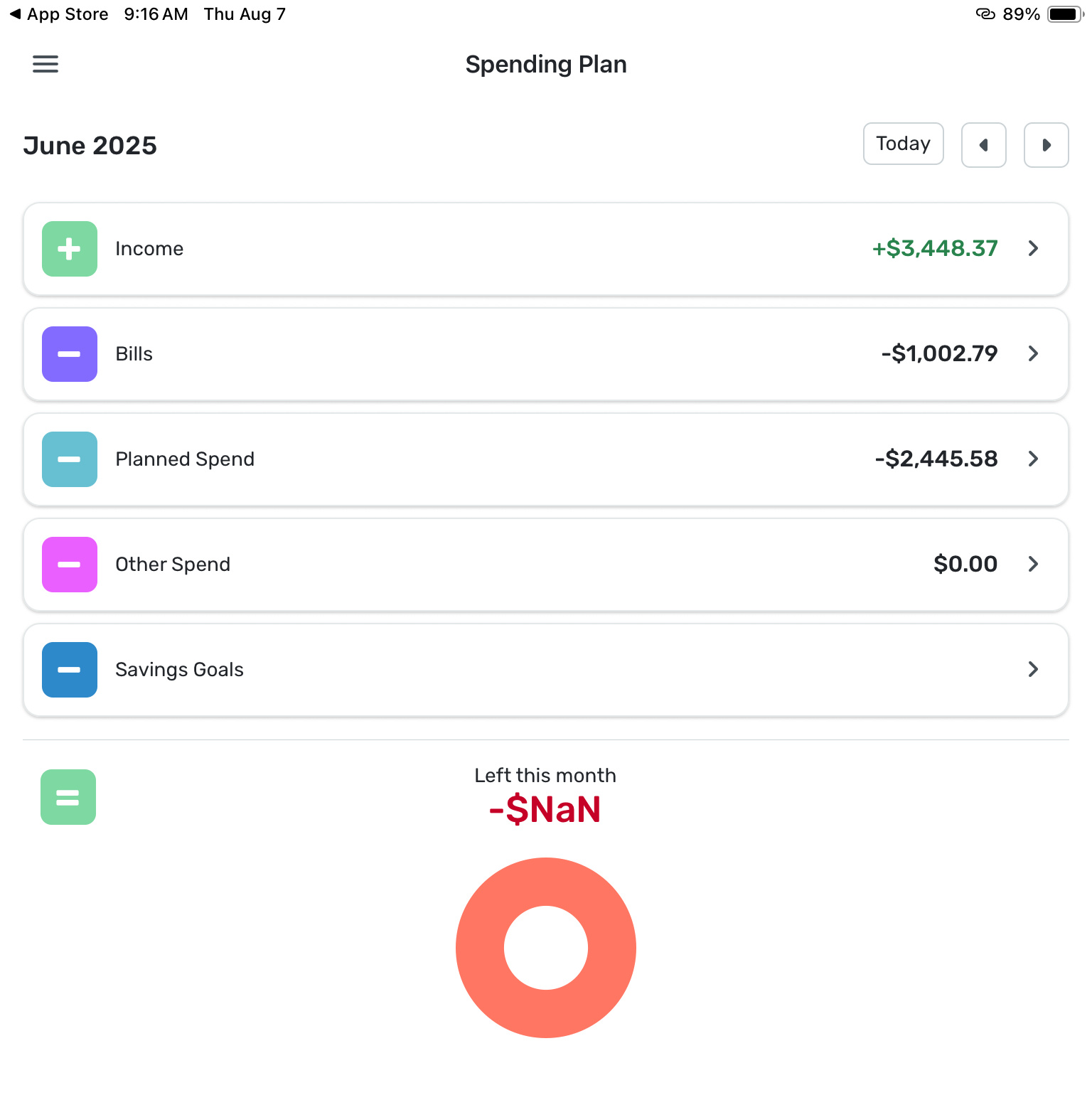
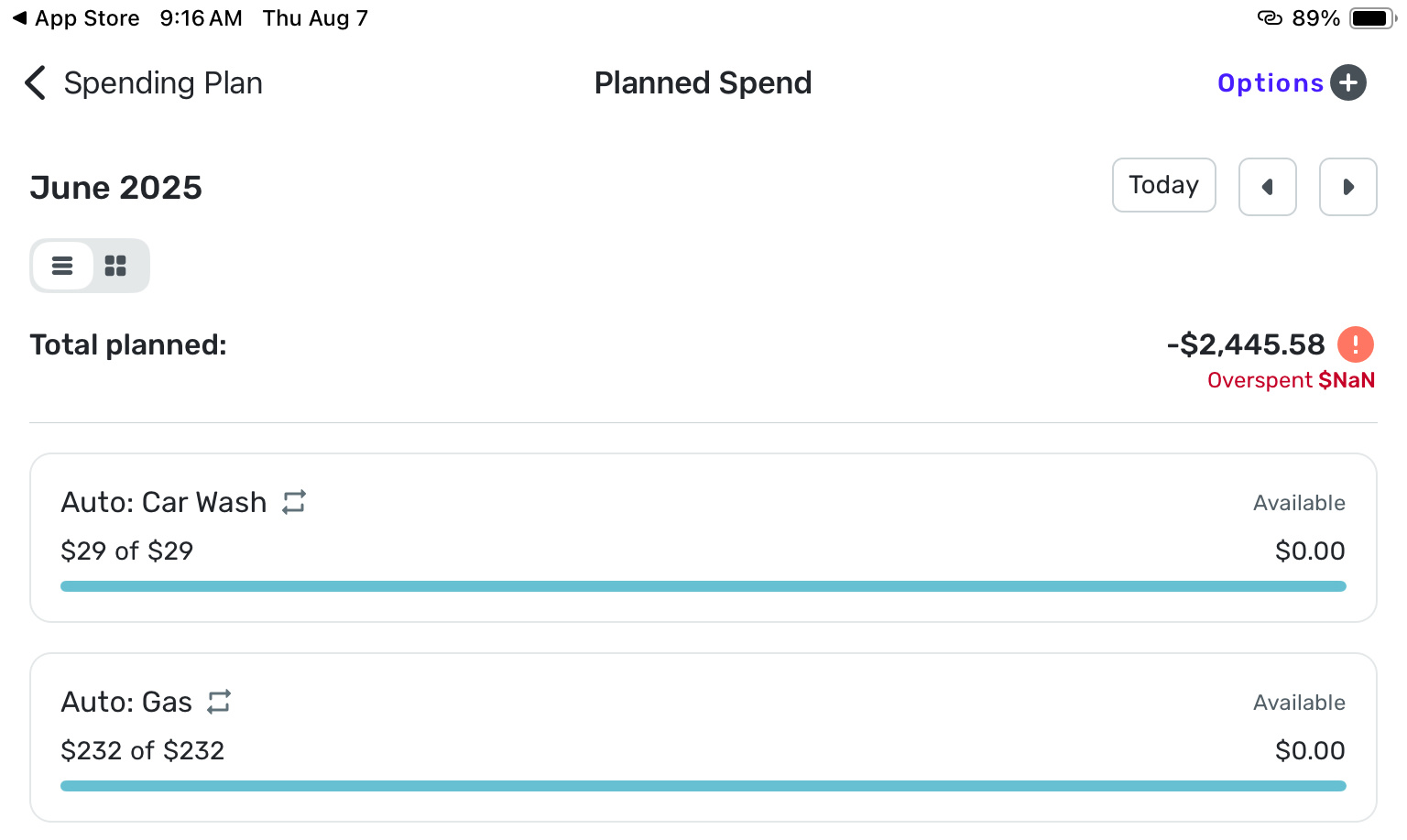
Left this Month = $NaN ??

donnajean
donnajean Member ✭✭✭
edited October 10 in Report a Bug
IMG_2243.png IMG_2244.jpeg IMG_2245.jpeg

What has happened here? Some of the previous months spending plans which used to show ‘Left this month’ as $0.00 now show $NaN since the update.

The $NaN error occurred when I edited the July spending plan this morning (added a transaction to zero the balance left to spend). I have always done this at the end of every month with no problem. Then I saw when I use the left arrow to view previous months, some of them now show the error as well. This is a new error since the update. I am seeing this when using the iPad version of the software, however the website version looks good (no error there).


Tagged:

Comments

  • Coach Jon
    Coach Jon Moderator admin

    Hello @donnajean,

    Thanks for reaching out! To clarify your situation, you are only experiencing this issue on the iPad version of Quicken Simplifi, correct? Can you provide a screenshot of what the web application looks like for you for comparison? Have you tried uninstalling and reinstalling the iPad version to see if that resolves the issue?

    -Coach Jon

  • cnelson
    cnelson Member

    I am also having this problem on the iPhone app. It seems like half the time I go to the spending plan page, it shows NaN. I first realized it because it was preventing me from adding another category to the plan. Sometimes it’s fixed by categorizing more transactions, sometimes it fixes itself without me making any change.

  • Coach Natalie
    Coach Natalie Administrator, Moderator admin

    @cnelson, thanks for posting on this topic!

    To clarify, are you seeing "NaN" for the 'Left at end of month' amount, or somewhere else? Also, is the issue happening in the current month, past months, etc.? Do you see the issue on the Quicken Simplifi Web App?

    The more details you provide will allow the Community to best assist!

    -Coach Natalie

  • Randy17485
    Randy17485 Member ✭✭

    I also see this issue in the iPhone app. $NaN is what it shows for Left this month when I go back to July. It shows $0 in the web app. This happened when, in August, I went back to July and contributed to a savings goal from the savings goals menu from July in the spending plan.

  • Coach Natalie
    Coach Natalie Administrator, Moderator admin

    @Randy17485, thanks for joining the discussion!

    Since it sounds like the issue is only present on the Quicken Simplifi Mobile App, I'd recommend performing an uninstall/reinstall of the app to see if doing so clears things up for you. I'd also recommend clearing the app cache and data before uninstalling.

    Let us know how things go!

    -Coach Natalie

  • Randy17485
    Randy17485 Member ✭✭

    I deleted the app and its data and reinstalled it. July still shows $NaN.

  • cnelson
    cnelson Member
    edited August 28
    IMG_9920.jpeg

    I’ve seen it for the current month and previous months but not always.

    [edited to reduce image size]

  • cnelson
    cnelson Member

    I can’t open the web app on my phone because it just redirects to the app.

  • Coach Jon
    Coach Jon Moderator admin

    Hello @cnelson,

    Thanks for the screenshot. Do you just see this issue from Planned Spending, or do you also see it in the 'Left at end of month' section of the Spending Plan? Are you able to open the web application from a computer to see if the issue is also affecting you there? Have you also tried uninstalling/reinstalling the mobile application to see if that fixes the issue you are seeing?

    @Randy17485, If you can also provide screenshots showing the issue from your side, this would be super helpful!

    -Coach Jon

  • Randy17485
    Randy17485 Member ✭✭
  • Coach Jon
    Coach Jon Moderator admin

    Hello @Randy17485,

    Thanks for the requested screenshot. Can you please let us know what version and build of the Quicken Simplifi Mobile application you are on. You can locate this by selecting the Profile icon in the top right. The version and build will be in the lower right hand corner. We will need to know the device specifications for your device (brand, OS, etc.).

    We will also need logs:

    1. Log into the Quicken Simplifi Web App.
    2. Select Profile from the left-hand navigation bar.
    3. With the Profile menu open, hold down the Option key for Mac or the Alt key for Windows, and then click Send Feedback.
    4. Leave all boxes checked, add a brief description of the issue, and then click Send.

    -Coach Jon

  • Randy17485
    Randy17485 Member ✭✭

    @Coach Jon Feedback sent

  • Randy17485
    Randy17485 Member ✭✭

    @Coach Jon also left a comment here with the other information already but not sure what happened to it.

    I am running 5.37.0 (42800) on an iPhone 14 running iOS 18.6.2.

  • Randy17485
    Randy17485 Member ✭✭

    @Coach Jon

    I am on 5.37.0 (42800). I am using an Apple iPhone 14 running iOS 18.6.2.

  • cnelson
    cnelson Member

    Currently, I do not see NaN in the “left this month” section even though I see it again in the same place as my earlier screenshot. This instance seems like it was triggered by me “editing this month’s expense” amount.

    I can try those other things later.

  • Coach Jon
    Coach Jon Moderator admin

    Hello @Randy17485,

    Thanks for the information. Can you please try updating your Quicken Simplifi mobile application to the most recent version, and let us know if you are still experiencing the same issue?

    -Coach Jon

  • Randy17485
    Randy17485 Member ✭✭

    @Coach Jon

    Since I just deleted it and reinstalled it, I assumed I would have been on the most recent version. Was a new version released today?

  • Coach Jon
    Coach Jon Moderator admin

    Hello @Randy17485,

    Yes, the newest version for iOS would be Quicken Simplifi version 5.38.1. Let us know if the problem is still present in this release!

    -Coach Jon

  • Randy17485
    Randy17485 Member ✭✭

    @Coach Jon

    Ok, yes, I see there was an update today, and I updated it. I still see $NaN

  • Coach Jon
    Coach Jon Moderator admin

    Hello @Randy17485,

    Thank you for confirming this information. Can you please supply a new screenshot showing the issue from your side and new logs, since the application has been updated?

    -Coach Jon

  • Randy17485
    Randy17485 Member ✭✭

    @Coach Jon

    The screen looks exactly the same as before. I will send new logs when I get home later.

    Thanks for your help today,

    Randy

  • Coach Jon
    Coach Jon Moderator admin

    Hello @Randy17485,

    Thank you for the reply and the screenshot. Be sure to let us know when you can supply those logs!

    -Coach Jon

  • Randy17485
    Randy17485 Member ✭✭

    @Coach Jon

    I sent the logs just now.

  • Coach Jon
    Coach Jon Moderator admin

    Hello @Randy17485,

    Thanks for that information! I did get this issue reported to our product team and will be sure to follw up here with any updates from them on this issue going forward!

    -Coach Jon

    SIMPL-29080

  • Coach Jon
    Coach Jon Moderator admin

    Hello @Randy17485,

    It looks like our product team was able to get a handle on this problem pretty quickly! They have issued a fix to be implemented with the Quicken Simplifi Mobile version 5.39.0. Be sure to let us know if the problem is resolved for you when that version rolls around.

    -Coach Jon

  • Coach Jon
    Coach Jon Moderator admin

    Hello @Randy17485,

    Quicken Simplifi Mobile version 5.39.0 was released! Be sure to verify if the problem is resolved for you from your side, and let us know if it is not.

    Thank you!

    -Coach Jon

This discussion has been closed.