Why are my Credit Card Payments Added to my Projected Cash Flow?

The Merg
The Merg Member ✭✭
edited September 23 in Projected Cash Flow

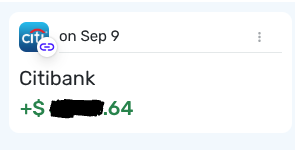
I currently have Citibank credit card connected in Simplifi for my statement balance and pay the full amount each month. When I look at my checking account, it will show my Projected Cash Flow and on the date that it projects me making the payment for the credit card, it will add that amount to my balance instead of subtracting it. When I view the actual transaction in the account, it shows as a debit. The same thing happens on the credit card account side. When viewing the Projected Cash Flow, it will show the amount of the payment for the card as adding to the balance and not subtracting from the balance. When I look at the actual transaction in the credit card account, it is showing correctly as a credit.

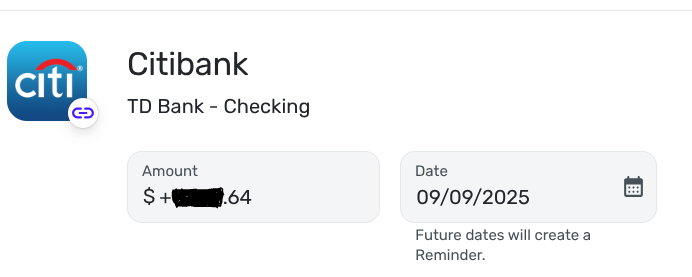
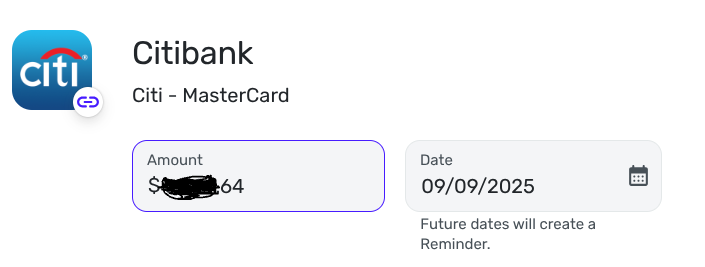
The issue seems to be how the accounts see the reminder/recurring transaction. It looks like the checking account sees the reminder as a deposit instead of a debit and the credit card account sees the reminder as a charge and not a credit.

When the payment/credit actually hit the accounts, it posts correctly.

This is what it looks like from the checking account:
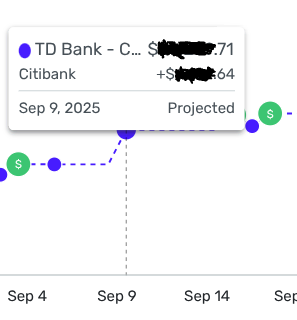
TD Bank - Projected.png TD Bank - Reminder.png TD Bank - Recurring.png

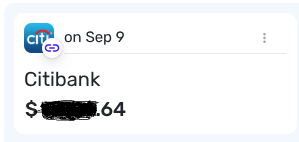
This is what it looks like from the credit card account:
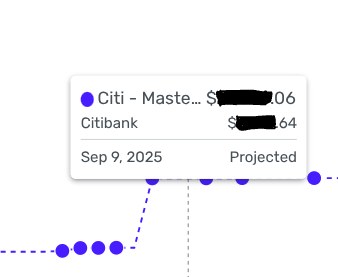
Citibank - Projected.png Citibank - Reminder.png Citibank - Recurring.png

Anyone have any thoughts on this? Is this just a weird quirk, bug, or am I doing something wrong with how I set up the credit card in Simplifi?

Thanks,
Merg

Today’s problems don’t worry me, I haven’t solved yesterday’s yet.

Comments

  • DryHeat
    DryHeat Superuser ✭✭✭✭

    @The Merg

    From your post, I can't tell for sure if you have activated Bill Connect on the credit card payment series.

    Anyway, on my credit card payment reminders when I click Edit Reminder and look at the editing window, I see something different.

    -On the bank side, the Amount does not have a "+" sign in front of it. Yours does.

    -On the credit card side, the Amount does have "+" sign in front of it. Yours doesn't.

    Did you enter it that way or did Bill Connect do it automatically?

    DryHeat
    -Quicken Classic (1990-2020), CountAbout (2021-2024), Simplifi (2025-…)

  • The Merg
    The Merg Member ✭✭

    I have Bill Connect set up for Citibank. Should I go ahead a delete the recurring and redo Bill Connect?

    Thanks,
    Merg

    Today’s problems don’t worry me, I haven’t solved yesterday’s yet.

  • DryHeat
    DryHeat Superuser ✭✭✭✭

    DryHeat
    -Quicken Classic (1990-2020), CountAbout (2021-2024), Simplifi (2025-…)

  • The Merg
    The Merg Member ✭✭

    So, I had seen that thread and nothing really applied to the issue I was having. I went ahead and deleted the recurring bill, used an older payment to re-create it, and made sure Bill Connect was activated. It seems to have re-added it the correct way now.

    I guess sometimes the simplest answer is to just start over. 😁

    Thanks,
    Merg

    Today’s problems don’t worry me, I haven’t solved yesterday’s yet.

  • DryHeat
    DryHeat Superuser ✭✭✭✭

    @The Merg

    I have done that (deleted and recreated) on three different credit cards so far. Two of them are still working (so far). The third went bad again and I abandoned Bill Connect for that account.

    There seems to be nothing in the user's actions that explains why on works and one doesn't. Maybe all will be clear one day.

    DryHeat
    -Quicken Classic (1990-2020), CountAbout (2021-2024), Simplifi (2025-…)

This discussion has been closed.