HI have a large car repair bill this month. I do have the money in a savings account.
Now it looks like I just am over the spend plan and went over budget.
How do I track this so it come out of savings and not blow out my budget.
Thanks
Julie
@chicago89
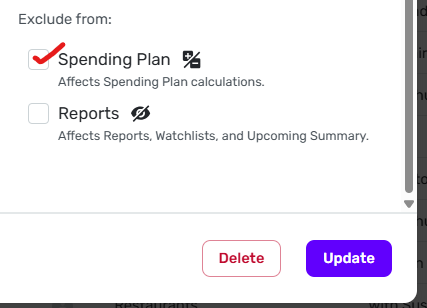
If you don't want this bill reflected in the Spending Plan, edit the transaction and check the Spending Plan box under "Exclude from:" down in the right-hand bottom corner.
I have a Savings Goal that I contribute to monthly and this contribution is counted as part of my Spending Plan. This SG is specifically for the purpose you mention, to cover such things as auto or home or appliance repairs. When such an occasion arises, I do like @DryHeat shows above and exclude the expense from my Spending Plan. I've already included the expense in my Plan via the monthly savings contributions. I use tags to help keep track of any expenses covered by SG money.
I pretty much do what @DryHeat suggests. When I have a big item that comes up such as plumbing or a major car repair, I just take it "off budget" by excluding it from the Spending Plan (but not from Reports).
A lot of how this is done depends on factors. For younger folks without much savings, it really could affect their Spending (I remember!), but for older folks and those with savings, we can absorb the blow.
Recently I bought a new refrigerator and I counted the sales tax and installation, but I did the actual refrigerator cost ($1199) as a transfer since I gained an asset (that will devalue over time).
By the way, I don't know if this refrigerator will last, but I was amazed to find that it was just $100 more than the one I bought in 2009. It was still working fine except the Ice Maker was gone; it wouldn't defrost right, and the water dispenser no longer worked. But once a week, I knocked the ice out the freezer. But when the ice maker went, my wife wanted a new one.
I don't like hiding things from the spending plan because then they're… hidden and easy to forget about. What I've done if I'm pulling the money from an actual savings account is to unhide one side of that transfer from the spending plan, then my monthly income is that much higher which offsets the large expense/bill.
It gets messier if I'm not actually with drawing that amount from another account. I've played around with floating available "income" from one month to another using a manual account and 2 transfers with different dates and the same amount but one positive and one negative. It's a bit of a hassle though. Ideally IMO Simplifi should let us roll over available funds to the next month's spending plan which would help with this situation. (I'd probably want it to be a manual thing to choose each month if needed.)
@EL1234 I understand that concern but it is still in reports, still shows up on your Dashboard transaction card and all your reports, including income and expense report, which is what you mainly look at after you get through the month, so that all you are doing is just excluding it as a budgeted item.
But the thing I love about Simplifi is that we can (mostly) do things the way we want. 😉
@EL1234
"I don't like hiding things from the spending plan because then they're… hidden and easy to forget about."
I understand that point of view. You don't want your budgeting software to give a false impression of how the month went. Makes sense to me.
Another way to approach it — conceptually — is to just accept that you were over budget for the month. The fact that you had enough in savings to cover the bill doesn't mean that you didn't overspend your previously planned spending level.
When you look back at that month, an honest appraisal of what happened is that your budgeted amounts were sufficient for your normal consumption but there was an abnormal event that drained some resources. Seeing that kind of information over time might help in planning something like a sinking fund (Savings Goal) to handle such things in the future.
Once you have something like that going, you can legitimately move the extraordinary expense off-budget by charging it against the sinking fund, knowing that you are accounting for it and similar needs in the budget through contributions to the sinking fund.
Both very good points!