Apple Card rewards and Simplifi
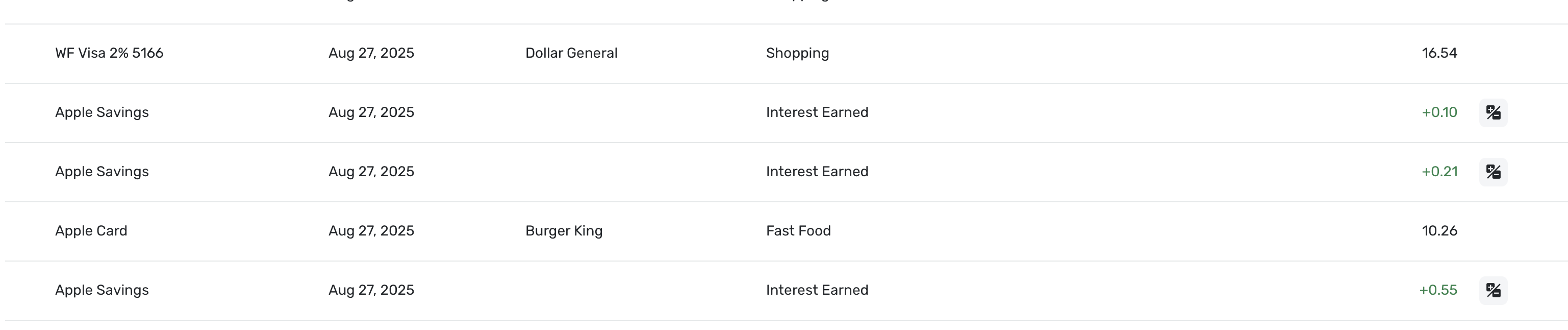
Just about anyone that takes a chip now takes Apple Pay (I know WalMart doesn't) and I find using Apple Pay with an Apple Watch very convenient. The down side is apple posting 2% or 3% rewards transaction on every purchase. I wish there was a rule to combine into one monthly transaction but I realize most cards do not even send rewards and there is really no reason for Simplifi to make a rule. The Simplifi Income/Expense report sums it each month which is a very useful addition. I am posting just in case someone knows a trick I am missing.
[edited for readability]
Comments
-
@N4KHQ, thanks for posting your inquiry to the Community!
I don't personally use Apple Pay, but hopefully other users who do will come along with feedback for you. In the meantime, I think it would be helpful to understand how the reward transactions look in Quicken Simplifi, how this is impacting your usability of the program, and what you would like or expect to see.
Let us know!
-Coach Natalie
0 -
The rewards show up as an additional transaction, Apple savings, Interest Earned. It an Apple thing and because I use the Apple Card a lot I see a lot of green small rewards. I like getting the rewards uploaded to Simplifi, I just wish apple would do it once a month. Not a big deal. It is great Simplifi is being constantly improved and having top notch support.
1 -
It's great that you are sending your Rewards to your Apple Savings account. I do the same thing, but it shouldn't be categorized as interest, if I am reading this correctly.
Interest is taxable but your rewards are not; it's like a rebate. I handle Rebates as a negative expense category. This way it won't count as income.
Other users prefer an income category for rewards. When you do that, you'll get several small income entries in your Spending Plan. But, you can tell the Spending Plan to ignore that irregular income.
I don't use my Apple Card that much, but Apple pays the rewards daily. I also get rebates from other cards, but you have to request those so I tend to do it once a month. With Amazon Card, I apply it to my order.
PS Walmart won't take Apple or Google Pay because they want their own clunky app and their own virtual cards. I pay the extra nickel at their gas station just to avoid that app.
Steve
Quicken Simplifi (Safari & iOS) Since 2021
Quicken Classic (MacOS) Since 2009
MS Money (1991-2009) and Dollars & Sense (1987-1991)1 -
I had not thought about rewards not being taxed, good to know. I noticed Apple or Synchrony is withheld tax on Apple Savings interest. Interest is just a category that Simplifi assigned. If I change the category to Rewards, I do not know a way to not record Apple Savings interest correctly without changing it every month. I the rules will allow you the enter exact amount but does not have a Less than amount.
0 -
You can bulk change the category on past transactions. You are right that it is hard to come up with a rule to cover all the possibilities. I use a different payee for each one: Apple Rewards, Chase Rewards, AmEx Rewards and I use the category Rebates.
But it is all up to you. But if you want to use the Taxes Report to help with your taxes, it will be good to not have it in an income category. But you can use an Income category if you like and then not tie it to the tax report.
Steve
Quicken Simplifi (Safari & iOS) Since 2021
Quicken Classic (MacOS) Since 2009
MS Money (1991-2009) and Dollars & Sense (1987-1991)0 -
Good point on interest, I use 1099 INTs it get in the mail or download to report interest. Apple sends the same payee for interest and rewards. The really should give them a different payee name.
1 -
Yeah, I know a lot of people who think it's interest. Thanks for the comment!
Steve
Quicken Simplifi (Safari & iOS) Since 2021
Quicken Classic (MacOS) Since 2009
MS Money (1991-2009) and Dollars & Sense (1987-1991)0