Stripe > transaction stuck on Pending
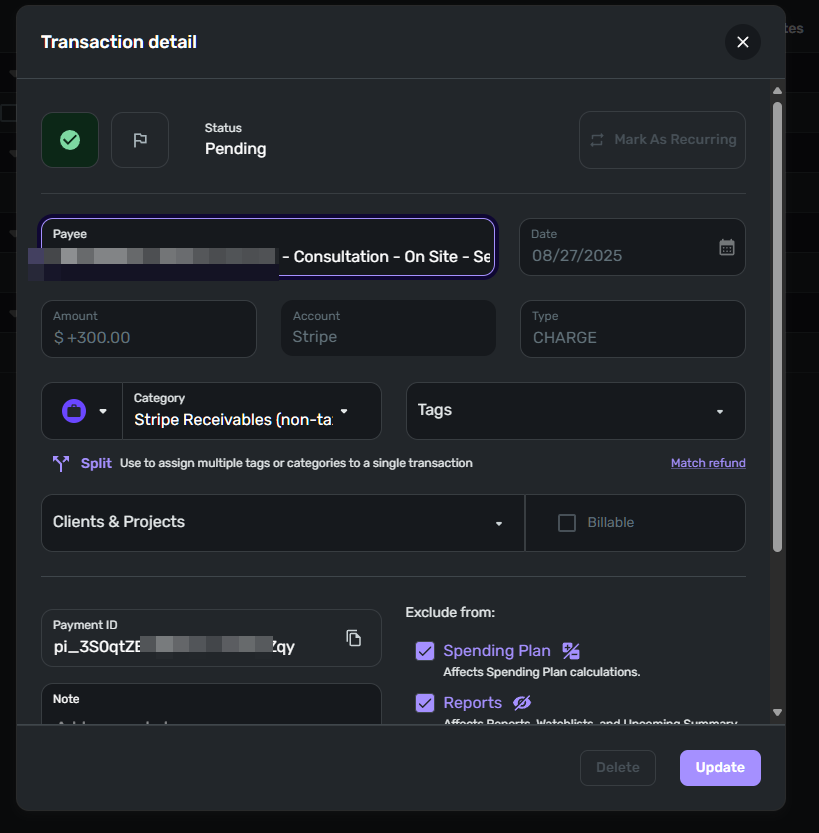
Per the title, I have a Stripe incoming transaction stuck on Pending. This amount is a payment collected by Stripe, 8/27
The corresponding payout transaction has cleared, also on 8/27.
The status field is not editable, i.e., no pulldown menu for 'Cleared'. I also can't delete the transaction - see the screenshot below, where 'Delete' is greyed out.
Any ideas to fix it? Put the Stripe account into manual? Delete Stripe entirely and start over?
Comments
-
@Coach Jon The iOS app is the same, uneditable, and can't be deleted.
0 -
Thank you for your reply,
Has the cleared transaction also downloaded into your Quicken Simplifi? If it hasn't, are you able to enter it manually (as a cleared transaction) and merge the downloaded transaction with it (for information on merging a manual transaction with a downloaded transaction, click here)?
It this transaction a payment towards an invoice in your Quicken Simplifi? If it is, has that payment been applied to the appropriate invoice (for information on doing that, click here)?
Thank you!
-Coach Kristina
0 -
Well, I have no clue now, as it's disappeared in the meantime. The Stripe balance hasn't zeroed out like it should.
I tried to do the merge, but I can't create a transaction using the Stripe account as it's not in the list, thus no merging.
The Stripe transaction was not for a Simplifi invoice.
At this point, I'll just delete the Stripe account and start over. I'll let you know.
1 -
And now, Stripe has zeroed itself out. The timing of these last couple of changes doesn't relate to anything I see over on the Stripe side. Nor did I make any changes within Simplifi.
Bottom line, just let Stripe do its thing. This is all the more reason to put Stripe transactions into a tracking category, not use for "Income".
1


