Impact 401(K) (Principal Financial Group) - How to link to existing account?

My current Principal 401k account is not able to connect, states "the bank is not available right now." I found a discussion that stated to connect to Principal financial group. The instructions said to first mark the current "not working" account to manual updates first. Then connect to Principal financial group, and during the connection step, after entering credentials, to link the account to the existing "not working" account. When I select the dropdown list, the not working account is not in the list. I can connect the new account fine but I end up with two 401k's. I don't want to delete the existing account and lose the history. Not sure where to go from here. I don't see a way to link account after connecting to Principal financial group. Please help.

Best Answer

  • Coach Kristina
    Coach Kristina Moderator admin
    Answer ✓

    Hello @TubinCubin,

    Thank you for letting us know that you're encountering this issue. The two main things that would cause the account not to show as an option to link to are if the account type is different or if the account you want to link already thinks it is connected in Quicken Simplifi.

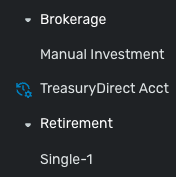
    You mentioned that it lets you add the account as new just fine. When you look in the account list bar, do you see that account under Brokerage or Retirement?

    Screenshot 2025-09-13 at 2.56.28 PM.png

    Please make sure that the non-functional account you're trying to link is showing as a manual account in Quicken Simplifi. For instructions on making an account manual, please see this article:

    If the account is showing as a retirement account and it is manual in Quicken Simplifi, and the issue persists, please let us know and please also include a screenshot of what you are seeing when you try to link the account (make sure to redact any personal information).

    I hope this helps!

    -Coach Kristina

This discussion has been closed.