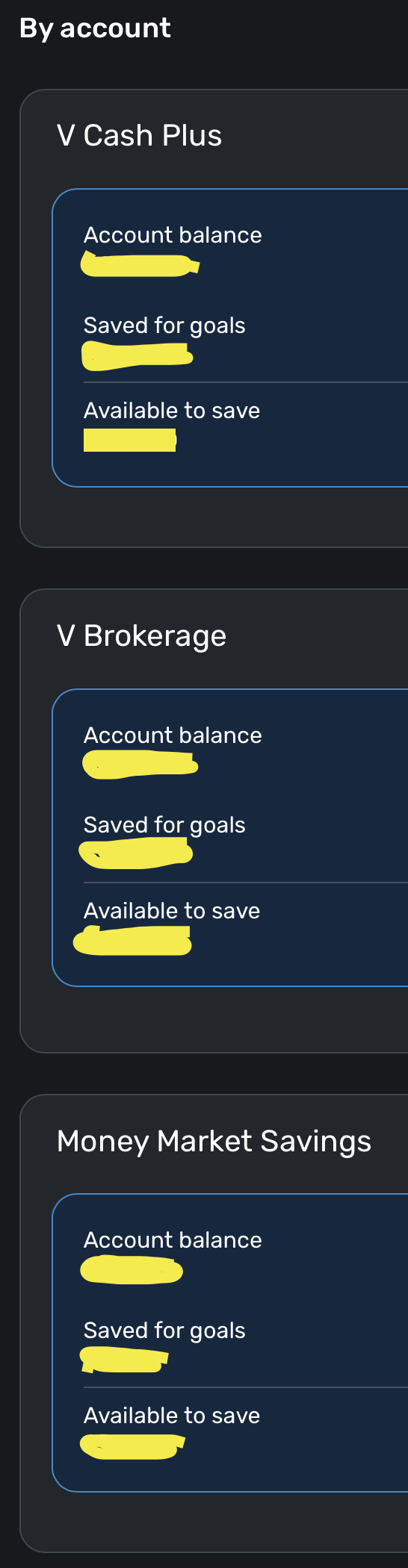
This is still happening for me in Quicken Simplifi even though the community reports that it is resolved. I have the updated versions that were reported to fix it, and there are no unnamed savings goals to release money from.
Hello @More or Les,
Thanks for reaching out! When testing this from my side, it seems like the deleted Savings Goals may take a little while to actually be removed within Quicken Simplifi. When I came back after a few minutes, the deleted Savings Goal was gone. Is your deleted Savings Goal still showing from your side? If so, I would see if signing out and back into Quicken Simplifi works to resolve the issue. If it does not, please supply a screenshot showing the deleted Savings Goal in the Accounts list, as well as the Savings Goals tab showing that it does not exist there.
-Coach Jon
The deleted savings goal does not still show. As you can see, the account view of my savings goals has only 3 accounts, none of which are the accounts that still show as having savings goal deductions taken from them.
Thanks for the reply. To confirm, did you try signing out and back into Quicken Simplifi to see if this resolves the issue you are seeing? I would also have you verify if this issue appears in another web browser/incognito mode and the mobile application as well, please.
If it does, please let us know your browser, operating system, and the Quicken Simplifi version and build you are currently on. This can be found at the bottom of the Dashboard in Quicken Simplifi.
Please also be sure to supply logs so we can work on getting this issue reported:
I typically view from one of three devices, and have signed out of all and then signed back in - no change. Mac Safari (version 4.770 (35262)), PC Microsoft Edge(version 4.770 (35262)) iPhone mobile (version 5.40.0 (43605)). I also checked browser extensions due to the attached error message when I signed back into the Mac PC - no browser extensions are active. I also checked using Chrome, which I don't normally use so it wouldn't have cookies - same result.
Thanks for the requested information. Did you mean to attach that screenshot above? I am unsure of what error message you specifically mean. Is it causing an issue when trying to sign into Quicken Simplifi?
wrong screen shot. This is the one that directed checking browser extensions.
Thank you for the screenshot. If you can further clarify, can you let us know if the deleted Savings Goals are still affecting your Account Balances? Or is the issue purely visual? If you select one of the deleted Savings Goals showing in your Accounts list, what specifically happens? Does it take you to an "Unknown Goal" or something along those lines, or does it take you to the Savings Goals page? Let us know!
If I select the savings goals from the accounts page, it takes me to the savings goal page. If I try to create a new savings goal and take from those accounts, the full amount is not available due to the deleted savings goal still holding on to the amounts. It is not purely visual
Thanks for confirming that for us. One last thing. We will need the versions for both your operating system and web browser, if you can please provide those. Afterward, we should be able to get this issue submitted.
I typically use 3 different devices to view, and have signed out of all, and then signed back in - it is still the same. Those are Mac Safari, iPhone, Microsoft Edge on a PC. Browser versions show app version of 4.77.0 (35262), mobile app version is 5.40.0 (43605). There are no active browser extensions, and I checked this in Safari because I received the attached error message when I signed back in. I tried Chrome on the Mac PC, which I don't normally use, and this does not change anything.
Safari Version 26.0.1 (20622.1.22.118.4) Mac Sequoia 15.07
iOS 26.0, app
Microsoft Edge 140.0.3485.94 , Windows 11 Home, 24H2
Thank you for the requested information. I did get this reported to our product team and will be sure to follow up once we have any status updates on the issue.
SIMPL-29588
We now have an alert you may follow for this issue.
We will be sure to post any status updates there going forward.