Problem connecting to AAA Dollars MasterCard account (FDP-102)

barthslb2
barthslb2 Member
edited November 24 in Adding and Updating Accounts

I have been receiving FDP-102 errors trying to connect to my AAA Visa credit card for the past two weeks. Prior to that it has worked fine. I have no problem logging into my account directly throigh the web. I have tried to reset the account throigh Simplifi amd also delete/reinstall the account but still receive the 102 error message. The web site it attempts to connect to is :creditcard.acg.aaa.com.As this is my primary credit card, any help would be appreciated. Thanks.


Tagged:

Comments

  • Coach Natalie
    Coach Natalie Administrator, Moderator admin

    @barthslb2, thanks for reaching out to the Community with this issue!

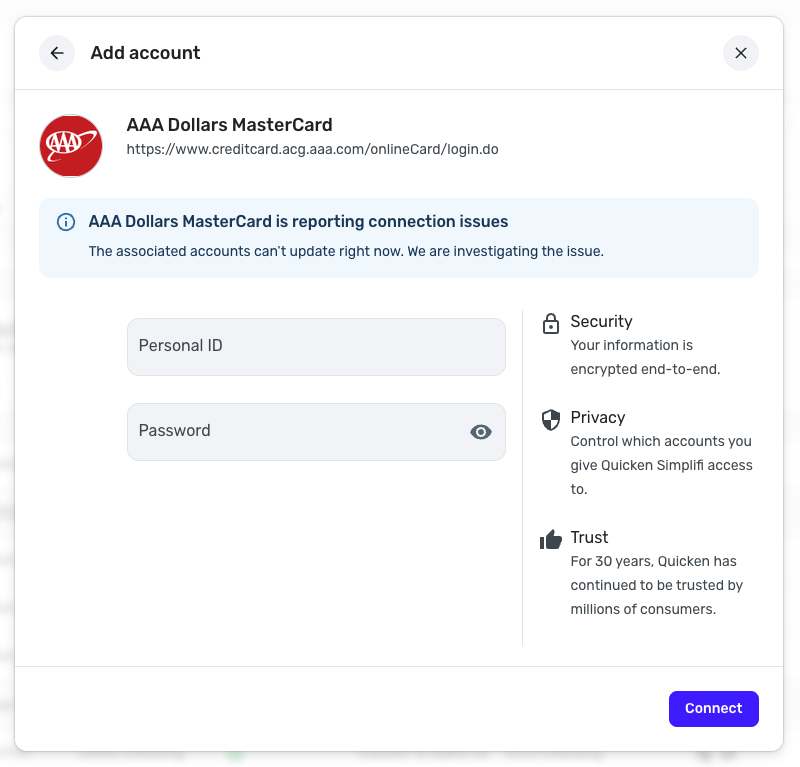
    I was able to confirm the FDP-102 error when checking your connection attempts for AAA Dollars MasterCard in Quicken Simplifi. This is usually a temporary error, and indicates that the bank is throttling connection traffic (limiting the number of successful connections). I also see a banner in Quicken Simplifi stating that this particular bank is experiencing connection issues and that the issue is currently being investigated.

    Screenshot 2025-10-01 at 1.02.33 PM.png

    With that, I would recommend continuing to try every so often and looking for the connection error banner to be removed. In the meantime, you can track the account manually. Here is our support article that goes over adding manual transactions in Quicken Simplifi: https://support.simplifi.quicken.com/en/articles/3348103-managing-transactions-in-quicken-simplifi#h_85ca9fed99

    Let us know if you have any questions regarding this information!

    -Coach Natalie

  • barthslb2
    barthslb2 Member

    Thanks Natalie. I will continue to try to connect with the bank. Do you know id that banner message is being generated by Simplify itself or the bank? Would it help to reach out to the bank or Simplifi tech support?

  • barthslb2
    barthslb2 Member

    After my last response I tried again this morning and now it worked. I will let you know if I continue to have problems with it, but thanks for your quick response to my inquiry here. I am a lomgtime Quicken user (since 1980’s DOS version). I really like that I can use Quicken on my ipad now. Keep up the good work!

  • Coach Natalie
    Coach Natalie Administrator, Moderator admin

    @barthslb2, I'm glad to hear it's working again!

    -Coach Natalie

  • barthslb2
    barthslb2 Member

    Connection problems with this bank are back for the past four days. Imhave been getting an FDP-105 error code this time imstead of the 102 nefore, thoigh.

  • barthslb2
    barthslb2 Member

    I deleted the account and re-added it. That seemed to fix it for now. I’ll see if it holds up going forward.

  • Coach Natalie
    Coach Natalie Administrator, Moderator admin

    @barthslb2, I'm glad to hear you got things working again!

    For future reference, instead of deleting the account, which causes a loss of all historical data, you can just disconnect it from the bank and then re-link it. Here are the steps to do so:

    1. Make all of the accounts with this bank manual by following the steps here.
    2. Once you see the account(s) listed in the Manual Accounts section under Settings > Accounts, go back through the Add Account flow to reconnect to the bank.
    3. Carefully link the account(s) found to your existing Quicken Simplifi account(s) by following the steps here

    These steps often resolve online banking issues!

    -Coach Natalie

  • barthslb2
    barthslb2 Member

    Thanks Natalie. I’ll give that a try next time (hopefully ther won’t BE a next time, though!).

This discussion has been closed.