Other Spend: Ability to select multiple categories for a total (edited)

MikeZ
MikeZ Member ✭✭
edited November 20 in Feature Requests

The bubbles in the Other Spend portion of the spending plan are okay, but it would be more useful to give us the option of viewing them in a list and allowing multiple selections so I could get subtotals of some categories without others. Once the categories are selected, show the running total in the header like it does now, but without the additional step of selecting each row.

While this can be done by displaying all transactions and selecting only those I want to see, it is a bit kludgy to do it that way. Multi-select is a pretty standard feature in modern software.

Another solution is to allow us to pull one or more categories out of Other Spend and add it as another "Other Spend" group with a custom name.

Also, bubbles are okay, but lists are better.

Thanks

3 votes

Active · Last Updated

Comments

  • Coach Natalie
    Coach Natalie Administrator, Moderator admin
    edited November 17

    @MikeZ, thanks for posting your request to the Community!

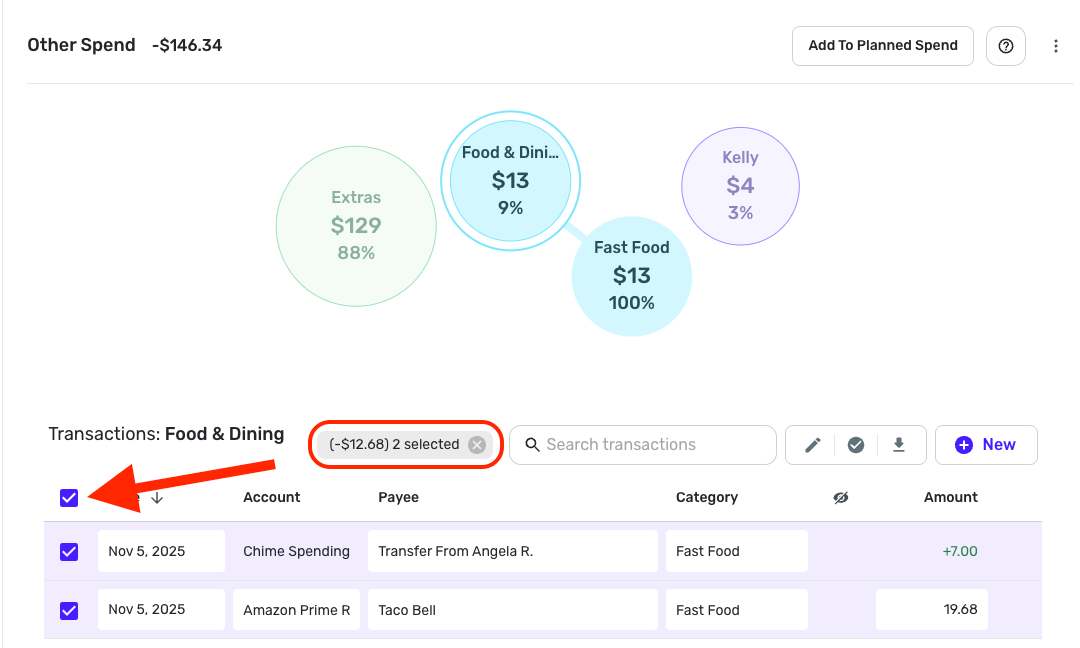
    I have moved this out of Feature Requests for now so we can provide some guidance, as this ability may already be available in Quicken Simplifi. In Other Spend on the Quicken Simplifi Web App, if you click on a bubble to see just that category, you can then click the box at the upper left of the transaction list to select all of the transactions included in this category, which will give you a "selected" total —

    Screenshot 2025-11-17 at 8.54.01 AM.png

    I see you mentioned selecting transactions, but I'm not sure if it's the same as what I just outlined. If this existing design doesn't meet your needs, please provide more details on what specifically you're looking for and how it differs from what's currently offered so other users and our product team have a better idea of what you're requesting.

    We look forward to hearing back from you!

    -Coach Natalie

  • MikeZ
    MikeZ Member ✭✭

    Yes, I know I could go through the process of displaying all the transactions and selecting just the ones I want, but as I said, it's kludgy. This is what's called a work-around. I should not have to do that.

    I want to be able to select MULTIPLE categories, but not all, and get the total for those categories added together.

    I mentioned lists because normally these would be displayed as lists, not bubbles.

    It doesn't really matter how they're displayed as long as I can select more than one, but not all.

    Currently, it's all or just one. That doesn't cover all of my desired scenarios.

    Multi-select is a feature in most software that's been around for many years now. Not having it seems to be a missed requirement.

  • Coach Natalie
    Coach Natalie Administrator, Moderator admin

    @MikeZ, thank you very much for the clarification! This has been turned back into a Feature Request.

    -Coach Natalie

  • MikeZ
    MikeZ Member ✭✭

    Thank you!