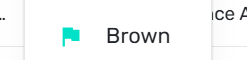
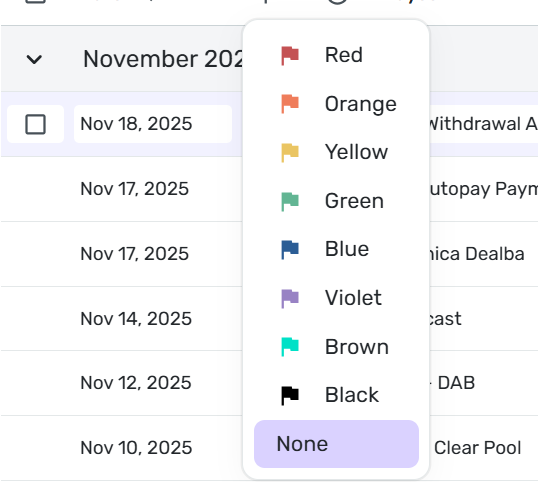
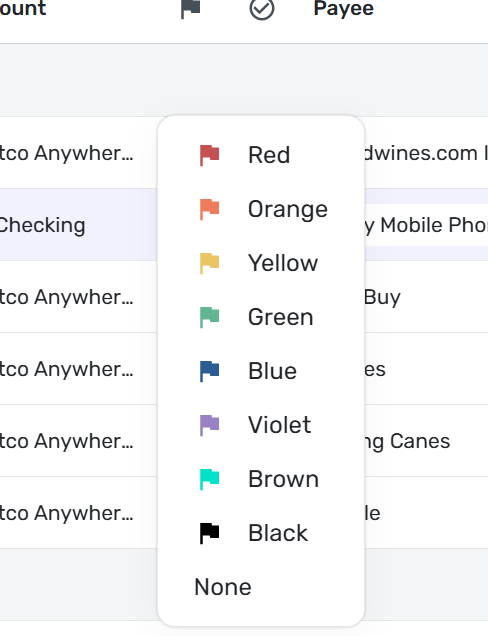
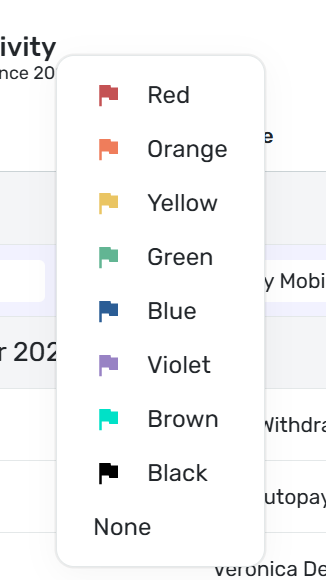
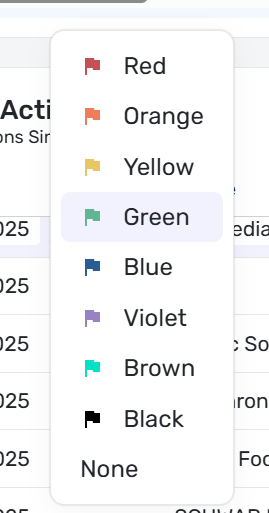
Cyan colored flag labeled as "Brown" in pick list

DryHeat
DryHeat Superuser ✭✭✭✭
edited November 19 in Report a Bug

Not a big issue, but something that needs correcting…

And, no, I don't think there is anything wrong with my monitor. I displayed the pick list on two different monitors with the same result. And any other brown object I see on my monitor looks brown.
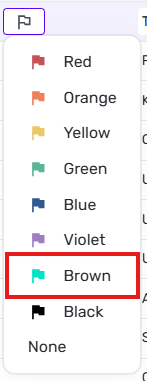

image.png

DryHeat
-Quicken Classic (1990-2020), CountAbout (2021-2024), Simplifi (2025-…)

Tagged:

Comments

  • DannyB
    DannyB Member ✭✭✭✭

    Yep… it's cyan not brown…

    image.png
    Danny
    Simplifi user since 01/22
    Budget: a mathematical confirmation of your suspicions.” ~A.A. Latimer
  • Coach Jon
    Coach Jon Moderator admin

    Hello @DryHeat and @DannyB,

    Thanks for reaching out! That is quite odd for sure. When I check from my side, I do not see a list of names when selecting a flag color for a transaction. Can you please let me know where the list you posted is located so I can verify what is occurring here?

    -Coach Jon

  • DannyB
    DannyB Member ✭✭✭✭

    @Coach Jon

    image.png

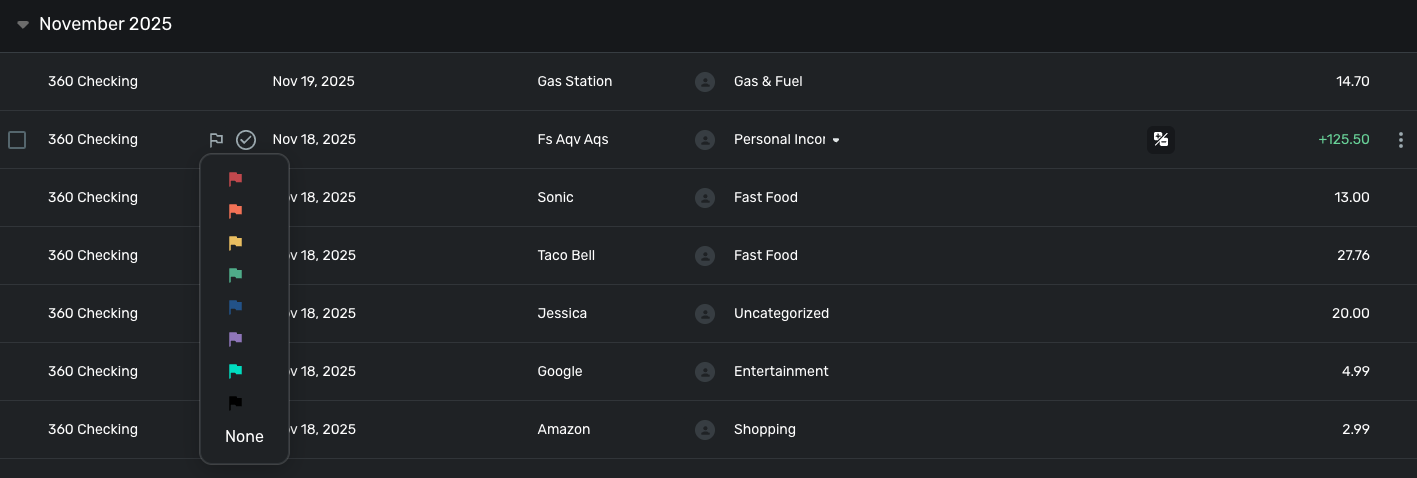
    Make sure the "Flag" column is selected in the Settings Menu (Gear icon). Move your cursor to any transaction in the transaction list and click on the "Flag" icon that appears in the "Flag" column. When you click on the flag a list of colored flags will appear.

    image.png

    This is from the desktop app using Edge web browser on a Windows 11 machine.

    Danny
    Simplifi user since 01/22
    Budget: a mathematical confirmation of your suspicions.” ~A.A. Latimer
  • Coach Jon
    Coach Jon Moderator admin

    Hello @DannyB,

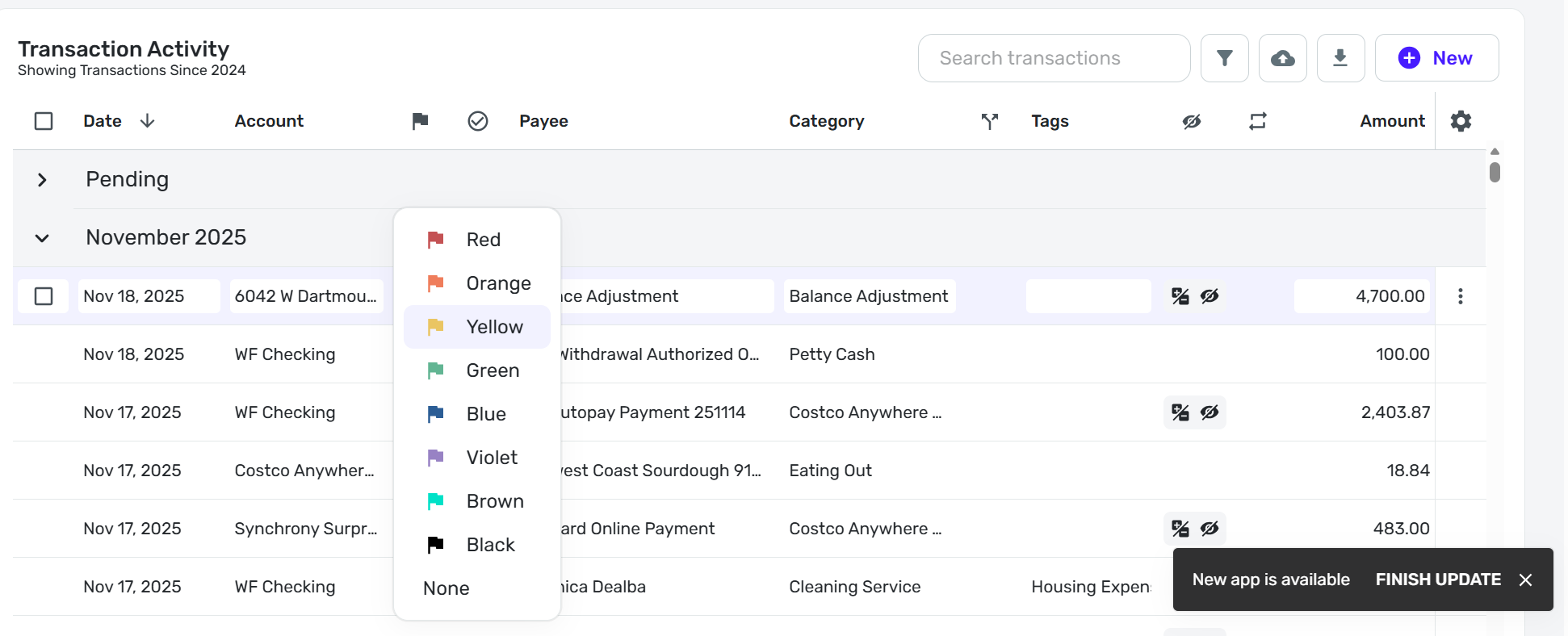
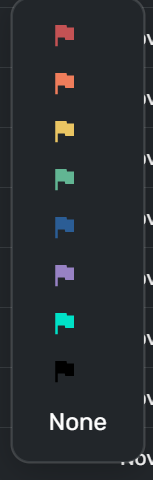
    Thanks for confirming. When selecting a flag, no names are shown from my side. This is quite peculiar.

    image.png

    If you try from another web browser, does the same behavior occur? Let us know!

    -Coach Jon

  • DryHeat
    DryHeat Superuser ✭✭✭✭

    @Coach Jon

    That's odd that you don't see the color labels. I see them when using Chrome and Edge browsers in Windows. I also so them in the Chrome PWA. I'm using Simplifi 4.84.0. It always looks exactly the same.

    We must be doing something differently. To figure that out, it would help to know:

    1. What operating system are you using?
    2. What browser are you using?
    3. Are you accessing Simplifi in a browser window or through a PWA?
    4. What version of Simplifi are you running?
    5. Are you enrolled in Early Access?
    6. Are you using the not yet fully released version of the transaction register?

    DryHeat
    -Quicken Classic (1990-2020), CountAbout (2021-2024), Simplifi (2025-…)

  • Coach Jon
    Coach Jon Moderator admin

    Hello @DryHeat,

    Thanks for the reply. I have checked in both Chrome and Safari from my side, and even with other members of my team here who have checked both versions of the register. I do not remember ever seeing the flag labels in previous versions of Quicken Simplifi either. Our support article also does not show the flag labels, which is why I mentioned the peculiarity. https://support.simplifi.quicken.com/en/articles/5662568-flagging-transactions-in-quicken-simplifi#h_edf226950c

    Have you always seen these labels when selecting flags in the register?

    -Coach Jon

  • DannyB
    DannyB Member ✭✭✭✭
    edited November 20
    image.png

    This is QS v. 4.84… I am now going to finish todays update and I'll see if this changes.

    This is QS v. 4.85…

    image.png

    Like @DryHeat my flags have color labels.

    Here is what I see when I use DuckDuckGo browser:

    image.png

    I see the same in Google Chrome browser:

    image.png

    I even tried changing the zoom setting to see if that affected the color labels - it didn't either zooming in or out.

    The original point of this discussion is the mislabeling of the cyan flag as Brown only to discover that at least for two of us there is the bewildering secondary issue that the labels appear at all.

    I don't use flags and typically have the column deselected so for me, I have no recollection one way or another of the flags being labeled in the past and if not, when they started showing.

    Danny
    Simplifi user since 01/22
    Budget: a mathematical confirmation of your suspicions.” ~A.A. Latimer
  • DryHeat
    DryHeat Superuser ✭✭✭✭

    @Coach Jon

    I have no idea when these labels first appeared, but they are there now.

    You didn't directly answer my operating system question, but if you are running Safari you are likely on a Mac.

    I suggest you check (if you have not yet done so) to make sure that your sample of team members (who are not seeing the labels) includes some people who are using Windows. That's the only significanat difference I can think of at the moment.

    Perhaps @DannyB can chime in on what operating system he is using.

    DryHeat
    -Quicken Classic (1990-2020), CountAbout (2021-2024), Simplifi (2025-…)

  • Coach Jon
    Coach Jon Moderator admin

    Hello @DryHeat ad @DannyB,

    Thank you to you both for the additional information. While I or Coach Natalie still cannot reproduce this behavior, I can agree that it is certainly strange. Can you both supply logs to better assist us in this investigation?

    1. Log in to the Quicken Simplifi Web App.
    2. Select Profile from the left-hand navigation bar.
    3. With the Profile menu open, hold down the Option key for Mac or the Alt key for Windows, and then click Send Feedback.
    4. Leave all boxes checked, add a brief description of the issue, and then click Send.

    -Coach Jon

  • EL1234
    EL1234 Member ✭✭✭✭

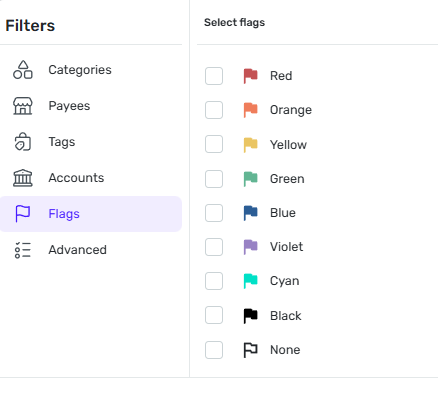
    I don't see the labels when editing a flag, but I do when filtering. Luckily on my end Cyan is named correctly:

    image.png

    (I'm using Chrome on Windows)

  • DryHeat
    DryHeat Superuser ✭✭✭✭

    @Coach Jon

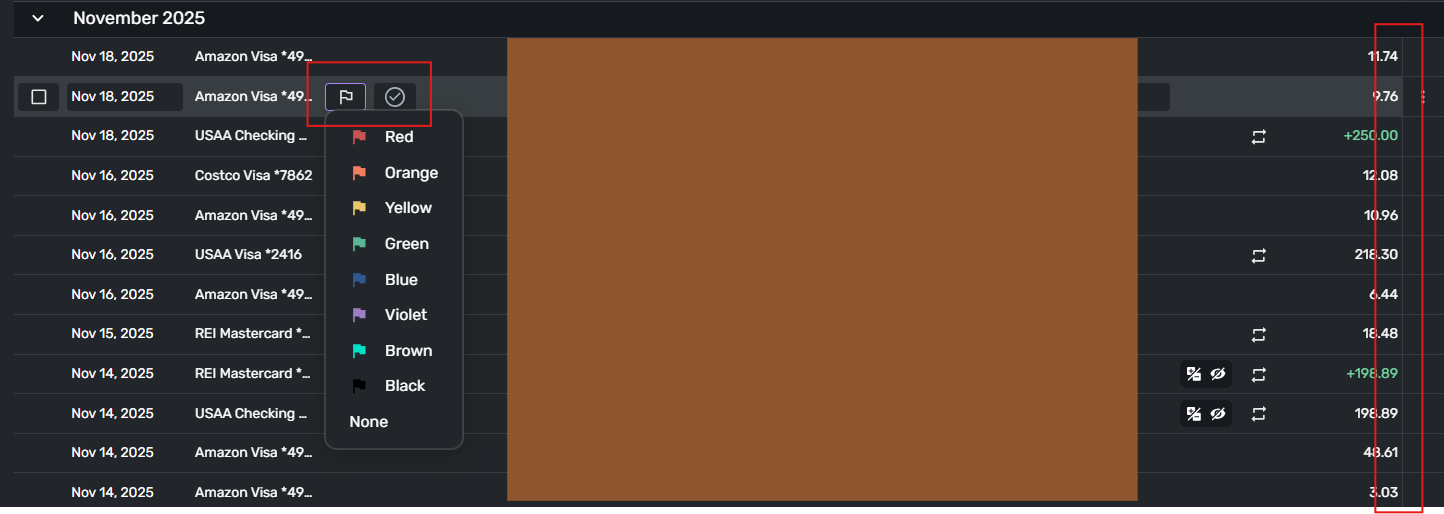
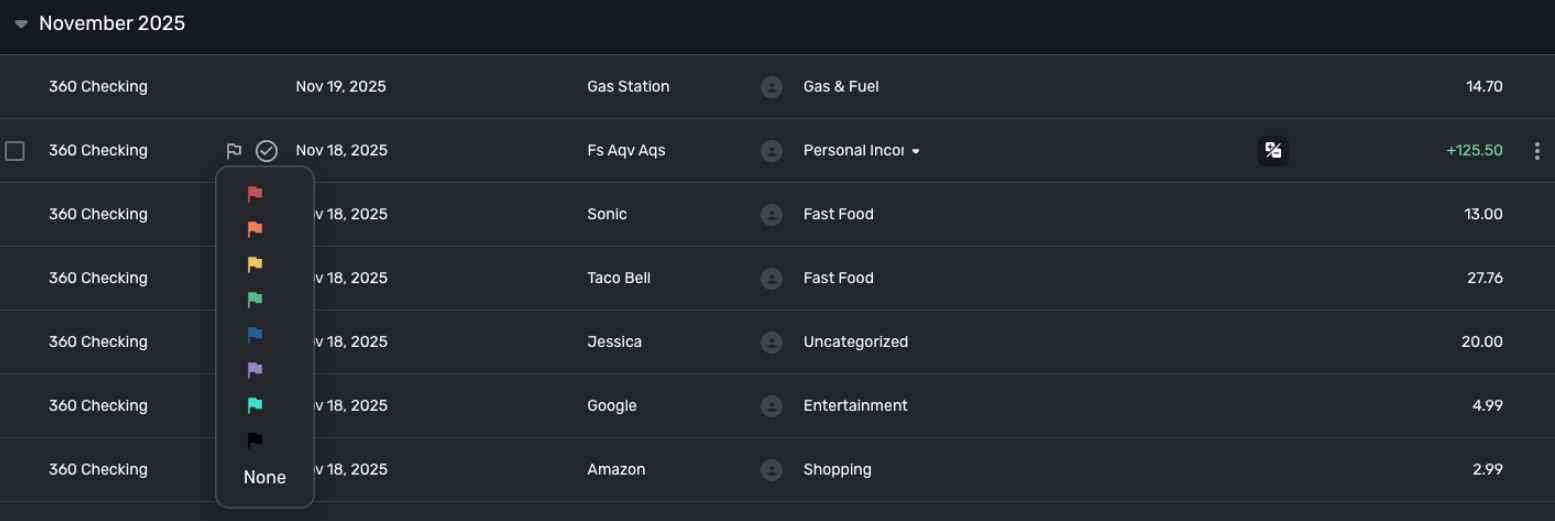
    The image you posted of your register looks different from my register (below) in at least three ways:

    1. the selected transaction has a highlighted background
    2. the icons for Flag and Review are boxed differently (see red box on left)
    3. there is a faint vertical border line after the amount (see red box on right)
    image.png

    Your image for comparison:

    image.png

    Are we using the same register? Do any of your team members have registers that look like mine?

    DryHeat
    -Quicken Classic (1990-2020), CountAbout (2021-2024), Simplifi (2025-…)

  • DryHeat
    DryHeat Superuser ✭✭✭✭
    edited November 20

    @EL1234

    Agreed. I see the same thing when filtering on flags: labels present, cyan flag is correctly labeled "Cyan."

    I've had confusions before when it turned out other people were not using the same (experimental) register that I am using. I'm thinking that's what's happening here too.

    This started out as a simple mislabeling issue. Sheesh!

    DryHeat
    -Quicken Classic (1990-2020), CountAbout (2021-2024), Simplifi (2025-…)

  • DannyB
    DannyB Member ✭✭✭✭
    edited November 20

    @DryHeat @EL1234

    I run QS on a Windows 11 Home V. 25H2, build 26200.7171.

    … and that's right! Way back when we were asked to sign up for a video chat to review a new register, I did. But something went wrong on the day of my appointment, and it got canceled but the new register latter "went live" in my account. I wasn't notified but started noticing differences in my bank registers. I wonder if this is related to that. Perhaps there are stray versions of the new register in the wild so to speak!

    Anyway, @Coach Jon I sent my logs.

    PS There is a feature request to add the ability to add labels to the flags. Was any work done towards that end and what we are seeing is some pre work done toward that end that isn't supposed to be available to users yet but got turned on in some instances of the newly released bank register?

    Add Labels to Flags — Simplifi

    Danny
    Simplifi user since 01/22
    Budget: a mathematical confirmation of your suspicions.” ~A.A. Latimer
  • EL1234
    EL1234 Member ✭✭✭✭

    That would be pretty funny! Imagine if they gave all the colors labels that you could change, and tested it by changing cyan to brown :D

    Oops!

    Let's hope it gets figured out, it would be a great feature to have (when implemented properly).

  • Coach Jon
    Coach Jon Moderator admin
    edited November 20

    Hello everyone,

    Thanks for the information given and for helping narrow down the issue! @DryHeat, as you mentioned, and since this issue is clearly having to do with the new register, please let Quicken Kirby know about the issue in the superuser lounge post for improvements to the register here:

    @DannyB, If you wanted to also let Quicken Kirby know you were experiencing the issue, you can do so in the transaction register feedback post here:

    As to your inquiry about the idea post you mentioned being linked to the issue described here, I would unfortunately not be aware if that is the case here in the community.

    -Coach Jon

  • DannyB
    DannyB Member ✭✭✭✭

    @Coach Jon I have already set up an appointment with Kirby for this afternoon. Thanks for the suggestion.

    Danny
    Simplifi user since 01/22
    Budget: a mathematical confirmation of your suspicions.” ~A.A. Latimer
  • DryHeat
    DryHeat Superuser ✭✭✭✭

    @DannyB

    I'm not sure what your appointment is about, but @Coach Natalie just informed me that they were mistaken when they said they weren't seeing flag labels at all in the new version of the register.

    So this really is just a "new version" problem that should come down to a simple label or color correction. Problem solved (this one, anyway).

    DryHeat
    -Quicken Classic (1990-2020), CountAbout (2021-2024), Simplifi (2025-…)

  • DannyB
    DannyB Member ✭✭✭✭

    I'm reconnecting with Kirby from our original appointment that was canceled. I want to go over with him what exactly changed and to review some "issues" (besides the flag color labels which seem redundant and not useful to me anyway) with what I see in my version of the register.

    Danny
    Simplifi user since 01/22
    Budget: a mathematical confirmation of your suspicions.” ~A.A. Latimer
  • DannyB
    DannyB Member ✭✭✭✭

    @DryHeat

    Problem solved…

    image.png
    Danny
    Simplifi user since 01/22
    Budget: a mathematical confirmation of your suspicions.” ~A.A. Latimer
  • DryHeat
    DryHeat Superuser ✭✭✭✭

    @DannyB

    I'm seeing the same thing you are. Apparently the just-announced new transaction register doesn't have labels at all, so there are no incorrect labels.

    But I'm seeing another problem with a doubled register. (See below.) Are you seeing that?

    DryHeat
    -Quicken Classic (1990-2020), CountAbout (2021-2024), Simplifi (2025-…)

  • DannyB
    DannyB Member ✭✭✭✭
    edited November 21

    OK, my mistake… I now have both the old and the new registers showing up in my accounts! One has not labels (the old register) and one has labels (the new register) and cyan is still brown. But Kirby did submit a bug report to get that corrected.

    I wonder if you have the same thing going on. Scroll all the way to the end of your transaction list and see if you have a second register. (I collapsed each month to get to the end quicker.)

    Danny
    Simplifi user since 01/22
    Budget: a mathematical confirmation of your suspicions.” ~A.A. Latimer
  • DryHeat
    DryHeat Superuser ✭✭✭✭

    @DannyB

    Scroll all the way to the end of your transaction list and see if you have a second register.

    Right… That's what the post I linked in my previous message was about. I was seeing two registers, as depicted in the images there.

    BUT… Now I am only seeing one. And it's the one with flag labels. I think they must have quickly rolled back the change because of the problems. Short-lived…

    DryHeat
    -Quicken Classic (1990-2020), CountAbout (2021-2024), Simplifi (2025-…)