Transaction List Update: Share your feedback here!
Comments
-
Hello @SRC54,
As far as who determines the account type, that would be on the financial instituions side, correct. However, from our research, we determined that there is a bug that we have filed that allows users to change the account type when resetting the account connection for their investment accounts, which should not be allowed, as this can cause further issues, like those reported here.
The CMA issue has been brought up to our engineering and product teams, and they are looking into it. That's all the information we have at this time, but hopefully we'll see something to address this! I know you already created an idea post for this feature, but I will post it again here for anyone who would like to vote for and add their feedback for the idea.
-Coach Jon
-Coach Jon
2 -
@Coach Jon Thanks. I guess that means that my setting will be left alone I hope. 😄
Steve
Quicken Simplifi (Safari & iOS) Since 2021
Quicken Classic (MacOS) Since 2009
MS Money (1991-2009) and Dollars & Sense (1987-1991)0 -
Thanks @Coach Natalie ! I'm excited to try it out.
The first thing I want to mention is that if I set a filter via the 3 dots menu at the top of a column, I want to see it listed in the filters at the top of the transaction list. And vice versa - filters set up there should be listed for the specific column they belong to as well.
Also and maybe this is a small thing, since the Amount column is right aligned, the 3 dots show at the top right of the column header, but it's hard/confusing to find it there since the rest of the columns show the 3 dots menu at to top right. I hope you can fix that!
0 -
Here's another thing - when I scroll through the transactions, the controls at the top of the list (filter, bulk edit, search) are cut off. I can see a little sliver of them but can't use them. I need to scroll back up in the sidebar (not inside the transactions) to see them.
This screenshot shows what I'm referring to:
 0
0 -
When adding a filter via the 3 dots menu, can you add a "Done" button? Otherwise I think just clicking out of the filter window works but I keep sorting columns by mistake when I do that. I think a Done button or a Save Filters button would be better.
0 -
+1 for the export issue missing Splits. I just got the update today Dec 23rd 2025 which means I was not in the initial beta release but it has not yet be fixed as you continue to roll out to beta users.
Also split headers have changed (not a huge deal as i can remap my excel spreadsheet to deal with it) but it would be great if the export also honored the column order in the UI.
0 -
I am wondering if the Flag, Reviewed, Exclusion, and Recurring columns take up more space than they used to. It might just be those last two. Any way you can reduce some of the real estate they take up to make more space for the other fields? (On my smaller monitor, the Amount field is cut off, I managed to make room for it by shrinking Payee.)
I also see a white column after the last field which has no data in it. It's got the gear icon for the whole table on top of it. I wish that space could be donated to the last column (for me it's Amount) since I want to see as much info as I can at a time.
0 -
I also noticed a bug (I think) - when I filter to only show transactions that are not reviewed, if I click the checkmark to review a transaction, it doesn't disappear from the list until I click onto another transaction.
0 -
@SRC54, I want to jump in here with a bit more context.
The ability to switch an investment account to a non-investment account type was intentionally removed. To clarify what was previously mentioned regarding a potential “fix,” the intention was not to re-enable changing investment accounts to other account types. Instead, the idea was to allow users to assign a purpose or usage to the account. At this point, we don’t have details on what that would look like, and no additional information has been shared since that discussion.
For now, the only supported way to track an investment account as a non-investment account is by adding it manually.
I hope this helps to clarify!
-Coach Natalie
0 -
@Coach Natalie So what we need then is to be able to have splits and recurring transactions in investment transactions and be able to treat it as a checking account. It would then be ok for it to be an investment account if we could treat it as checking or savings and have its balance added where into the group where we have it listed.
Does this make sense? It could be then an investment account and use all the dividend stuff and payment/deposit, etc.
Thanks for the clarification.
Steve
Quicken Simplifi (Safari & iOS) Since 2021
Quicken Classic (MacOS) Since 2009
MS Money (1991-2009) and Dollars & Sense (1987-1991)0 -
Is it just me? The check # field keeps disappearing… I keep on putting it back but sooner or later it's gone again!
I think what happens is that when I navigate to a Credit Card account, the field goes away (which is fine) but then when I go back to all accounts or to a checking account, it doesn't come back (like it's supposed to and used to on the old register).
0 -
@EL1234 Not sure what happened but I lost the check # field. I had turned on Attachments checking something out for another user and later noticed it was gone. I reset the fields and put it back. Simplifi did remember where I had put it. I'll try to check again in the morning.
Steve
Quicken Simplifi (Safari & iOS) Since 2021
Quicken Classic (MacOS) Since 2009
MS Money (1991-2009) and Dollars & Sense (1987-1991)0 -
I was able to replicate it by looking at a credit card account and then coming back to a checking account. And I have to rearrange the column each time :(
0 -
@EL1234 I went to Walmart and back, and the check column was gone, and it isn't an option again until I reset defaults. So yeah, there's a problem.
Steve
Quicken Simplifi (Safari & iOS) Since 2021
Quicken Classic (MacOS) Since 2009
MS Money (1991-2009) and Dollars & Sense (1987-1991)0 -
Yep! I hope coaches are reading this thread :)
0 -
-
Yep, they are. Especially for these early access features and I believe some of the product development people follow it as well.
Steve
Quicken Simplifi (Safari & iOS) Since 2021
Quicken Classic (MacOS) Since 2009
MS Money (1991-2009) and Dollars & Sense (1987-1991)2 -
Thank you @Coach Natalie! I posted some other feedback above last week, I hope it didn't get missed :)
1 -
Previously when downloading a split transaction, the line item detail for all categories would download (albeit without the complete parent data). Now only the main transactions downloads with category = NA but the individual split line item details do not download. This is a huge functionality problem for anyone who exports data to analyze in Excel, Sheets, etc.
2 -
Hello @Blgeiger,
Thank you for reaching out! We went ahead and converted your idea post into a discussion and merged your post with the feedback thread here, since this does involve an early access feature, and this issue has already been reported to our product team as a bug. They are currently working on a fix at this time.
This issue is unique to the new data grid/register, so if you turn off Early Access, you should be able to export as expected in the meantime. This can be found in Settings > General > Early Access.
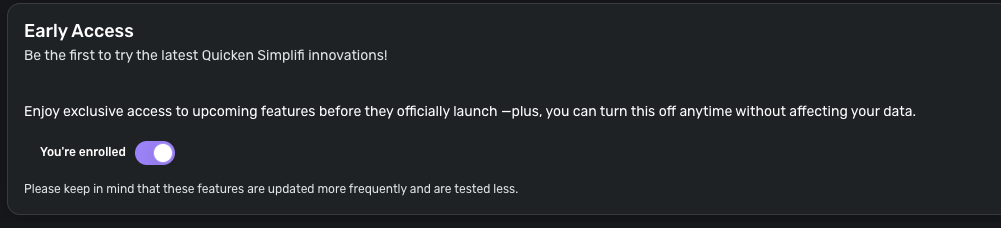
I hope this helps!
-Coach Jon
SIMPL-30551
-Coach Jon
1 -
Whew. Thank you!
1 -
Today I did a .csv export and the layout was changed vs. what I've used for years. That's not terrible, as long as all the columns are there. But what I also noticed is that i can no longer download the category detail for split transactions. It just shows 1 row with Category NA and another blank row. The blank row problem has always been an issue but I just workaround it when i export to excel (with a Go To, Special, Blanks trick). But now, if I can't get the category detail, the export is near useless to me. And I use split transactions all the time. In fact, if you can't download split detail, what is the point of having the feature.
Fortunately, a tech team member named Samuel showed me how to turn off early access, which remedied the issue for now.
But please, please, don't ever implement this feature, or any feature, that woudl preclude Split category detail on export. In fact, please make it work better but whatever you do, don't make it worse. I would literally have to find a new solution from a competing product and I don't want to do that.
Thanks!2 -
I download transactions annually into Excel for further pivot table manipulation. Last year Jan 2025 i got multiple rows for SPLIT transactions. as shown in Figure 1 below: Parent row with SPLIT in the category column and child rows for each split with valid category/subcategory. It was kind of a pain that the columns for account, state, payee etc did not repeat the data from the parent row but I found a way to fix this in excel.
Unfortunately when i perform the same export this year, the only thing shown for SPLIT transaction is a single row for each with "NA" in the Category column. See Figure 2 below.
Please advise how I get the split transaction amounts and categories exported to excel. NOTE I need data that I can only see in the transaction multirow display like Notes and tags
Figure 1

Figure 2

-Quicken Desktop 2005-2014
-Mint 2014-2023
-Simplifi in Jan 2024 (fleeing from Credit Kharma)
-Excel forever!!!0 -
Another issue that I keep running into: every so often the Amount field is partially/mostly off the screen. I need to resize my columns to get it back - but why does it keep happening? Sometimes it stays fixed for a while and sometimes I find myself fixing it over and over.
Maybe it's because I have different size computer screens? But if Simplifi needs to adjust column widths to accommodate different screen sizes, it should ideally keep the Amount column fully visible and shrink other columns such as notes/category.
0 -
Hello @pwhelan81,
Thank you for letting us know you're encountering this issue. I tested in my Quicken Simplifi and saw the same thing when exporting from the Transactions section.
I tested exporting the Spending report, and that one did display the categories for split transactions. However, it does not include as much information as the export from the Transactions section, so I'm not certain that would be a viable work around.
To help us investigate the issue, please send logs. To do that, please follow these steps:
- Log into the Quicken Simplifi Web App.
- Select Profile from the left-hand navigation bar.
- With the Profile menu open, hold down the Option key for Mac or the Alt key for Windows, and then click Send Feedback.
- Leave all boxes checked, add a brief description of the issue, and then click Send.
Thank you!
-Coach Kristina
1 -
@jbone & @pwhelan81, the issue with splits not exporting is part of the new register, which is in beta testing. This is a bug that our product team is aware of. You can disable Early Access to export normally. Please see Coach Jon's comment above —
I hope this helps!
-Coach Natalie
2 -
It no longer shows splits
You are supposed to add capabilities not remove themPrevious export: (3 lines)
SPLIT
Maintenance, Landscaping, & Repairs:Landscaping & Softscape
Reserve ExpensesCurrent export: (1 line - yes for split - but missing the 2nd category)
yes Landscaping & SoftscapeThis makes the export useless for me.
0 -
@rbrooks7125, thanks for reaching out!
The issue with splits not exporting properly is part of the new register, which is currently in beta testing. With that, your post has been merged with the official feedback thread for the new register. Please see my comment above for more information on this known issue!
-Coach Natalie
1




