Does the account-specific Balance Type setting actually do anything?
Comments
-
Well, as promised @DryHeat, here are the results of my switching my local checking account to Option B though it has always worked fine with Option A (see exception below).
It worked perfectly. Whereas I expected the balance to be wrong since I thought my checking account that worked with Option A to report the cleared balance of $944.39, it actually reported the available balance of $584.64, which is with the 4 pending transactions that are available at the bank's web site. (By the way, at first it didn't show the new way; I had to close Simplifi and reopen it.)
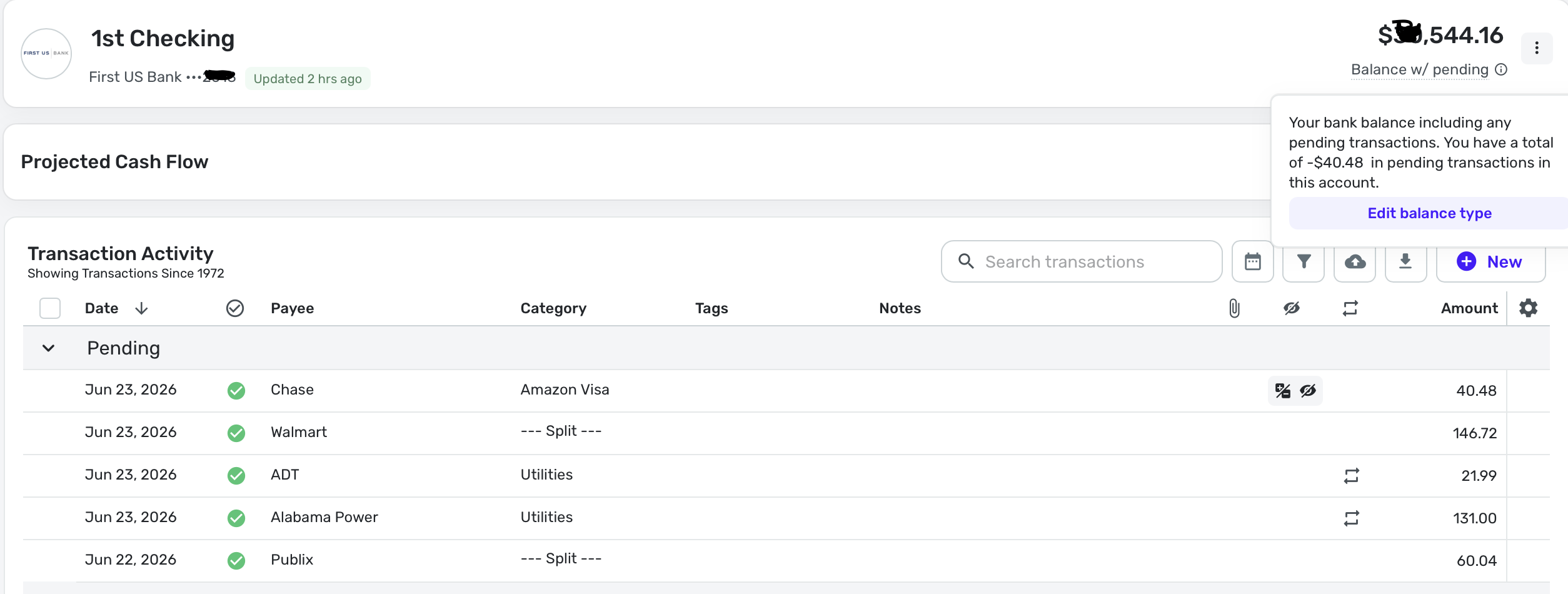
In addition, Simplifi correctly subtracted a manual pending transaction of $40.48 to show my balance as $544.16. That one should arrive at the bank later today when the bill pay is executed.
So, does this mean that my bank will report both the Cleared and Available Balances to Simplifi? And Simplifi uses the one it needs according to the option?
The reason I speculate is because last year (as I've reported before), this bank suddenly started downloading the Available Balance instead of the cleared balance, and threw off Simplifi. I changed it then and it worked, but I also told the bank's online support man about it and he said he would fix it. In a few weeks, it went back to working correctly with the default. Now I wonder if my local bank just allows for both?
Of course, we users should stick with the default as long as it works.
Steve
Quicken Simplifi (Safari & iOS) Since 2021
Quicken Classic (MacOS) Since 2009
Dollars & $ense (DOS) and MS Money (Windows) 1987-20090 -
I don't really understand how (if?) the results changed when you changed options. Some questions:
- Were the number, amount, and type (bank or manual) of pending transactions the same before and after the change?
- After the change, did you wait until the next refresh occurred to check the results?
- Was the balance the same or different before and after the change/refresh? If different, how?
I doubt that QS can select which type of balance to download from the bank. If they could, there wouldn't be much reason for them to ask us for that information.
DryHeat
-Quicken Classic (1990-2020), CountAbout (2021-2024), Simplifi (2025-…)0 -
Were the number, amount, and type (bank or manual) of pending transactions the same before and after the change?
Yes.
After the change, did you wait until the next refresh occurred to check the results?
Yes
Was the balance the same or different before and after the change/refresh? If different, how?
Different Downloaded Balances; Same running balance although derived differently.
The downloaded balance was $944.39 (Still is in Quicken Classic) before the change and $584.64 after the change/refresh.
QS then subtracted my $40.48 manual pending transaction to get the running balance of $544.16, which is exactly what Quicken Classic shows for this account as well. So all the math is correct.
I doubt that QS can select which type of balance to download from the bank. If they could, there wouldn't be much reason for them to ask us for that information.I'm at a loss to understand it, which is why I think it is something about my local checking account as explained above.
Anyhow, the two options seem to work because before in Option 1, I had pending transactions totaling $400.23 and after Option 2, I have just the one pending payment to Chase for $40.48. That is correct.
Steve
Quicken Simplifi (Safari & iOS) Since 2021
Quicken Classic (MacOS) Since 2009
Dollars & $ense (DOS) and MS Money (Windows) 1987-20090 -
The downloaded balance was $944.39 (Still is in Quicken Classic) before the change and $584.64 after the change/refresh.
You say that the downloaded balance was different. Where exactly in QS are you seeing the amount of the downloaded balance?
Also, you responded that pending transactions were the same before and after the change, but also say:
before in Option 1, I had pending transactions totaling $400.23 and after Option 2, I have just the one pending payment to Chase for $40.48
That makes it look like the pending transactions were not the same before and after.
DryHeat
-Quicken Classic (1990-2020), CountAbout (2021-2024), Simplifi (2025-…)0 -
@DryHeat The 5 pending transactions were the same in QS, BUT
after changing to option 2, QS will only subtract the un-downloaded transaction, which is $40.48. That's because it now downloads the available balance and not the cleared balance.
This afternoon when I go back to Option 1, it will download the cleared balance and subtract all 5 pending transactions of $400.23.
I mean that is the difference between Option 1, which downloads the cleared balance and Option 2, which downloads the available balance.
What is odd here is that somehow QS is picking up the cleared balance with Option 1 and picking up the Available Balance with Option 2 whereas I would have thought a bank would offer one or the other. Somehow my bank is able to do both.
That wasn't the case for you, right? When you switched to Option 2, it didn't subtract your pending transactions and it threw off your running balance. This was the behavior I was expecting.
Steve
Quicken Simplifi (Safari & iOS) Since 2021
Quicken Classic (MacOS) Since 2009
Dollars & $ense (DOS) and MS Money (Windows) 1987-20090 -
You say that thedownloaded balancewas different. Where exactly in QS are you seeing the amount of thedownloaded balance?You go to the Settings in the Account Bar and change from Bank Balance with Pending to Bank Balance. The latter is what is downloaded.
Of course, you can always just add the pending back to the balance. So my downloaded balance with Option 2 is $584.64. It was $944.39 with Option 1.
Steve
Quicken Simplifi (Safari & iOS) Since 2021
Quicken Classic (MacOS) Since 2009
Dollars & $ense (DOS) and MS Money (Windows) 1987-20090 -
We see this differently.
In your earlier post, you specified the amount of the downloaded balance (which was different for each option). I asked where you got that, because I don't think QS shows the actual downloaded balance anywhere. My guess is that you are calculating the different "downloaded balances" based on how you think the system works.
That's important, because my guess is that QS downloads the same balance no matter what option you choose.
Here's what I think actually happens:
- QS downloads the same balance from the back, regardless of your option choice.
- (if using Option 1) QS subtracts (or adds) the transactions that are pending at the bank, because the bank did not take them into account before providing the balance to QS
- (if using Option 2) QS does not change the downloaded balance, because the bank has already handled those pending transactions before providing the balance to QS
- QS then subtracts (or adds) any manually entered pending transactions.
I think the main problems are with the interface. QS incorrectly describes what the options do, does not always correctly show which option is in force, and gives a confusing total for pending transactions that does not always match the pending transactions in the transaction activity list.
I'm pretty sure QS is going to do some interface work on this, so I am going to hold off on any more testing or theorizing until they get that cleaned up.
DryHeat
-Quicken Classic (1990-2020), CountAbout (2021-2024), Simplifi (2025-…)0 -
So @DryHeat What you think is that the option you choose downloads the same balance but calculates it differently based on the downloaded pending transactions. That is interesting, but if that is true, why do we need to wait until the next download to update it. Why couldn't we just hit a switch and Simplifi change its calculation method?
I do know that last year when things changed for me on this local account, it was downloading a different balance. My bank site even went from showing the Cleared Balance to the Available Balance. I was able to fix it by either 1) clearing my downloaded pending transactions or 2) switching to Option 2.
Observations:
- This change is a definite improvement to the interface since we now can see what Option we are using.
- Simplifi ought to make it clearer that the Bank Balance or Balance w/pending that is displayed in the transaction register is merely what is set in the Accounts Bar.
- The nomenclature is the major problem. I don't know the solution but I am taking to saying Cleared Balance, Available and Running Balance just to keep things straight in my mind.
I agree that we've done as much as we can unless someone else wants to try. @EL1234?
I already switched back to the default on my account and right on cue, it went back to $400.23 in pending transactions instead of $40.48 and the download balance is back to $944.39. So I've done my bit.
Steve
Quicken Simplifi (Safari & iOS) Since 2021
Quicken Classic (MacOS) Since 2009
Dollars & $ense (DOS) and MS Money (Windows) 1987-20090 -
I think I may have been misunderstanding something you wrote. You have been referring to the "downloaded balance" and I have taken that to mean the balance that the bank sends down. But looking back at your numbers and images, I think you may have been referring to this balance instead:
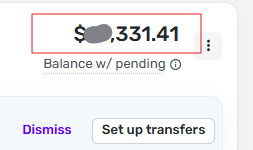
Is that what you meant by downloaded balance?
I have been using downloaded balance to mean the number the bank sends down to QS when QS downloads your info from the bank. (Which QS then adjusts to get the account balance shown in the account header bar, in this case $XX,331.41.)
Nomenclature, eh?
DryHeat
-Quicken Classic (1990-2020), CountAbout (2021-2024), Simplifi (2025-…)0 -
@DryHeat No, I think we both mean the balance that the bank sends down before the pending transactions are added (subtracted). With Option 1, this balance doesn't include any pending transactions and with Option 2, it includes any pending transactions that are on the bank's site.
As usual, my head is starting to swim. LOL.
Let's see how the programmer's change the verbiage in the next iteration.
Steve
Quicken Simplifi (Safari & iOS) Since 2021
Quicken Classic (MacOS) Since 2009
Dollars & $ense (DOS) and MS Money (Windows) 1987-20090

