Reviewed Flag is being reset

Ruonline
Ruonline Member
edited December 11 in Troubleshooting

I am relatively new user to Quicken Simplifi and I have experience a number of issues. The most current one is the Review flag being reset to Not Reviewed. I did see where there was a previous issue with marking pending transactions to Reviewed. Is this still an issue? Does the Reviewed setting currently work consistently? Thank you

Tagged:

Comments

  • SRC54
    SRC54 Superuser ✭✭✭✭✭

    I haven't seen this. There was a problem a while back with this happening, but it was fixed.

    There was also a change this summer so that all transactions stay unreviewed until the user marks them. Before then, downloaded matched transactions would automatically be marked reviewed. Now to be reviewed, a user must mark it himself.

    My guess is that your reviewed mark is not being saved for some reason. I would try a different browser or clear the cache in the browser that you are using. I am assuming this problem is in a browser. Or are you using the Android or iOS app?

    Just some ideas for you. Hope it is helpful.

    Steve
    Quicken Simplifi (Safari & iOS) Since 2021
    Quicken Classic (MacOS) Since 2009
    MS Money (1991-2009) and Dollars & Sense (1987-1991)

  • EL1234
    EL1234 Member ✭✭✭✭

    I only mark transactions as Reviewed once they clear, for this reason. Years ago I had this issue. I don't know for sure if it's fixed. I also have noticed here and there that sometimes pending transactions lose their "notes" once cleared, but I wonder if it's getting cleared out, or if the pending transaction disappears from the bank and then a new one gets posted and downloaded to Simplifi.

    A similar example: I ordered 2 items and got 1 pending transaction. Once the items shipped (one at a time), I got 2 transactions that cleared and the original pending one disappeared. (I noticed because I had put notes in it.)

    So maybe that's what happened here?

  • SRC54
    SRC54 Superuser ✭✭✭✭✭

    @EL1234 Yep, that can happen if your bank downloads the transaction and it doesn't merge with the one you already have; then the new transaction will be marked unreviewed.

    My checking account is with a local bank that downloads pending transactions. I usually let them download, then split them and then mark them reviewed. The next day when the pending transaction downloads again with that day's date, it will sometimes not merge (and the merge function doesn't usually work) so I delete the duplicate and stick with my already edited and reviewed version.

    The 3rd day when it downloads the cleared transaction, it almost always merges even though it has a different date. Go figure.

    I have asked the local bank why they bother to change the date of the pending transaction and download it again, but they just look at me. LOL. For example, this rarely happens with my connected credit cards because it is one and done just downloading the pending once.

    Most of my accounts do not download pending transactions at all. And a good thing to remember is that you can just delete them and wait for the cleared transaction. To me it's not worth the bother. I just delete the duplicates. OTOH, if one has lots of transactions, this can be troublesome.

    Steve
    Quicken Simplifi (Safari & iOS) Since 2021
    Quicken Classic (MacOS) Since 2009
    MS Money (1991-2009) and Dollars & Sense (1987-1991)

  • EL1234
    EL1234 Member ✭✭✭✭

    re "I have asked the local bank why they bother to change the date of the pending transaction and download it again, but they just look at me. "

    I'm pretty sure this is a Simplifi issue, not a bank issue. About the date changing when the transaction clears.

  • SRC54
    SRC54 Superuser ✭✭✭✭✭
    edited December 11

    @EL1234 Oh no, the bank changes the date (or the clearing house that handles the VISA debit card charges) and it updates on the second day and then Simplifi redownloads it as a new transaction. Simplifi's problem is not recognizing it as the same transaction. But to be fair, why change the date. I did the charge on day 1, it downloads with that date; then the bank updates it on day 2 with that date and Simplifi redownloads it. It clears on day 3 with day 2's date.

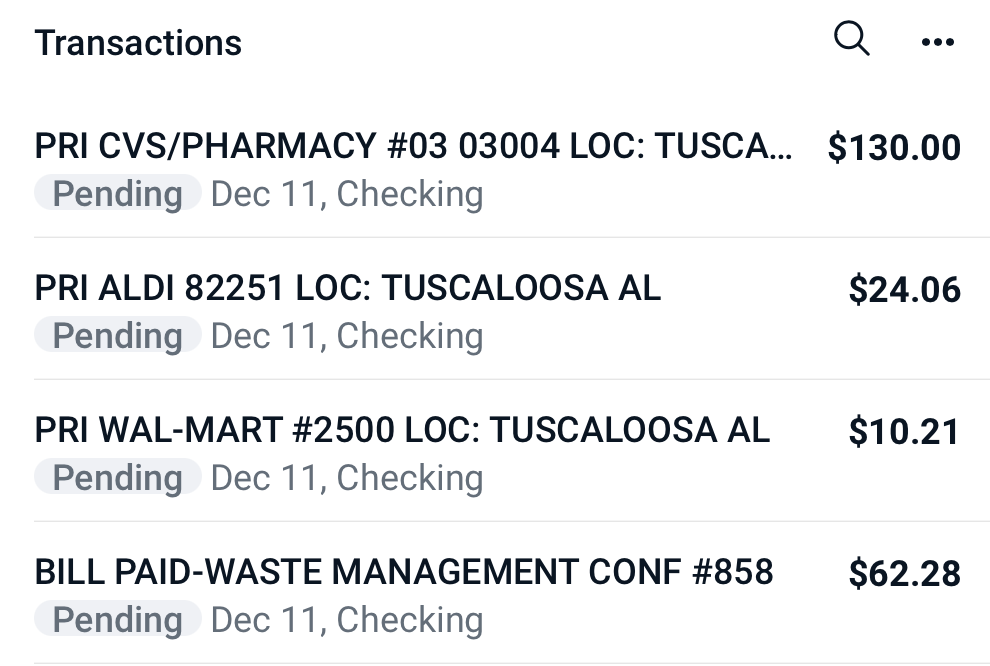
    Here is the latest from my bank's site:

    Screenshot 2025-12-11 at 5.08.32 PM.png

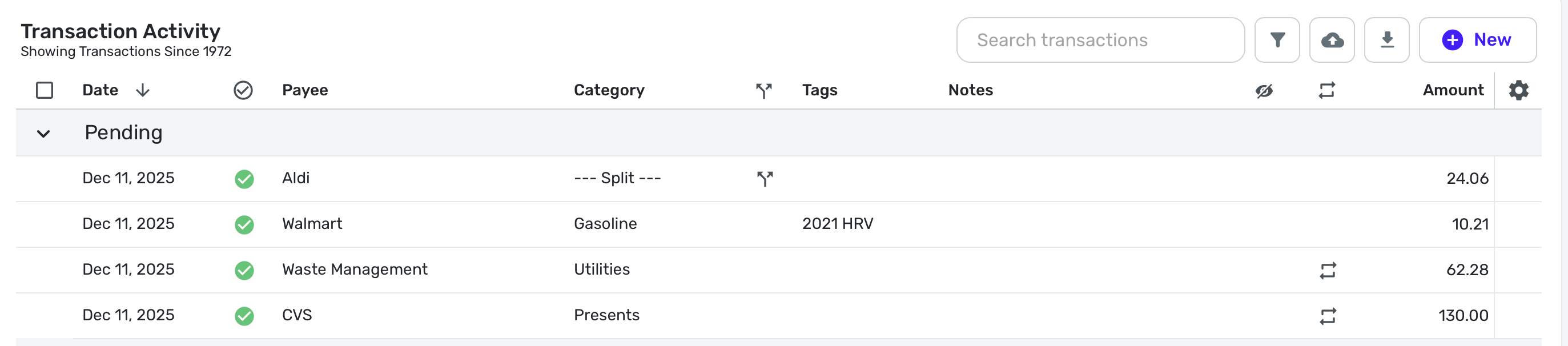
    The CVS Charge was yesterday, Dec 10; it downloaded yesterday and I reviewed it and set the category.

    Here is how it looks presently in Simplifi. These are all downloaded transactions:

    Screenshot 2025-12-11 at 5.12.49 PM.png

    In a bit, I will download it. We'll see what happens. It varies. Sometimes it matches; sometimes it downloads as a separate transaction. I'll let you know what happens.

    My other banks don't download pending at all. 3 of my credit cards download pending transactions, but they never change them. They either clear in a couple of days or go away.

    Steve
    Quicken Simplifi (Safari & iOS) Since 2021
    Quicken Classic (MacOS) Since 2009
    MS Money (1991-2009) and Dollars & Sense (1987-1991)

  • SRC54
    SRC54 Superuser ✭✭✭✭✭

    So @EL1234 here's the result of my latest download:

    Screenshot 2025-12-11 at 7.20.07 PM.png

    Notice that as predicted, CVS redownloaded unreviewed with new date of Dec 11 and with default category of Sundries.

    This time I was able to merge it with the previously downloaded and corrected category:

    Screenshot 2025-12-11 at 7.21.20 PM.png

    Notice the date stays Dec 11. When it clears tomorrow and most likely matches as the date will stay the 11th, I will change the date back to the 10th.

    This is my life. I live to serve Simplifi and to correct its errors. LOL

    Steve
    Quicken Simplifi (Safari & iOS) Since 2021
    Quicken Classic (MacOS) Since 2009
    MS Money (1991-2009) and Dollars & Sense (1987-1991)

  • SRC54
    SRC54 Superuser ✭✭✭✭✭
    edited December 12

    @Ruonline Any update. If EL1234 is correct, you should end up with duplicates, but I don't think this is the case. If it is, just delete the duplicates. I doubt that Simplifi is actually marking the reviewed transactions as unreviewed. But if it is, let us know.

    Steve
    Quicken Simplifi (Safari & iOS) Since 2021
    Quicken Classic (MacOS) Since 2009
    MS Money (1991-2009) and Dollars & Sense (1987-1991)

  • EL1234
    EL1234 Member ✭✭✭✭

    I've seen pending transactions disappear by themselves from Simplifi, without my having to delete them manually.

  • EL1234
    EL1234 Member ✭✭✭✭

    See this thread for a whole conversation about the date thing: https://community.simplifimoney.com/discussion/1788/display-transactions-by-transaction-date-rather-than-posted-date-edited

  • SRC54
    SRC54 Superuser ✭✭✭✭✭

    I have too, but never in my checking account. Maybe in a credit card once. There seems to be a time limit. I think in that case, it came back a day or two later when it cleared.

    It may be that I don't wait long enough. I like to have everything right so when I know it's wrong, I fix it.

    Steve
    Quicken Simplifi (Safari & iOS) Since 2021
    Quicken Classic (MacOS) Since 2009
    MS Money (1991-2009) and Dollars & Sense (1987-1991)

  • SRC54
    SRC54 Superuser ✭✭✭✭✭

    An oldie but goodie. We both participated in that conversation. I would support this; maybe it would help Simplifi with the matching. Who knows?

    Steve
    Quicken Simplifi (Safari & iOS) Since 2021
    Quicken Classic (MacOS) Since 2009
    MS Money (1991-2009) and Dollars & Sense (1987-1991)

  • SRC54
    SRC54 Superuser ✭✭✭✭✭

    I like to mark it reviewed so I know I reviewed it and have made any necessary changes. The unreviewed ones are then newly downloaded transactions so I can find problems.

    I know some others use the review flag for different purposes and I understand why. But to be honest the OCD in me just wouldn't let me leave a reviewed transaction marked unreviewed. It gives me the heebie-jeebies.

    Steve
    Quicken Simplifi (Safari & iOS) Since 2021
    Quicken Classic (MacOS) Since 2009
    MS Money (1991-2009) and Dollars & Sense (1987-1991)

  • EL1234
    EL1234 Member ✭✭✭✭

    I do the same thing, but I minimize the Pending section first and don't look at them (unless I have a specific reason to) until they clear. Since pending transactions can change (sometimes the amount changes, for example), the OCD in me would worry that my Reviewed transactions could change which is why I wait until their information is more reliable. Sometimes pending transactions just disappear too.

    It does get a little bit annoying though that they are counted in spending plan. It could throw things off a little. So sometimes I'll categorize the pending transactions properly if I notice that in spending plan, but I still won't mark them as reviewed until they clear.