When splitting transactions, it would be nice to be able to add notes about that split, just like you can in non-split transactions. Adding "Tags" is nice, but I find "Notes" more useful than "Tags".
I see that this ability is planned! Great! If we could get recurring transactions with splits and automatic entry next, that would be great. 😀
I have the same need
Need a separate note for each split.
Coming from Quicken Classic I love Simplifi. Missing split critical features and that’s the split notes as well as having split reminders. I’ll take the split notes first because I have tons of them I’d like to move over from Classic to remove some of my dependency. The reminders would be really nice as I split bills with others and it’s a set about every month for each. Thank you.
Steve, where do you see split transaction notes is planned?
Hello @Dave J,
To answer your question, the very first post has a yellow bar that shows the status.
The status showing for this Idea is Planned, and there is no option to add a vote because of that status.
I hope this helps!
@Coach Kristina,
This was marked "planned" nearly 1 year ago, and we still don't see it?
Once something is "planned" how long does it normally take? I would think if they marked "planned" then you'd see it within the next few months.
Trying to move from Quicken Classic and I see this one particular issue kind of holding me up from importing my transactions. I can just keep waiting, I guess.
Thanks for the prompt reply.
@Dave J I see that Kristina answered your question. Yes, it seems to take a while before things happen, but other times, it's rather quick. We shall see.
When splitting a transaction between multiple accounts, It would be good to have an additional details option, where you can add notes for the transaction for each split. Currently, the ability to add notes is only on the main transaction page. However, when splitting to multiple accounts, additional details may need to be supplied, almost making it like a journal entry. It's especially useful when reimbursing an individual for multiple things. We are a theater, so we already use the tags for productions, this is more of a little extra detail for the transaction.
check this thread and give it a vote
[removed link to merged thread]
Yes, please!
Currently you can add Tags to a line items in a Split transaction. It would be very helpful to also add Notes to an item in a Split tranaction to document unique details for that particular line item. Using Tags is helpful to provide another layer to categorization, but a Note is unique to that line item so you can document the specifics associated with the line item in a Split transaction.
In the UI for entering a Split transaction, the current Tag field is very wide so it appears you have the room to add a Notes field between the current Tag and Amount fields.
Thanks for the consideration!
Hello @TJSam,
Thank you for coming to the Community to provide your feedback! There is already an existing request for the functionality you're requesting. I merged your request with the existing request. It's currently in Planned status, which means that our teams intend to implement this feature in the future, but we do not have an ETA.
Thank you!
Regarding "Show Split Items" — you can now add Notes to splits in the new register.
The editing form for a split transaction does not provide a way to add notes to individual splits.
BUT… when you "Show Split Items" in the new register and make the Notes column visible, you can add notes to the individual splits directly in the register.
These "split notes" will not show up in the transaction editing form, which has its own Notes field for notes related to the entire transaction. But the "split notes" are saved with the transaction and will show up whenever you "Show Split Items" in the register.
(This is only for the new version of the register, which should be available to all users fairly soon.)
Interesting! I didn't notice that yet.
I did want to say that I notice that the splits now seem to stay together, which is a good fix.
I also like the fact that when you "Show Splits" you see the individual split notes:
But when you show the transactions without splits, you see the note for the whole transaction:
So all I miss at this point is having the split fields show in the Transaction Entry Box. Thanks for the good work.
I've started adding notes to the splits from the register view, which is a wonderful enhancement! There are still some improvements needed for a seamless experience.
1) We need the ability to add notes directly in the transaction edit/entry screen.
2) Notes from the splits and the transaction level need to concat so that regardless of whether the split view is on or off you are able to view (and filter on) notes from both levels. This would work much the same way as the tags on the splits do today. Currently either the split notes or the transaction note displays in the transaction register and the filter only works on the displayed notes.
3) Unless there was a change in the last couple of days, only transaction level notes are showing in reports and spending plan transaction lists, meaning you have to find the transactions in the full transaction register to see the split notes if you need those details.
4) The csv export needs to concat the notes as noted above. The export is currently displaying the notes the same way as the register and is only including the split note OR the transaction note depending on the split view selected. This means you are currently unable to do a single export that includes all of your notes.
I agree with all of the above except for #4, it may be cleaner to have two separate notes column in the export, one for the transaction and one for the splits. But either way they definitely need to be included in the export.
@Coach Kristina, when you stated that this idea of having notes for each split is Planned, I went back to the yellow bar, and it shows "In Review". I am assuming that it was shown as "Planned" because of the "Show splits" enhancement. As others have shared, this only works in the register view and has issues when exporting to CVS for reports. Do we need to add a new request to clarify these issues?
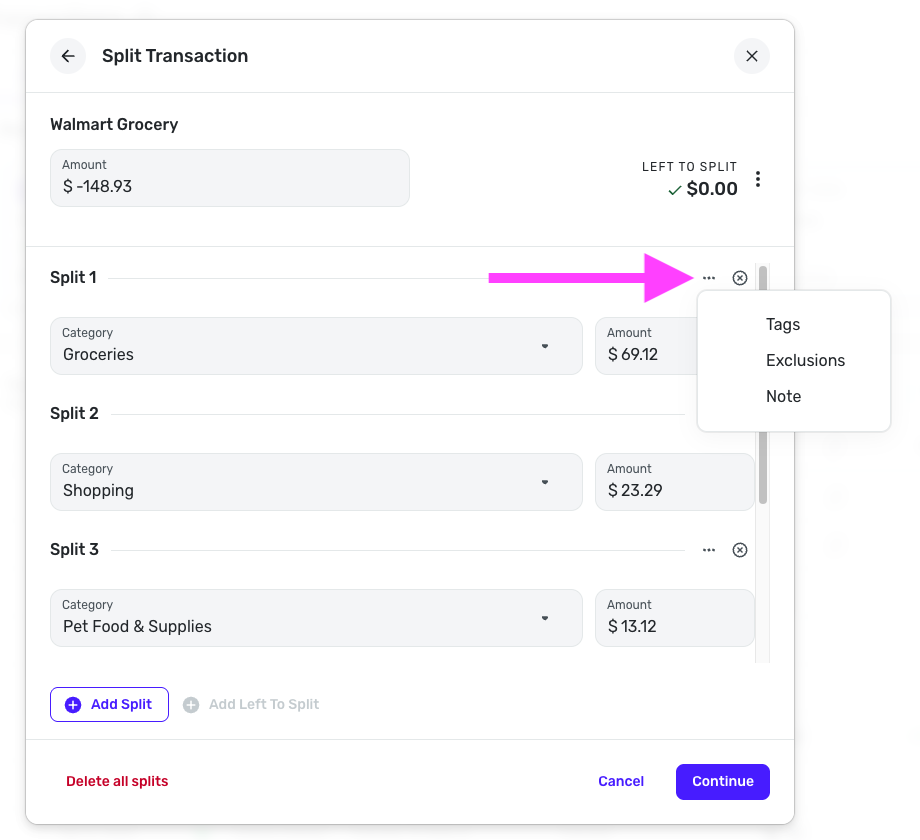
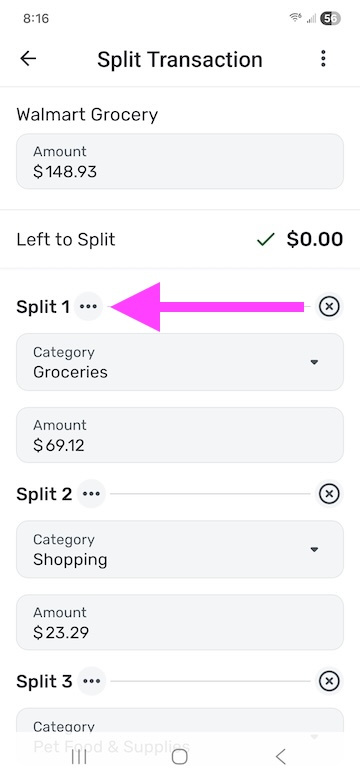
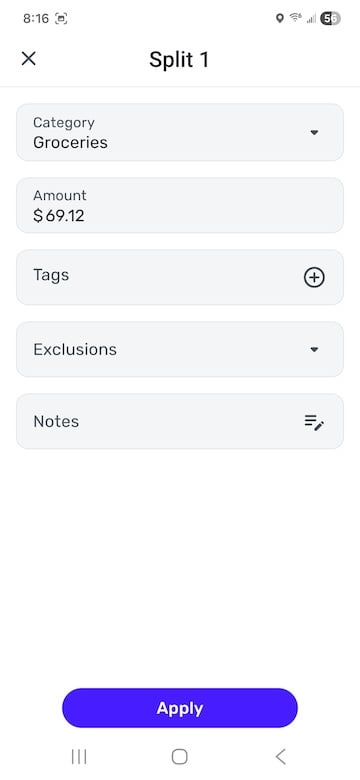
Great news! You can now apply notes at the split level in Quicken Simplifi. To do so, click the three dots at the top of the split line (available for each line) —
If you are using QBP, you can also apply usage settings at the split level!
Individual notes and exclusions are very nice! Thanks.
You guys just made a lot of people really happy! LOL
Yeah, I could nitpick about having to find the complications of finding where to enter the info instead of just making the transaction entry dialog box bigger to add more fields, but I can live with this just fine.
I agree completely! This is a huge add! I do wish the options just always displayed, or could by user option. At least on web, there’s plenty of real estate to make the dialog box bigger and save me a lot of clicks long term. Either way, I’m really excited about this enhancement!
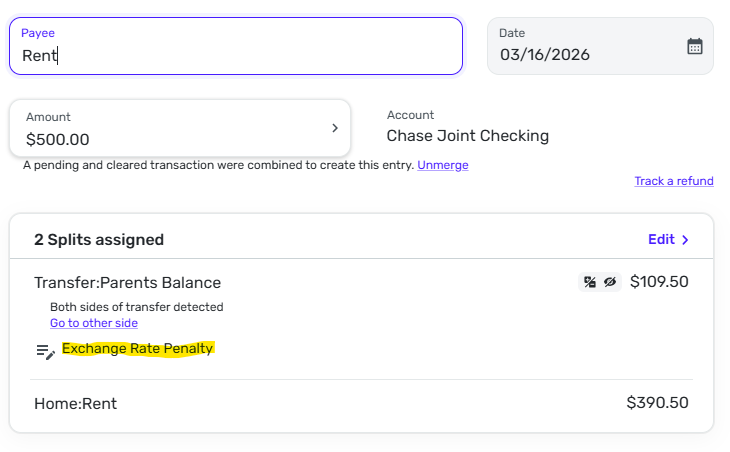
Hi @Coach Natalie there seems to be an issue with adding notes in a split view when one of the splits is a transfer. The moment you add the note in the original transaction and it creates a new transaction in the transfer, the note doesnt show up on the other end of the transaction (which makes it pointless to add a note in transfers). Original Transaction: (SPLIT)
Notes added to Split in original transaction:
Exclusions work, but notes are not added to the destination transaction as shown.
You will want to post our dedicated feedback thread for the splits enhancements:
Thanks!