Maryland 529 Accounts Not Syncing Due to Unsupported New Aggregator Authentication (FDP-103)

Frazzle Dazzle
Frazzle Dazzle Member

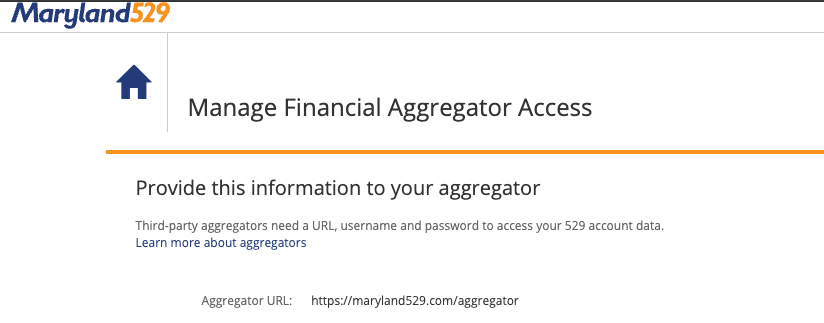
Maryland 529 has implemented a new aggregator-specific authentication process for third-party financial apps. They now require aggregators (such as Simplifi) to authenticate via a dedicated aggregator endpoint:
Screenshot 2026-01-04 at 9.57.53 AM.png

https://maryland529.com/aggregator

Because this new authentication process is not currently supported or reflected in Simplifi, Maryland 529 accounts are unable to sync properly. As a result:

  • No current account values are displayed
  • No transactions are visible
  • Resetting the connection and re-entering credentials does not resolve the issue

This is not a user credential problem and not fixable via standard troubleshooting, as the institution’s authentication flow has changed and requires an update on Simplifi’s side to support the new aggregator connection method.

Expected Resolution:

  • Update Simplifi’s Maryland 529 integration to support the new aggregator authentication process
  • Restore visibility of balances and transactions once authentication is completed successfully

Additional Notes:

Maryland 529 has explicitly confirmed that aggregators must use the new process. Until Simplifi updates its integration, affected users will continue to have broken account connections.

Tagged:

Comments

  • Coach Kristina
    Coach Kristina Moderator admin

    Hello @Frazzle Dazzle,

    Thank you for sharing this information! To help troubleshoot, just in case the aggregation isn't the issue, I checked our internal tools, and can see you have been getting a FDP-103 error. Is that what you see on your end also when attempting to connect or update your account? Was the account previously connected and working?

    If you are seeing the FDP-103 on your end also, I recommend following the troubleshooting steps below:

    • Enable the “Show Password” option to confirm no typographical errors.
      • If you're using a password manager, manually type the password, just in case the one saved is outdated.
    • Since multiple failed login attempts can cause your account to become locked on the financial institution's end, please verify that you can successfully login to your account directly through the financial institution's website.
    • Update your credentials – Try temporarily updating your password at the bank's website, and then try again to connect in Quicken Simplifi. We recommend NOT using the following special characters: & < > / \.

    I look forward to your response!

    -Coach Kristina

  • I am not locked out. The credentials are correct. I have updated my password at the bank website. This is a continuing issue that has happened previously and other members of the community have brought it up.

  • To follow up, Simplifi continues to attempt to authenticate to a DIFFERENT url that it is attempting to authenticate with which is NOT the aggregator URL that is identified above in my initial outreach. This is a change that the Maryland 529 team did. The URL is different.

  • Coach Jon
    Coach Jon Moderator admin

    Hello @Frazzle Dazzle,

    Thanks for reaching out! I am sorry to hear about your recent trouble connecting to your Maryland 529 account in Quicken Simplifi. I would check to see if the following steps to enable aggregator access work for you:

    1. Log in to your 529 account.
    2. Select Profile & Documents.
    3. Select Password and Security Features.
    4. Select Manager Financial Aggregator Access.
    5. Enable Quicken for access and then try to connect again in Quicken Simplifi.

    Let us know!

    -Coach Jon

    -Coach Jon

  • Jon,


    The step 5 that you have outlined does not exist as an option in the “manage financial aggregator acccess” section.

  • Coach Jon
    Coach Jon Moderator admin

    Hello @Frazzle Dazzle,

    Thank you for letting us know! In that case, could you please provide the following information so that we can work on escalating this issue?

    • The name of the account(s), as it appears in Quicken Simplifi.
    • The name of the account(s), as it appears on the bank's website.
    • Have there been any recent changes made to the bank's website or its sign-in process?
    • What is the exact URL you use to log in to your account on the bank's website?
    • What type of account(s) are you attempting to connect in Quicken Simplifi?
    • A screenshot of the Accounts Summary page from the bank's website that has a wide enough scope to show the full page URL. This is the landing page after signing in, and typically lists all accounts and balances. You will want to take this from a web browser and not a mobile browser, as well as redact any private info such as account numbers.
    • The format of your password (DO NOT provide your actual password!). For example, "Quicken123$" would be coded as "Xxxxxxx###$", where a capital "X" indicates a capital letter, a lowercase "x" indicates a lowercase letter, and a "#" indicates numbers; the actual special characters used will need to be provided.

    We will also need logs to be sent:

    1. Log in to the Quicken Simplifi Web App.
    2. Select Profile from the left-hand navigation bar.
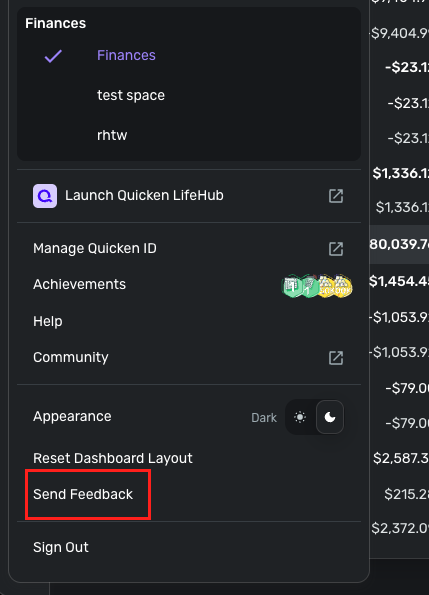
    3. With the Profile menu open, hold down the Option key for Mac or the Alt key for Windows, and then click Send Feedback.
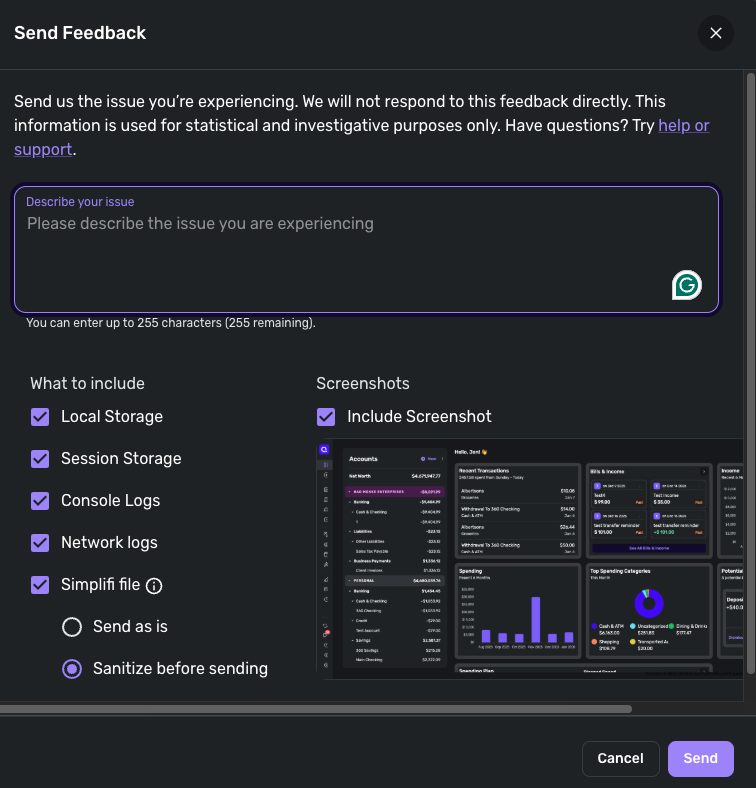
    4. Leave all boxes checked, add a brief description of the issue, and then click Send.

    -Coach Jon

  • Frazzle Dazzle
    Frazzle Dazzle Member
    edited January 7

    Jon,

    Click send on what? The tool for the logs? As to everything else before the logs are mentioned, how do I send that?

  • Coach Jon
    Coach Jon Moderator admin

    Hello @Frazzle Dazzle,

    I apologize for the confusion. To send logs, you will need to follow the steps I provided previously:

    1. Log in to the Quicken Simplifi Web App.
    2. Select Profile from the left-hand navigation bar.
    3. With the Profile menu open, hold down the Option key for Mac or the Alt key for Windows, and then click Send Feedback.
    4. Leave all boxes checked, add a brief description of the issue, and then click Send.
    image.png image.png

    I hope this helps clear up any confusion!

    -Coach Jon

  • Frazzle Dazzle
    Frazzle Dazzle Member

    Jon —

    I’m going to be direct: asking customers to post authenticated screenshots, full post-login URLs, account names, and especially password-character patterns (including which special characters are used) in a public forum thread is objectively bad security practice. Even with “redact private info,” it encourages oversharing and creates unnecessary risk.

    I’m willing to help escalate, but I will not post:

    • account names (Simplifi or Maryland529),
    • any screenshot from an authenticated session (Accounts Summary, landing pages, etc.),
    • any post-login URL from an authenticated session,
    • or password format details beyond very high-level characteristics.

    What I can confirm publicly:

    • I see FDP-103.
    • This account previously worked in Simplifi.
    • Credentials are correct; I can sign in directly to Maryland529; I am not locked out.
    • Password reset + “reset connection” did not fix it.
    • Maryland529 has moved to an aggregator-specific authentication flow (maryland529.com/aggregator), and Simplifi appears to be authenticating against a different flow/URL.

    I will send logs now via Profile → (Option/Alt) → Send Feedback as you instructed.

    If you want the additional details you listed, provide a private escalation path (support ticket / secure upload / moderator DM). I’ll share what’s needed there with appropriate redactions.

  • Coach Jon
    Coach Jon Moderator admin
    edited 5:03PM

    Hello @Frazzle Dazzle,

    Thank you for the reply. You are always free to DM me any information directly if that is your preference! We will need the information I requested previously in order to escalate this issue. I appreciate your understanding.

    Alternatively, if you prefer a private support experience in general, you can reach out to our Chat/Phone Support Team for a private interaction: https://support.simplifi.quicken.com/en/articles/5077917-how-to-contact-support#h_fb87dc291f

    -Coach Jon

    -Coach Jon