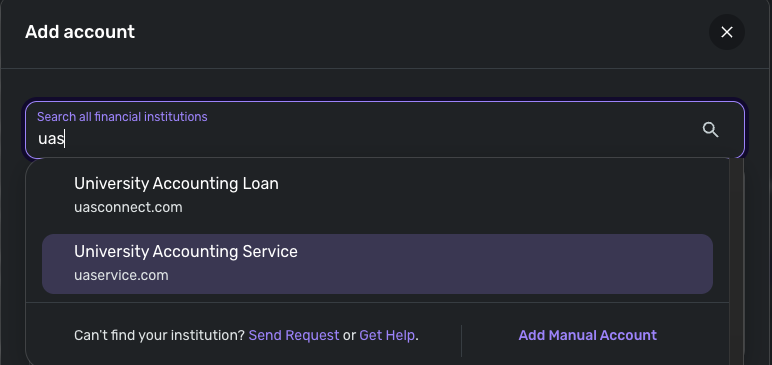
UAS Connect Account connecting but showing $0 balance
Hi,
I have a student loan through RISLA. They use UAS Connect for the loan amount information. The account is showing up as fine in Simplifi but the balance is $0, which is incorrect. Has anyone else had problems with RISLA or UAS Connect? Or have a solution?
Thanks!
Comments
-
Hello @mscemcee,
Thank you for reaching out! Did you just add this account, or is this a new issue with an existing account in Quicken Simplifi? Are you able to see if the following steps work to resolve the issue you are seeing with the account balance?
- Make all of the accounts with the bank manual by following the steps here.
- Once you see the account(s) listed in the Manual Accounts section under Settings > Accounts, go back through the Add Account flow to reconnect to the bank.
- If the connection is successful, carefully link the account(s) found to your existing Quicken Simplifi account(s) by following the steps here.
Let us know!
-Coach Jon
0 -
Hi this is a new account I added about a month ago that has always shown a $0 balance. I have tried the steps above multiple times and it connects but still shows a $0 balance. I have never received any error codes.
0 -
Hello @mscemcee,
Thank you for the reply. Please supply the following information so we can look at getting this issue escalated. Feel free to send this information via DM to me if you prefer:
- The name of the account in question, as it appears in Quicken Simplifi.
- The name of the account in question, as it appears on the bank's website.
- A fresh screenshot of the balance for the account in Quicken Simplifi.
- A screenshot of the balance displayed on the bank's website for comparison.
- A screenshot of the Accounts Summary page from the bank's website that has a wide enough scope to show the full page URL. This is the landing page after signing in, and typically lists all accounts and balances. You will want to take this from a web browser and not a mobile browser, as well as redact any private info such as account numbers.
We will also need logs to be sent:
- Log in to the Quicken Simplifi Web App.
- Select Profile from the left-hand navigation bar.
- With the Profile menu open, hold down the Option key for Mac or the Alt key for Windows, and then click Send Feedback.
- Leave all boxes checked, add a brief description of the issue, and then click Send.
-Coach Jon
0 -
Hi Jon,
Thanks. I've dm'd you and sent a log. Please let me know if there's anything else I need to do.
Thanks,
Ciara
0 -
Hello @mscemcee,
Thank you for the information! It looks like the only thing we are missing is the screenshot of the Accounts Summary page from the bank's website. Remember that this is the landing page directly after signing in, and typically lists all accounts and balances. You will want to take this from a web browser and not a mobile browser, as well as redact any private info such as account numbers.
Let us know when you can send that over!
-Coach Jon
0 -
Hi Jon,
The screenshot I sent is the account summary page. There is only one account. Please provide more instructions if you are looking for something different than what I've sent you.
0 -
Hello @mscemcee,
Thank you for the screenshot! After further research, I discovered that there is another instance of UAS Connect within Quicken Simplifi. I know you are using the 'University Accounting Loan' instance right now, but could you try the 'University Accounting Service' instance to see if that successfully brings the balance?
Let us know how that goes!
-Coach Jon
0 -
Hi,
It connects without errors but also shows up as $0.
0