Transactions "Exclude from Reports" Stuck on or off

dollardave
dollardave Member
edited January 13 in General Troubleshooting

I cannot toggle the option to exclude a transaction from reports or spending plan. I'm less concerned about the spending plan and more concerned about the reports, since I need my Schedule E to be accurate and it's currently missing MANY transactions. It doesn't seem to matter what I do, the Exclude from Reports is either stuck on (which is bad for many transactions) or stuck off. If I click to uncheck Reports, it removes the check, but then immediately adds it back not a second latter. It doesn't matter if I'm in the quick transaction button, or the full edit transaction window.
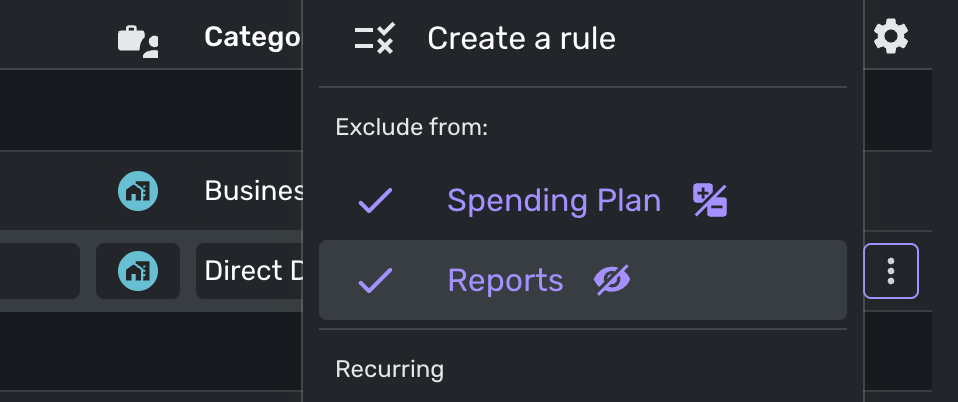
Screenshot 2026-01-10 at 12.58.13 PM.png

I've tried changing the account types, and nothing seems to make a difference. The only category of accounts that I'm able to toggle reports on/off is under my Personal Credit accounts. I'm not able to perform this function under any of my business, or personal cash & checking accounts. Very frustrating.

Comments

  • SRC54
    SRC54 Superuser ✭✭✭✭✭

    Is this on the phone app or the web app? Have you tried it in both places?

    If this is a phone app, I would reboot the phone and/or remove the app and reinstall.

    Is the account an investment account? If so, you'll have to change type to payment/deposit.

    These are off the top of my head? Give us more information if you can.

    Steve
    Quicken Simplifi (Safari & iOS) Since 2021
    Quicken Classic (MacOS) Since 2009
    MS Money (1991-2009) and Dollars & Sense (1987-1991)

  • Thanks Steve. I had the brokerage account selected as a checking account (because that's what I treat it as). I switched it to a brokerage account and now I'm able to change to Payment/Deposit which allowed unchecking the "Exclude from Reports".

    When editing multiple transactions, why can't we modify the "Type" so that I can mass change the transactions to "Payment/Deposit" or even create a rule to also change the "Type"?

  • SRC54
    SRC54 Superuser ✭✭✭✭✭

    Yep, it works better as a brokerage account, but with drawbacks. You cannot link transactions to a recurring and you cannot split transactions. We really need those.

    And you are right, we cannot edit mulitple transactions to change them to payment/deposits. We need that too.

    Steve
    Quicken Simplifi (Safari & iOS) Since 2021
    Quicken Classic (MacOS) Since 2009
    MS Money (1991-2009) and Dollars & Sense (1987-1991)

Leave a Comment

Rich Text Editor. To edit a paragraph's style, hit tab to get to the paragraph menu. From there you will be able to pick one style. Nothing defaults to paragraph. An inline formatting menu will show up when you select text. Hit tab to get into that menu. Some elements, such as rich link embeds, images, loading indicators, and error messages may get inserted into the editor. You may navigate to these using the arrow keys inside of the editor and delete them with the delete or backspace key.