Help setting up new categories and subcategories (edited)

jmhull67
jmhull67 Member
edited January 12 in Categories and Tags

I can't figure out how to set up new categories and subcategories. I am new to this program

Tagged:

Best Answers

  • sbennet1
    sbennet1 Member ✭✭
    Answer ✓

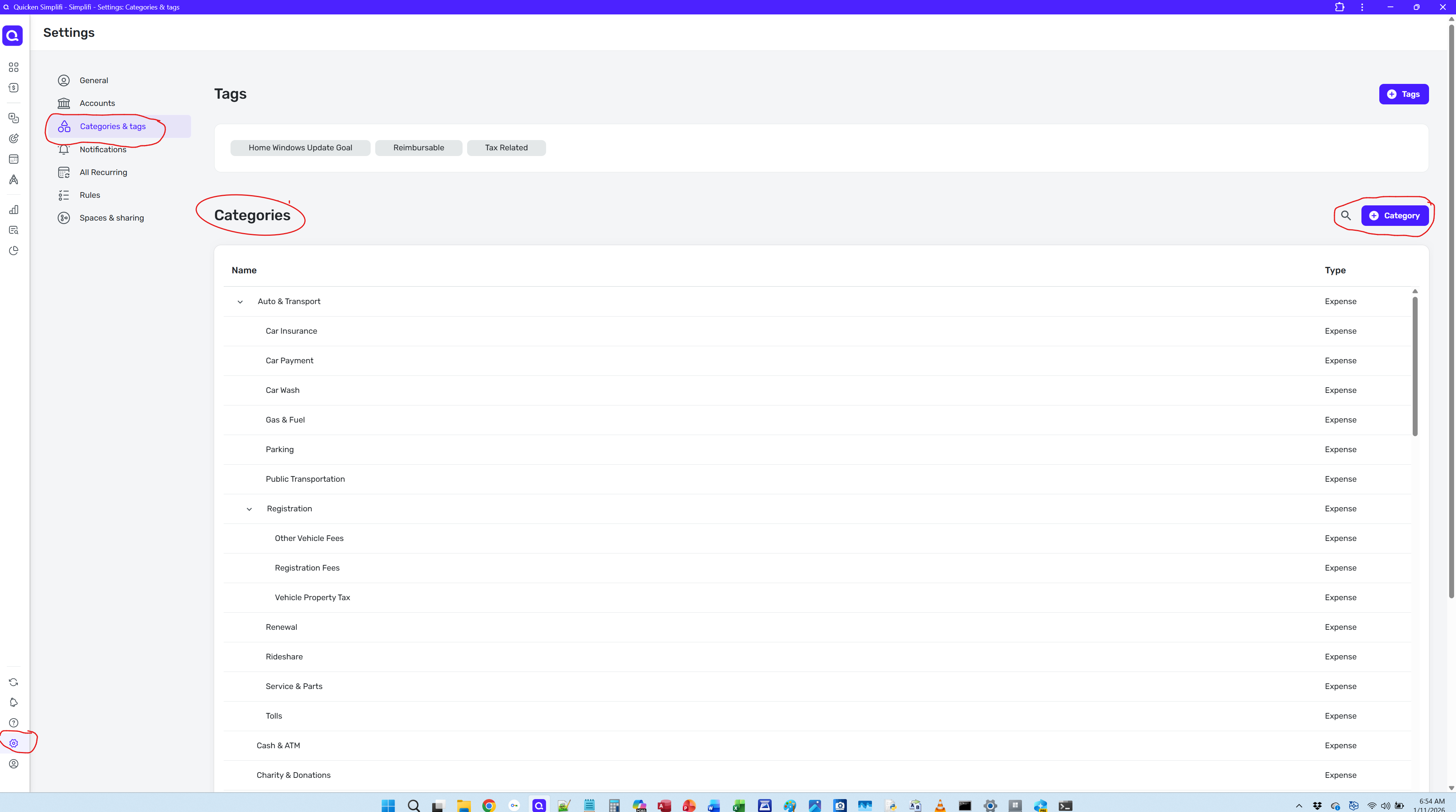
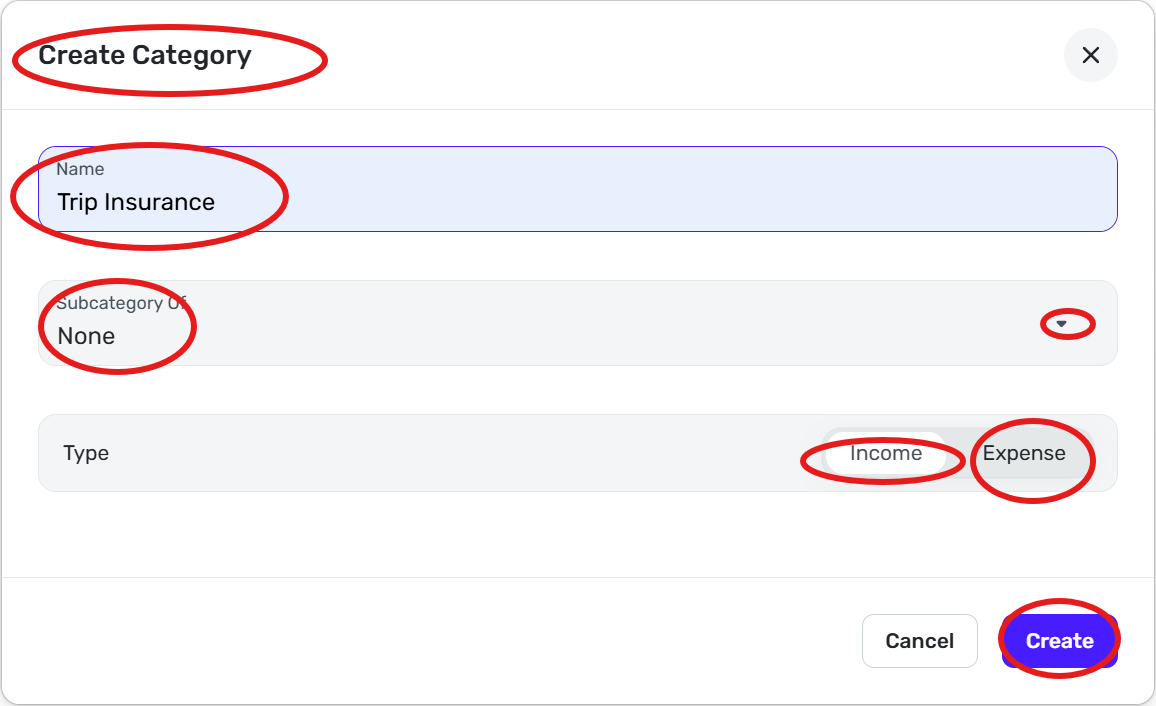
    WEB Version Go to settings (Bottom left) —> Categories & Tags —> + Category

    image.png

    image.png

    Or just start typing in category field and click on create button for main category or pick a sub category

    Steve B

    Ex Fortran, Cobol, Basic, MS Access and VBA (Visual Basic for Applications programer

    Been using Simplifi since Dec 2026.


  • Coach Kristina
    Coach Kristina Moderator admin
    Answer ✓

    Hello @jmhull67,

    Thank you for reaching out! In addition to the information @sbennet1 provided for adding new categories in the Web version, here is the information our article provides on how to add categories in the Mobile version:

    1. Tap the Menu icon (three lines in the upper left).
    2. Select Settings and then Categories.
    3. Tap the plus (+) button in the upper right.
    4. Enter the name of your new category.
      1. If this is a main category:
        1. Select Income or Expense.
        2. Select Personal or Business.
        3. To add tax reporting:
          1. Tap Tax Info and toggle Tax Related on.
          2. Select the applicable tax form and tax line items from the menus.
          3. Press Update.
      2. If this is a subcategory of an existing category:
        1. Click the "Subcategory Of" menu.
        2. Select the primary Category or Subcategory.
    5. Click Create when done.

    22.gif?expires=1768158900&signature=3933605fcbd7e9e6590c06e0e8fe1bc14ed1392664ef28f978fed454f84283d4&req=dSQmEcx%2FlIFeUPMW1HO4zco3kd%2FD7NRnC1%2BMxPkI2IqJEYsLm%2BVqe%2FekGjmO%0Abn46TyLdWL4NTOk2KeQ%3D%0A

    Creating Categories and Subcategories from a Transaction

    1. Create or open an existing transaction.
    2. Select the Category field and then type the name of the category or subcategory you'd like to create.
    3. Tap Create in the menu that appears.
      1. If this is a main category:
        1. Select Income or Expense
        2. Select Personal or Business.
        3. To add tax reporting:
          1. Click Tax Info and toggle Tax Related on.
          2. Select the applicable tax form and tax line items from the menus.
          3. Click Update.
      2. If this is a subcategory of an existing category:
        1. Click the "Subcategory Of" menu.
        2. Select the primary Category or Subcategory.
    4. Tap Create when done.
    33.gif?expires=1768158900&signature=fd07dda23da7425f91da16c7070ae2754351d2ecfed68b017071b9e2e2acb00e&req=dSQmEcx8nYRaXPMW1HO4zSRr1zBLPTUGmQzhsTo82mACnXVv5sCt9ayJ3abB%0A%2F6d5CUEVZmdxf230mSg%3D%0A

    For more information on managing categories, please review these articles: https://support.simplifi.quicken.com/en/articles/4712014-managing-categories-and-subcategories-on-the-mobile-app#h_710ca2edcd

    https://support.simplifi.quicken.com/en/articles/4378958-managing-categories-and-subcategories#h_40fd563b84

    I hope this helps!

    -Coach Kristina

Answers

  • sbennet1
    sbennet1 Member ✭✭

    Thanks @Coach Kristina, I did not know Simplifi had such good documentation. I have not looked at the documentation yet. I will take a look at some things that I have questions on in the future.

    Thanks for the mention.

    Steve B

    Ex Fortran, Cobol, Basic, MS Access and VBA (Visual Basic for Applications programer

    Been using Simplifi since Dec 2026.