Missing workflow
Subject: Critical Missing Workflow: Simplifi Needs a True Reviewed/Not Reviewed System
Message: I’m writing as a long‑time Quicken Classic user who is on a 30 day trial to move to Simplifi expecting a modern interface with the same core reliability. Instead, Simplifi is missing one of the most essential features for accurate financial management: a true Reviewed/Not Reviewed workflow.
Right now, Simplifi provides bold text, blue dots, tags, flags, and a manual Reviewed checkbox — but none of these elements work together to reliably identify which transactions are new, which need attention, and which have been reviewed. This forces users into complicated workarounds that Classic never required.
This is not a niche request. Anyone who reconciles accounts, manages shared finances, or maintains audit‑ready records depends on a clear review system. Classic handled this perfectly. Simplifi does not.
The current design creates real problems:
- New transactions are indistinguishable from old ones
- The Reviewed checkbox is manual and disconnected from Simplifi’s “new transaction” logic
- Tags and flags require constant maintenance
- Users cannot reliably filter for “items I haven’t reviewed yet”
- The workflow breaks down if a user misses a day or two
This is a core functionality gap — not a preference issue.
Please prioritize implementing a true Reviewed/Not Reviewed system modeled after Classic:
- New transactions automatically marked “Not Reviewed”
- A single click to mark them “Reviewed”
- A reliable filter to show only unreviewed items
- No dependence on tags, flags, or workarounds
This change would dramatically improve Simplifi for serious users and eliminate one of the biggest barriers preventing Classic users from fully adopting Simplifi. It’s a small feature with an outsized impact on accuracy, trust, and long‑term retention.
Thank you for considering this. Simplifi has enormous potential, but this missing workflow is holding it back for the people who rely on precision.
Without this change I will likely not choose Simplifi and beyond that will end up looking for a different program to use.
Big miss!
Comments
-
I'm not sure I understand exactly what you are asking to change.
You describe your desired system like this:
- New transactions automatically marked “Not Reviewed”
- A single click to mark them “Reviewed”
- A reliable filter to show only unreviewed items
- No dependence on tags, flags, or workarounds
My Transaction Activity lists work like this:
- there is a column where a green circle/checkmark denotes "reviewed" status
- new transactions automatically come in as "not reviewed"
- a single click marks a transaction as "reviewed"
- there is a filter to show only "reviewed" or only "not reviewed" transactions
What is it that is missing or not working correctly? (Serious question… I use the reviewed column in a very simple way and I'm sure there could be problems with it that I'm not aware of.)
DryHeat
-Quicken Classic (1990-2020), CountAbout (2021-2024), Simplifi (2025-…)0 -
Thank you for the response. I signed on tonight, after discussing this with others, with the intent to cancel, but I'll hold off on that for now.
1-Even though I have the reviewed column flagged in settings (gear box), the column doesn't show up unless I hover over the transaction. Is there a way for it to always be displayed?
2-What you explained, I believe, does provide what I am looking for. Please let me know if the column can be displayed though.
Thanks
0 -
1-Even though I have the reviewed column flagged in settings (gear box), the column doesn't show up unless I hover over the transaction. Is there a way for it to always be displayed?
To help, I first have to understand what you mean by "the column doesn't show up."
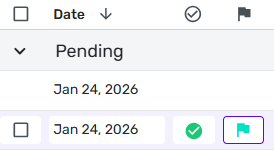
On my Transaction Activity lists, the Reviewed column is displayed and you can see the symbol in the header row (see image below), but the column itself is empty unless the transaction is marked as reviewed (see the first transaction in the image). But if the transaction is marked Reviewed, the checkmark symbol appears whether you hover or not. (If it's not Reviewed, hovering reveals a "ghost image" of the "reviewed" checkmark to indicate where to click if you want to mark the transaction.)
So… when you say the column doesn't show up, do you mean (1) it works the way mine works, as described above, or (2) actual "reviewed" checkmarks you have placed on transactions don't appear unless you hover?
If it is number (1), then I think what you are saying is that you want a symbol of some kind to appear in the column to indicate that the transaction is "Not Reviewed," rather than the column just being blank. Is that right?
If it's number (2), of course, then something is seriously malfunctioning.
DryHeat
-Quicken Classic (1990-2020), CountAbout (2021-2024), Simplifi (2025-…)0 -
If you don't see the Reviewed column in the transactions list, you may need to add it by clicking the Gear icon at the top right of the transactions list. (That's how you get to it in the new register, I don't remember exactly how to get to it from the old register.)
I filter by transactions = Not Reviewed on a very regular basis and categorize and review them.
(I do wish that I could see the column in spending plan - that's one place where it's missing.)
0 -
@EL1234 — "you may need to add it by clicking the Gear icon"
I think @ruthanneclarkjcp's problem is something else, as in her post she said, "Even though I have the reviewed column flagged in settings (gear box)…." But we'll see.
BTW, you can add the Reviewed column to Spending Plan, but like all other column changes it doesn't stick. Supposedly that is going to change … but it can't happen too soon for me.
DryHeat
-Quicken Classic (1990-2020), CountAbout (2021-2024), Simplifi (2025-…)0 -
Right! (The ability to add it in spending plan is new, but the fact that it doesn't stick makes it almost useless…)
1 -
BTW I agree that the "New Transactions" card isn't so useful - what I'd prefer is an "Unreviewed Transactions" card but I would want the option to tell it to ignore pending transactions, as I wait to review them until they have cleared.
0 -
You are correct that once a transaction has been reviewed the check mark in the green circle does show up even without hovering over the transaction and the non reviewed are just blank. However, on mine there is nothing in the header row of the reviewed/not reviewed column. I can probably live without the header as eventually there will be enough check boxes to know the column.
I would say I agree with this statement from EL1234 as well: ""New Transactions" card isn't so useful - what I'd prefer is an "Unreviewed Transactions" card but I would want the option to tell it to ignore pending transactions, as I wait to review them until they have cleared."
0 -
Have you tried out the new register? I think it's still available only in Early Access, which you can toggle on in your account settings (click the gear icon in the bottom left area of the screen, and it's listed on the General page). In the new register, the reviewed column's header is an empty checkbox, so it's much easier to find.
0 -
@EL1234 is correct about the new register. I am on "Early Access" and the image I posted is from my account. I was unaware that the regular register did not have a label icon in the header. I can see how that would be a problem.
But, as you say, now that you know it is there you can get along without the header — at least until you are switched over to the new register (which I think should happen soon … as soon is defined by Simplifi). Other than that, it sounds like Simplifi meets your description of the Review system you want. I hope it works for you.
DryHeat
-Quicken Classic (1990-2020), CountAbout (2021-2024), Simplifi (2025-…)0 -
Thank you
0