Ability to set a default custom income amount in the Spending Plan (edited)
I'd like to have a way to have a default manual income in the Spending Plan. I like to manage my expenses to a custom budget and not just off of the particular income for that month. I'd like to be able to set this default for future months and not have to re-enter it every month. I'd like to be able to set this amount based on a time period so if one year I want a certain income as my spending basis but maybe another year I can budget around more or less income.
Comments
-
Spending Plan is designed to compare your real income to your real expenditures, so doing what you propose won't be easy. But if you want to use a fixed number for income I think there might be a way to do it.
Assuming, for example, that you wanted a fixed income of $9000 per month, here's what you could try:
- Mark all of your actual income transactions as excluded from the Spending Plan. That should leave your income, for Spending Plan purposes, at zero.
- Create a fictious manual account — perhaps call in "Fixed Income" — and set up a monthly recurring Income transaction in that account for $9000. That will cause your Spending Plan income to be $9000 for every month in the future.
- Create another monthly recurring expense transaction in that account for $9000 but mark it to be excluded from the Spending Plan. That won't affect your spending plan but will cause the balance in the "Fixed Income" account to remain at zero.
- Every month, enter two $9000 transactions — one income and one expense — to match the recurring ones and link them. That will cause them to be marked as "Recieved" and "Paid" in Spending Plan.
I know that seems complicated. But you are trying to do something that Spending Plan isn't designed to do, so you have to make some effort to work around it. I'm not sure this will work, but it seems like it would.
DryHeat
-Quicken Classic (1990-2020), CountAbout (2021-2024), Simplifi (2025-…)0 -
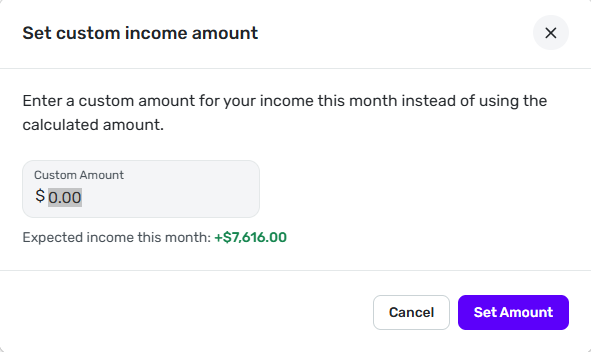
When looking at the Income section of spending plan, you can click the 3 vertical dots at the top and click Set custom amount to use a custom income amount instead of the actual income based on transactions and reminders.
0 -
Yes, but it doesn't carry forward to the next month. I had done this a few years ago and set a default income but now I want to change it. If I change it for one month it reverts to the amount I set a few years ago for the next month. Seems they broke something from a feature in the past.
0 -
Interesting! I wonder what changed.
0 -
Are you sure you are editing the series and not the month? If necessary, delete the series and recreate it.
Steve
Quicken Simplifi (Safari & iOS) Since 2021
Quicken Classic (MacOS) Since 2009
MS Money (1991-2009) and Dollars & Sense (1987-1991)0 -
Good question but where do I delete the series? I've looked and can't find where to do this.
0 -
I don't think there is a series. If you look at the "Set custom income amount" form it says it's for "this month."
You could go through the future months and set it for each of them individually, one at a time. I don't want to try it because I'm not sure how to reverse it. But if you want an income that appears automatically for future months (which I thought was your goal) the recurring series I described earlier is the only way I know to do it.
DryHeat
-Quicken Classic (1990-2020), CountAbout (2021-2024), Simplifi (2025-…)0 -
Well, if you don't want to set a custom amount every month, then I would do a series and then you can update it as you like. I use several for income that I get in Investments as I cannot mark recurring. Once those come in, I dismiss the monthly one and the series remains for the next month.
I would just create a new series by going to Spending Plan, clicking + and adding an amount monthly. It doesn't really matter what account you put it in. Say Cash. But as Dryheat says, you will then have to tell the Spending Plan to ignore all your other income or it will add to it.
The easiest thing to do though is to add a Custom amount for the month as that will override your income transactions. Of course, you have to do it every month, but when you close out a month, you can just add the custom amount for the next month.
You just have to do what works best for you. Good luck.
Edit: I just had a thought; You might want to Edit your Idea Request to allow for a monthly Custom Amount that carries over to next month, like a series of custom income amounts. That might get more votes.
Steve
Quicken Simplifi (Safari & iOS) Since 2021
Quicken Classic (MacOS) Since 2009
MS Money (1991-2009) and Dollars & Sense (1987-1991)0 -
What I might do in this situation is create a reminder for the first of the month, with a $0 amount, and set the payee to be "reminder to set custom income amount". Then when the reminder hits (or if you see it gets overdue), set the custom income amount and then dismiss the reminder. It's basically like a recurring "todo item".
0