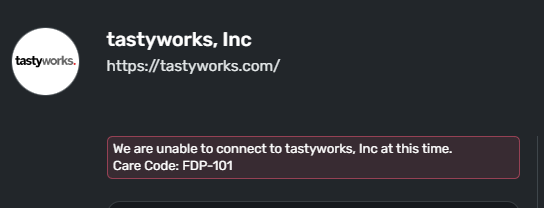
What happened to Tastytrade/Tastyworks connectivity? It was working until a few weeks ago and can no longer connect my account.
Has support been lost for this institution?
Hello @RomanBones,
Thanks for reaching out! On our end, I can see you are encountering an FDP-101 error when trying to connect to Tastyworks in Quicken Simplifi. I would verify if the following steps work to resolve the issue:
Let us know how this goes!
I have already done one better .. I've removed the account completely and trying to re-create/connect. No luck. Still receiving the FDP-101 error.
I'm able to successfully connect with Empower so it's not TastyTrade.
And with BoA connection being down also, that's two accounts I'm unable to connect through Simplifi so it's becoming much less useful to me.
Im also encountered this issue and cant get it to fix, pretty annoying.
Thank you for your replies,
Hello @slpeeler,
When did you first notice this issue? Have you followed the troubleshooting @Coach Jon posted earlier in this discussion?
Make all of the accounts with the bank manual by following the steps here.Once you see the account(s) listed in the Manual Accounts section under Settings > Accounts, go back through the Add Account flow to reconnect to the bank.If the connection is successful, carefully link the account(s) found to your existing Quicken Simplifi account(s) by following the steps here.
Make all of the accounts with the bank manual by following the steps here.
Once you see the account(s) listed in the Manual Accounts section under Settings > Accounts, go back through the Add Account flow to reconnect to the bank.
If the connection is successful, carefully link the account(s) found to your existing Quicken Simplifi account(s) by following the steps here.
@RomanBones,
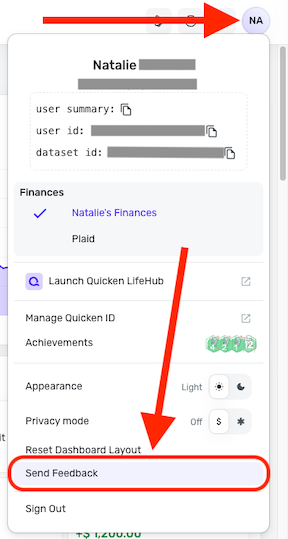
To help further investigate the issue, please provide a screenshot of the error message you are seeing (make sure to redact any personal information). Please also send logs. To do that, please follow these steps:
Thank you!
Hi Kristina,
Here is the error
Logs sent at 1017pm on 3/2/26
Thank you for the reply and for providing that information! Can you also supply a screenshot of the Accounts Summary page from the bank's website that has a wide enough scope to show the full page URL? This is the landing page after signing in, and typically lists all accounts and balances. You will want to take this from a web browser and not a mobile browser, as well as redact any private info such as account numbers.
You may feel free to DM this to me if you prefer!
Coach Jon, I DM'd you the screenshot requested.
Thanks for the additional information! I reported this to our service provider and will follow up here with any updates going forward.
In the meantime, you can track the account manually by adding manual transactions, which will keep your records up-to-date. Here are the steps to do so: Managing Transactions in Quicken Simplifi | Quicken Simplifi Help Center
EWC - 12274258
I am back with an update from our service provider. They came back requesting a debug session with you to further troubleshoot this issue. Before we can request this session, we need a little information. Feel free to DM me this information:
Sent you DM with info requested.
Thank you! I did provide our team with this information, so be sure to be on the lookout for an email from our engineering team. Once they reach out, they will confirm a date and time for the session with you.
In the meantime, you can track the account manually. Here are the steps to add a manual account: https://support.simplifi.quicken.com/en/articles/4295304-adding-accounts-in-quicken-simplifi#h_933c74c4b4
And here are the steps for adding manual transactions: https://support.simplifi.quicken.com/en/articles/3348103-managing-transactions-in-quicken-simplifi#h_85ca9fed99
If the account is an investment account, you can add/edit the holdings to keep your records up-to-date: https://support.simplifi.quicken.com/en/articles/4474538-tracking-investments-in-quicken-simplifi
If the account is an investment account, you can also add Investment Transactions, if needed: https://support.simplifi.quicken.com/en/articles/6540220-managing-investment-transactions#h_103b01fa6f
CTP-16569
Hello,
I'm trying to add Tastytrade to my Simplifi account and I'm seeing the exact same issue: We are unable to connect to tastyworks, Inc at this time.
Care Code: FDP-101
Hello @AsyncC,
Thanks for reaching out and for letting us know! You can follow along here for updates as our team works on a resolution, since we have already escalated this issue. If we do need more information, we will be sure to let you know.
I am following up to let you know that our engineering team emailed you to schedule the debug session. Unfortunately, we did not hear back, so the ticket has now been closed. If you would like, we can reopen the ticket if the issue is still occurring, but you will need to respond to any emails from our engineering team.
Let us know how you would like to proceed!
Hello @Coach Jon, I can have a debug session with you. I work in software. Happy to help.
The debug session would not be with me, but with our engineering team. We can see about adding you to the ticket if you are experiencing the same issue. First, I would have you try the following steps to see if they work in resolving the issue for you:
If the issue continues, please let us know how long you have been experiencing this error and provide a screenshot of the Accounts Summary page from the bank's website that is wide enough to show the full page URL. This is the landing page after signing in, and typically lists all accounts and balances. You will want to take this from a web browser and not a mobile browser, as well as redact any private info such as account numbers.
You will also need to submit your logs via the 'Send Feedback' option:
Finally, we will need the following information:
Feel free to DM any of this information to me if you prefer!
@Coach Jon , TastyWorks (TastyTrade) is working for me now. I originally wasn't able to connect at all. Now I'm connected and can see my balance.