Security Service Federal Credit Union FDP-101 (edited)

I've noticed that there's been several institutions that have been popping the FDP-101 error code, but haven't seen anything regarding my bank, Security Service Federal Credit Union. Has there been any progress at all towards reestablishing connection, if at all?


Tagged:

Comments

  • Coach Jon
    Coach Jon Moderator admin

    Hello @Snowman2199,

    Thanks for reaching out! I am not aware of any known issues with this bank, but I can see the FDP-101 error you are receiving. I would see if the following steps work to resolve the issue:

    • Make all of the accounts with the bank manual by following the steps here.
    • Once you see the account(s) listed in the Manual Accounts section under Settings > Accounts, go back through the Add Account flow to reconnect to the bank.
    • If the connection is successful, carefully link the account(s) found to your existing Quicken Simplifi account(s) by following the steps here.

    Let us know how this goes!

    -Coach Jon

  • Hi, even after following the suggested fix, I still get this:

    We are unable to connect to Security Service FCU at this time.

    Care Code: FDP-101

    is there anything else I can do from my side to reconnect my bank?

  • Coach Jon
    Coach Jon Moderator admin
    edited March 5

    Hello @Snowman2199,

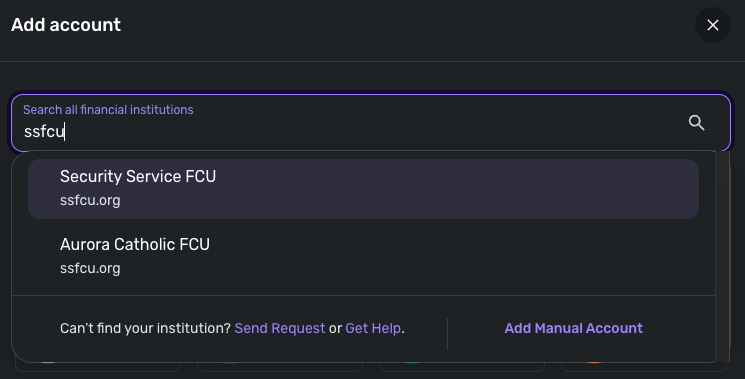
    Thanks for the update! We do have another instance within Quicken Simplifi that shares the same URL you could try connecting to.

    image.png

    If that still does not work, please supply the following information:

    • The name of the account(s), as it appears in Quicken Simplifi.
    • A screenshot of the Accounts Summary page from the bank's website that has a wide enough scope to show the full page URL. This is the landing page after signing in, and typically lists all accounts and balances. You will want to take this from a web browser and not a mobile browser, as well as redact any private info such as account numbers.

    We will also need logs to be sent:

    1. Log in to the Quicken Simplifi Web App.
    2. Select Profile from the left-hand navigation bar.
    3. With the Profile menu open, hold down the Option key for Mac or the Alt key for Windows, and then click Send Feedback.
    4. Leave all boxes checked, add a brief description of the issue, and then click Send.

    -Coach Jon

  • Greetings,

    sorry for the delayed response, but after attempting the suggested fix, the Aurora Catholic FCU option noted above wasn't there anymore and only my bank was there. I was able to get reconnected to all my accounts with no further issues. Don't quite know what was done on the back end, but I appreciate your time!