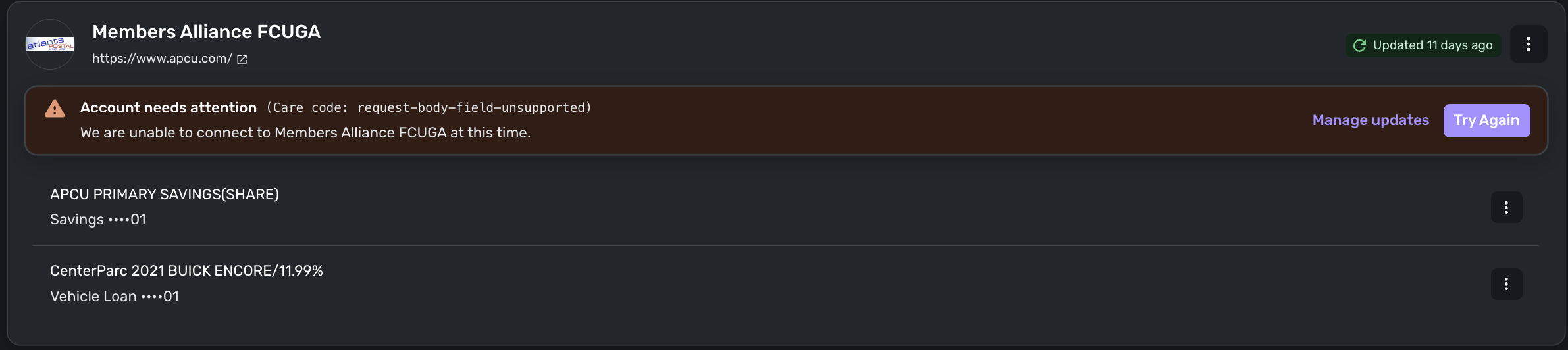
Members Alliance FCUGA (apcu.com) "We are unable to connect at this time" message - FDP-103 (edited)

RobWilk
RobWilk Superuser ✭✭✭✭✭
edited March 5 in Report a Bug

I just updated my APCU/CenterParc password after the site was recently updated, forcing a password reset.

Afterwards, this is all I know about it not connecting:

Screenshot 2026-03-05 at 9.23.18 AM.png

Rob Wilkens

Tagged:

Comments

  • Coach Jon
    Coach Jon Moderator admin

    Hello @RobWilk,

    Thanks for reaching out! On our end, I am seeing an FDP-103 error when trying to connect to Members Alliance FCUGA in Quicken Simplifi. I would have you first try the following steps to see if they work in resolving the issue:

    • Verify the bank selected is the correct instance – You may see several different instances of your bank; check to see if you’re using the correct one.
    • Verify that your login information is correct – Type your password/PIN into a text application to ensure you don’t have any typographical errors. Then, copy and paste your login information into Quicken Simplifi to ensure accuracy.
    • Verify your login at the bank’s website – Try to sign in to your bank’s website using the same login credentials to ensure you've not locked yourself out of the account and that the credentials are still valid.
    • Check for an app-specific password – Some banks require users to use a specific app password when connecting to a third party. Check with your bank to see if you need to use an app-specific password.
    • Update your credentials – Try temporarily updating your password at your bank's website and then try again to connect in Quicken Simplifi. We recommend NOT using the following special characters: & < > / \.

    If they still do not work, please try the following steps to see if making the account manual and re-linking it resolves the current issue:

    • Make all of the accounts with the bank manual by following the steps here.
    • Once you see the account(s) listed in the Manual Accounts section under Settings > Accounts, go back through the Add Account flow to reconnect to the bank.
    • If the connection is successful, carefully link the account(s) found to your existing Quicken Simplifi account(s) by following the steps here.

    If those steps still do not work in resolving the issue, then please supply the following information:

    • The name of the account(s), as it appears in Quicken Simplifi.
    • The name of the account(s), as it appears on the bank's website.
    • Have there been any recent changes made to the bank's website or its sign-in process?
    • What is the exact URL you use to log in to your account on the bank's website?
    • What type of account(s) are you attempting to connect in Quicken Simplifi?
    • A screenshot of the Accounts Summary page from the bank's website that has a wide enough scope to show the full page URL. This is the landing page after signing in, and typically lists all accounts and balances. You will want to take this from a web browser and not a mobile browser, as well as redact any private info such as account numbers.
    • The format of your password (DO NOT provide your actual password!). For example, "Quicken123$" would be coded as "Xxxxxxx###$", where a capital "X" indicates a capital letter, a lowercase "x" indicates a lowercase letter, and a "#" indicates numbers; the actual special characters used will need to be provided.

    Let us know how this goes!

    -Coach Jon

  • RobWilk
    RobWilk Superuser ✭✭✭✭✭

    Thanks @Coach Jon - after I sent that, I received an e-mail from the bank about scheduled downtime while they change their domain name from apcu.org to mycenterparc.org (or something like that) - I am going to guess for a short while that I should wait until the bank stabilizes their website. This is probably a transition issue for a financial institution.
    Rob Wilkens
