With the latest enhancements to reports, including the ability to save them, we want to hear what everyone thinks. Let us know by commenting below!
Here is the announcement with more info:
Super excited to try this out! Thanks team!!
This is great - thank you so much!
I like that the Net Worth report allows time frame YTD but would like a related metric on change $ and %. As is, all I can do is define the accounts to include (I include all) and the time range. But please include the delta in $ and %.
I like Taxes report for the details but it needs structure as it might list taxes paid (federal withholding) on one line and then interest earned on another line (which is taxable but no suggested tax is referenced). So this report is essentially a catch all for anything that could be tax related. I created 2 new reports and saved them with these names: Taxes - All Taxable Transactions YTD, Taxes - Federal Taxes Paid YTD. So it’s working for me with a little effort. Thanks.
My enthusiasm is somewhat tempered because while the Saved Reports will remember time frame and filters, it won't remember columns selected or what lines you collapse.
For the Tax Report, I don't need 14 pages of every transaction. We just need the bottom line for Income, Social Security, Dividends, Interest, Charitable Deductions.
So I ask the team to consider allowing us to save those options as well.
Edit: More comments and workarounds below.
Great to see this feature arrive. Great for QC users.
Can I access and save old reports while testing the new saved reports, for example under transactions I have a number of category filters already set up in my Spending and Income and Expense reports. I can access them by turning off early access. It would be helpful to keep EA turned on while testing saved reports.
OK, I have been playing with the feature, and it is working fairly well. Here are comments:
On the whole, this has been implemented nicely and I trust further enhancements and refinements will make it even better.
This is a really good start. What I would like to also see is the ability to save filtered transactions and save that as a report. I don't see the ability in reports to see transactions meeting a saved set of filters. You can save a report with totals for that criteria and drill into the details, which just adds another step.
@SRC54 re Charitable Deductions by Payee
I used the Tax Report, filtered on Charity and Donations. This gave me a year-to-date list of transactions by payee. I find the detail useful to make sure I haven't missed something.
I'd also like a condensed version, and second your request to be able to collapse lines and save.
I also agree about keeping the list of reports on the right instead of along the top.
@Steve M I think I've been able to do what you're looking for.
I wanted a saved report of transactions on my credit card statement, by category. I used the Spending Report with a specific date range, filtered on the credit card account. The report displays as a graph followed by a list of transactions. If I collapse the graph it "remembers" that next time so I see only the transactions.
I've been creating this report every month for a while now, and appreciate that I can now save it, although I'll have to change the report dates each month to match the statement.
@lindsayla18 Yes, the Taxes Report is great and if we can get reports to "remember" settings other than filters and dates, it would be even better.
I like the tax files (txf) but my program doesn't use it. I mainly use the tax report to double check things. I get end of the year statements, 1099s, etc. that I plug into the tax return.
Oh, I discovered today that I can get rid of my saved reports at the top by x-ing them out. They still stay in the list. That is neat, so you can just keep the most important ones up there. Very nice!!
A big help! In your spare time (😉), please provide a Cash Flow report, hopefully with a graph showing how soon I can afford a new, used car (or, how soon I'm going to run out of cash at the rate I'm spending).
Really great addition! I have a few feature requests:
I love this feature, I'm very pleased so far.
My only thing so far would be to rename “Home” to “Reports Home” or “Reports Dashboard”. The first couple times I clicked it, I wondered if it would take me back to the home dashboard.
The new saved reports feature is a really nice addition to Simplifi, and has been requested by a lot of people over the past few years. For those of you who decide to save reports, you should be careful of one major thing: if you create a report based on any filtering of categories, and then subsequently add a new category, that new category will not show up in the saved report when you next run it. You must re-filter the saved report to include the new category(ies) - which sort of defeats the purpose of a saved report, but I don't want to complain too much, since this is a good step in the right direction. Just be certain of what you're getting when you save and then re-run the reports.
@lwyman, your post has been merged with the official feedback thread for Saved Reports, which is currently in Early Access testing, so it can be reviewed by our product team.
Thanks for sharing your feedback!
I played around with it some more. Interestingly, when you save a report and then go back and edit it, it doesn't reset the "Save" button. When I closed one report (Profit & Loss), it prompted me to save my changes. When I closed the other report (Balance Sheet), it didn't. Either way, for both of them, the "Save" button should have been reactivated as soon as I made a change in the little gear icon for the reports; but it didn't. For both reports, I added alternate row coloring after having saved the report.
Coincidentally, this released at the perfect time! I was behind in doing my taxes and these saved reports showed up right when I needed them. Apparently, it pays to procrastinate!
@ChattMatt ,
It's not where you want it, but have you ever played with Simplifi > Side Menu > Bills & Income > Cash Flow ? Personally, I find the Projected Cash Flow tied to each account more useful, but this might get you closer to what you're looking for.
I'd also like for them to allow us to group all the individual rows in one summary row to see a better picture of how we're doing. This idea…
https://community.simplifimoney.com/discussion/5562/ability-to-see-all-selected-accounts-in-a-single-line-on-the-graph-in-bills-income-cash-flow?utm_source=community-search&utm_medium=organic-search&utm_term=bills+%26+Income+cash+flow
Maybe someday, I hope, they'll move this to Reports and when they do, I'd love for your account selections to be sticky.
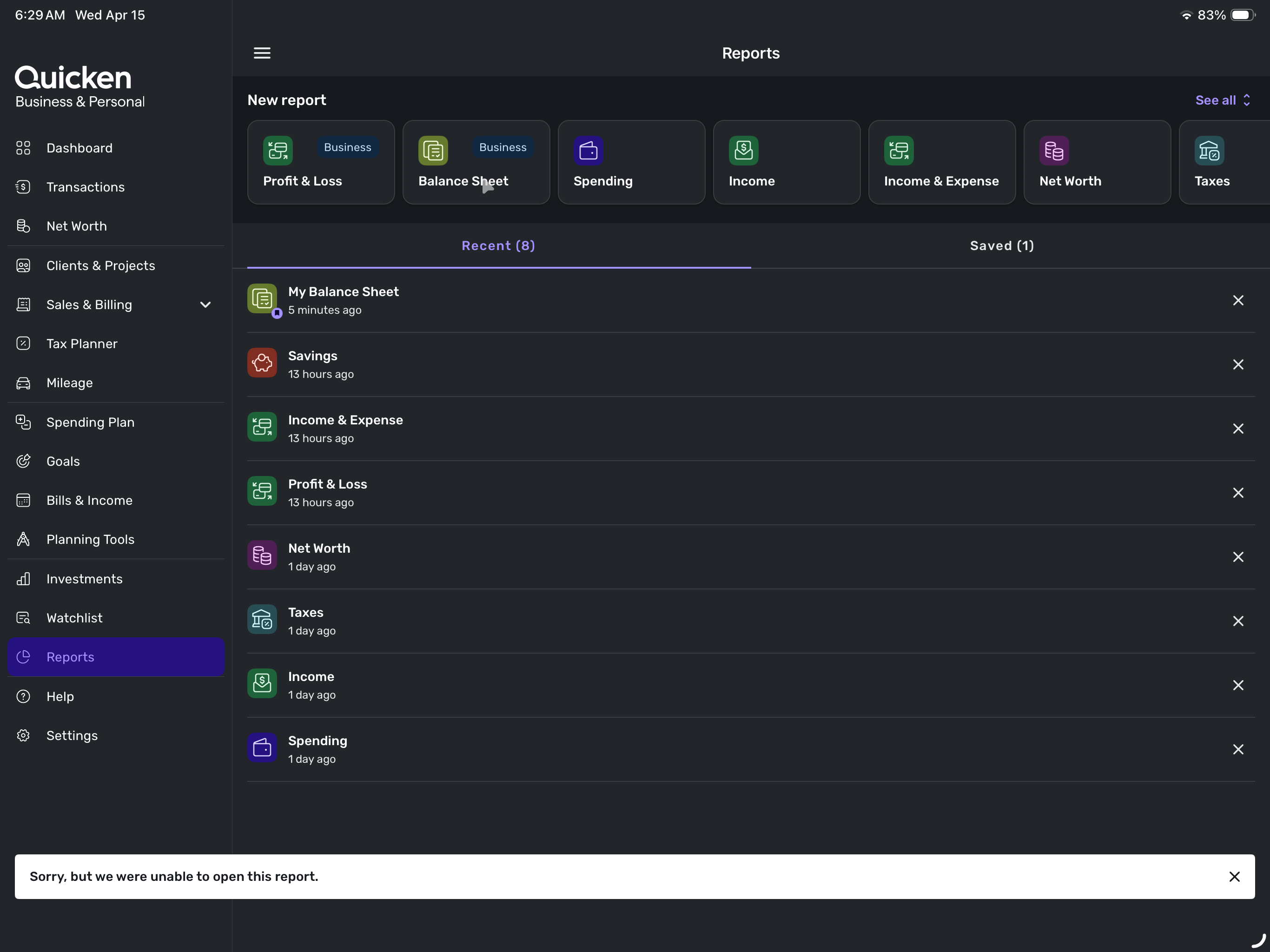
I love the new reporting features, but HELP! I cannot run Balance Sheet, it says “Sorry, but we were unable to open this report.”
Agree this is really useful. but even more useful (and surprising) is the way iPhone app displays Cash flow. It lists a table of actual values projected (its easier to read the exact values that way). so I'd request both graph and table of values alternate view
I've been trying several things to resolve the Balance Sheet report issue, here is a clumsy work around that I can use until resolved…
I logged on to the web and discovered I could run Balance Sheet from there, I saved it as My Balance Sheet. I go back to the IOS app and the saved My Balance Sheet works; however, clicking on the Balance Sheet button still gives unable to open report message.
Thanks for listening.
I was able to resolve this Balance Sheet report issue. I created a test dataset from scratch and switched to it. Balance Sheet ran fine under test dataset with all zero numbers. I then switched back to my real financial dataset and now Balance Sheet works. This appears to be the only way I was able to get past the “unable to open report” issue that was preventing it.
Thanks,
Randy
@Randolph Thanks for identifying the problem, we have a fix for this in our upcoming release. In the meantime for anyone impacted, logging out and logging back in should resolve the issue for you.
These reports are very insightful! Now if only there was a tab for investments that provides more in-depth reporting.
@Dan23 Check out this feature request:
It is an older request. You may want to create your own adding specifically what you would like to see.
I like the new reports and ability to save and return to favorite reports. For me, one much needed feature would be to have a 'today' option for the date range. I know that options like 'recent 12 months' will update based on today's date each time I pull up the report. But if I want to look at other date ranges like 1/1/2011 to today, I can set those dates but they will remain static and I will have to update the end of the date range to today's date each time I pull up the report. An option to set a dynamic 'today' in the date range would fix this. Thanks!
This is an issue when trying to view a report with 1 month or less (for example last 30 calendar days. I want to see what happened this time last month to help me forecast remaining spend coming up. (In QC I can do this using a saved report for last 30 days)
After changing the report date range the report will always reverts to 'by day' vs 'by month' as I had last saved it. The by month setting needs to saved too.
Example
Save a report with 'by month' selected
Change the date range custom for from just last 30 days.
Change the view to by month and save the report again
Change the date range again . It will always revert back to 'by day'.
Daily view is no at all helpful to report when looking at last 30 days or a months worth of transactions as it scrolls way off the screen. I saved it to display by month so why is that not saved? Alternatively make by month the default view when viewing a month of data
The reporting display preference "Show expenses as negative" selected by the user should be reflected in the export output: PDF, CSV (Nested), CSV (Flat), Print. As of now, expense values are always negative in the CSV files. The nested CSV export would be useful if it matched this reporting display user preference.
@Coach Natalie, as long as we are talking about reports, I did want to highlight a bug in the Income/Expense Report (referring to the web version of Simplifi) that we initially began discussing in June 2025. The report still fails to include income/expense transactions posted within an account type of Liability (doesn't seem to matter the specific type of Liability). As a result, for Liability accounts that might have income/expense transactions, I have these classified as Asset accounts as a workaround so that the income/expense transactions display in the report. If this bug is no longer a priority to fix, then I think users should be made aware because otherwise they will get inaccurate results in the Income/Expense report (likely understating expenses).
This, please priortize 1 in this comment. I have been asking for this for a while. Today needs to be an option in the To date in custom time filters.
I was thinking about this and agree this would be helpful, especially with the enhancement for split recurring transactions. I would like to track interest expense per liability and from what I've figured out so far, I have to choose between tracking on the liability and it being excluded from reports or to include the expense from the checking account side and not be able to differentiate by loan. It seems like if you are choosing to manually maintain the transactions that it should follow the same include/exclude functionality as any other transaction.