We’re excited to introduce a highly requested update that gives you more control and flexibility when managing your recurring transactions!
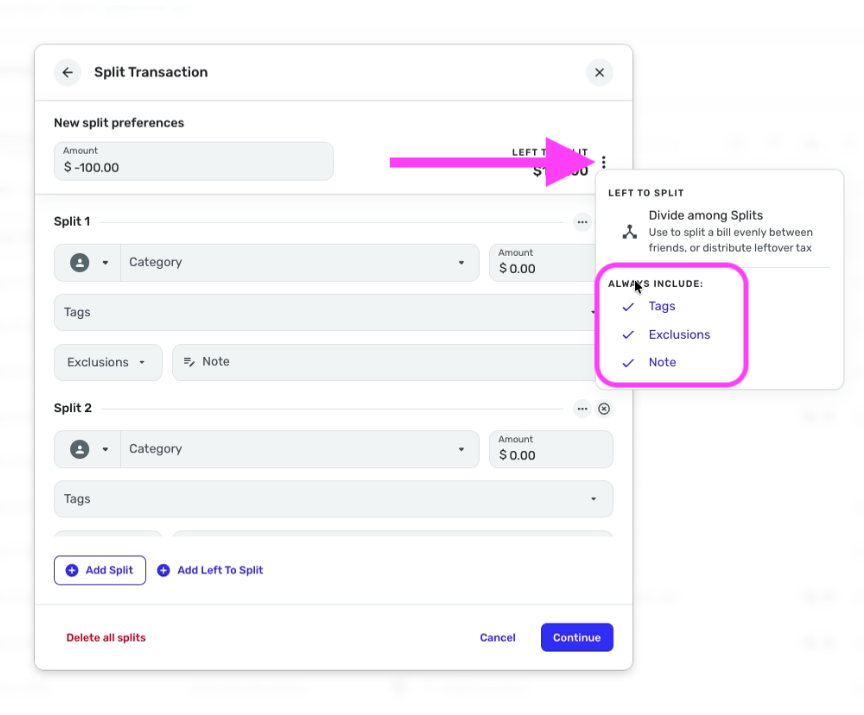
You can now add split lines directly within your Recurring Series—whether you’re setting up a new series or editing an existing one. This allows you to categorize portions of a recurring transaction in advance, so everything is automatically organized when it posts.
This feature is currently available for 25% of in Early Access for all users for Basic users on both web and mobile, with availability for Quicken Business & Personal users coming soon.
Key highlights
- Split recurring transactions by category during setup
- Works for both expenses and income, including paychecks
- You can also use transfers within the splits
- An overflow category is always included to catch any over/under differences
- The overflow line cannot be removed, but you can assign it a category—so your totals stay balanced, even if the final amount varies
Other Splits Enhancements
We’ve also expanded split functionality for both individual transactions and Recurring Series, with these enhancements already live in individual transactions for all users:
- Apply notes, tags, exclusions, and usage (QBP) at the split level
- When assigning usage at the split level, you can separate personal and business portions, ensuring only personal amounts are reflected in the Spending Plan
We know there’s even more we could do with splits in the future—but we wanted to get these first major improvements into your hands. As always, your feedback helps guide what we focus on next. Let us know what you think in our dedicated feedback thread!