How to run a report for a date range? (edited)

pasteve99
pasteve99 Member ✭✭
edited April 13 in Using Reports

I have used all search engines which have provided me multiple answers, all which have not worked. I want to go into an account and run a report with a date range. Under FILTER there is no option for date range. In the search bar, there is no way to enter a date range.

Any assistance would be appreciated

Steven

Best Answer

  • DryHeat
    DryHeat Superuser ✭✭✭✭
    edited April 11 Answer ✓

    @pasteve99

    You are using the Filter option at the to right hand side of the Transaction list.

    I am talking about the Filter option that is part of the Date column header.

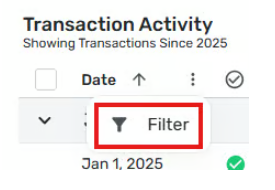
    Here's the image from my post above again. Notice that where the Filter option is and note my instructions to "First hover over and click on the three-dot menu icon to see the Filter option, then click on that."

    image.png

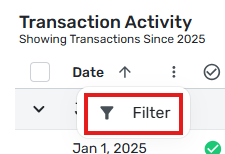
    If you follow those instructions you will see the options shown in the second image in my post above.

    DryHeat
    -Quicken Classic (1990-2020), CountAbout (2021-2024), Simplifi (2025-…)

Answers

  • DryHeat
    DryHeat Superuser ✭✭✭✭

    @pasteve99

    Under FILTER there is no option for date range.

    Have you tried adding starting and ending dates when you filter on the Date? First hover over and click on the three-dot menu icon to see the Filter option, then click on that:

    image.png

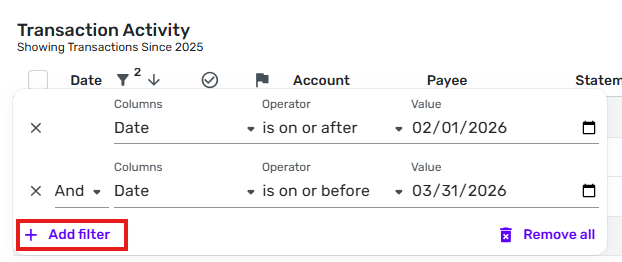
    Then in the Filter window, add a starting date, click on "Add Filter," and add an ending date:

    image.png

    Does this do what you want done?

    DryHeat
    -Quicken Classic (1990-2020), CountAbout (2021-2024), Simplifi (2025-…)

  • pasteve99
    pasteve99 Member ✭✭

    When I click on Filter in Quicken Simplifi there is no date option. That is the issue I am having.

  • pasteve99
    pasteve99 Member ✭✭

    Here is a picture of my Filter options. I do not see any DATE option

  • pasteve99
    pasteve99 Member ✭✭

    Ahh..Ok got it

    Thank you!

  • pasteve99
    pasteve99 Member ✭✭

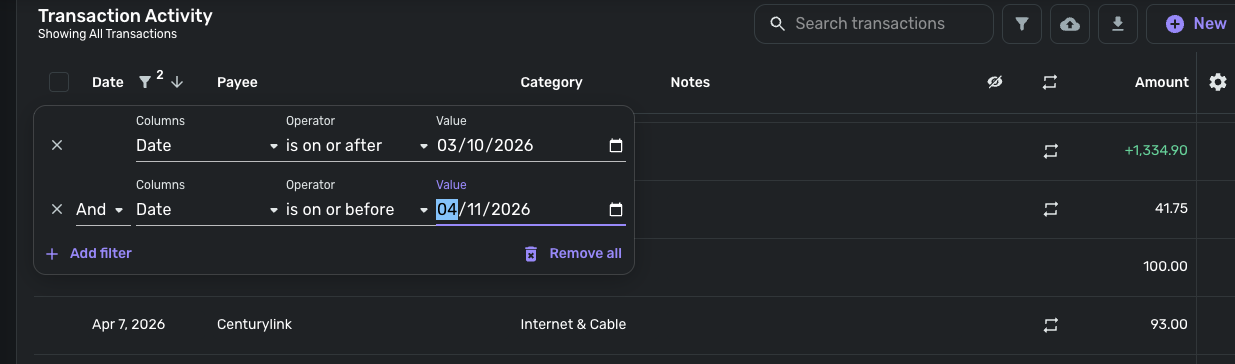
    Ok sorry…One more question. See the screenshot below. I enter the following to get a report from 3/10/26 to 4/8/26. If I am entering this correcting when I am done with the second date selector, nothing comes up even though there is data within this range.

    I am a long time quicken user trying to switch over to Simplifi so sorry for all these questions

  • Coach Kristina
    Coach Kristina Moderator admin

    Hello @pasteve99,

    Thank you for reaching out. It looks like the screenshot you referenced didn't attach. If you're trying to set the Date filters for a date range, I'd expect it to look something like this:

    Screenshot 2026-04-11 at 3.19.03 PM.png

    I hope this helps!

    -Coach Kristina

  • pasteve99
    pasteve99 Member ✭✭

    Yes it did! Thanks again for your patience and reaching out to supporting new users! Very much appreciated!

    Steve