Robinhood account showing incorrect balance (edited)

vak15
vak15 Member

Hi, I'm experiencing an issue with my Simplifi account connected to my Robinhood Brokerage. About a week ago, the displayed balance became significantly lower than my actual Robinhood balance.

This issue started exactly one week ago and prior to that, everything was functioning correctly. It doesn't appear to be a Robinhood problem, as another spending tracker app I use shows the accurate balance.

Could you help in diagnosing this problem?

I can also replicate the issue on my wife's account which is also showing a lower balance than her actual Robinhood brokerage account.


Comments

  • Coach Jon
    Coach Jon Moderator admin

    Hello @vak15,

    Thanks for reaching out! Sorry to hear about the account balance issues you have been experiencing with Robinhood. I would check to see if the following steps work to resolve the issue you are seeing:

    1. Navigate to the bank's website, sign in, and then remove Quicken's access from the bank's third-party linked apps.
    2. Navigate back to Quicken Simplifi, and make all of the accounts with the bank manual by following the steps here.
    3. Once you see the account(s) listed in the Manual Accounts section under Settings > Accounts, go back through the Add Account flow to reconnect to the bank.
    4. If the connection is successful, carefully link the account(s) found to your existing Quicken Simplifi account(s) by following the steps here.

    Let us know how this goes!

    -Coach Jon

  • vak15
    vak15 Member

    I tried these steps and the issue persists. My Brokerage account is still showing an incorrect balance.

  • Coach Jon
    Coach Jon Moderator admin

    Hello @vak15,

    Thanks for the reply! If the account balance is still wrong after these steps, could you please provide the following information to help us troubleshoot this issue? You may feel free to DM this information to me if you prefer.

    • The name of the account in question, as it appears in Quicken Simplifi.
    • The name of the account in question, as it appears on the bank's website.
    • A fresh screenshot of the balance for the account in Quicken Simplifi.
    • A screenshot of the balance displayed on the bank's website for comparison.
    • A screenshot of the Accounts Summary page from the bank's website that has a wide enough scope to show the full page URL. This is the landing page after signing in, and typically lists all accounts and balances. You will want to take this from a web browser and not a mobile browser, as well as redact any private info such as account numbers.

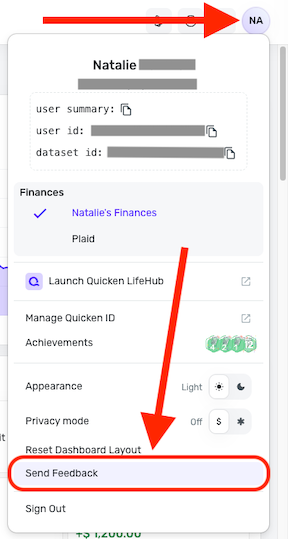
    Please also submit your logs via the 'Send Feedback' option:

    1. Log in to the Quicken Simplifi Web App.
    2. Select the Profile icon in the upper-right corner of the screen.
    3. With the Profile menu open, hold down the Option key (Mac) or the Alt key (Windows), and then click Send Feedback.
    4. Leave all boxes checked, add a brief description of the issue, and then click Send.
    image.png

    -Coach Jon