Bill entries missing in the Spending Plan from month to month (edited)

Quinho
Quinho Member
edited May 4 in Using the Spending Plan

Hello,

As anyone experienced seeing different or missing entries in the Bills section of the Spending Plan feature from month to month. For some reason I’m not seeing consistent entries every month.

I would appreciate any help or suggestions.


Regards,


Henrique

Tagged:

Comments

  • Coach Natalie
    Coach Natalie Administrator, Moderator admin

    @Quinho, thanks for reaching out!

    In order for something to show in the Bills section of the Spending Plan, it must:

    • Be a recurring reminder, whether "Upcoming" or "Past"
    • Be a transaction linked to a recurring reminder, which will show a "Paid" label

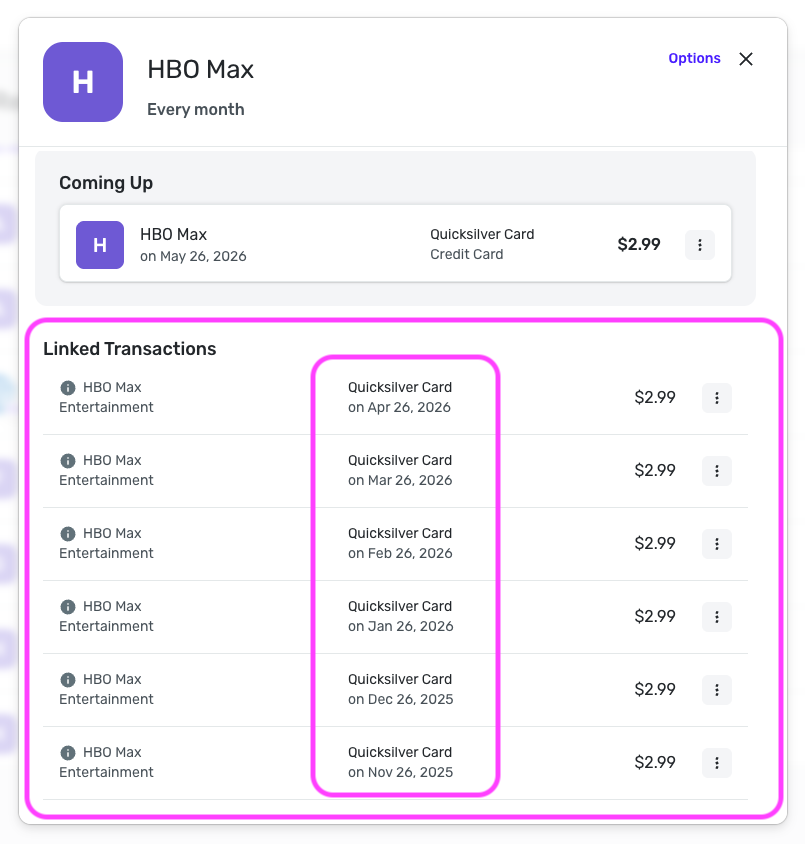
    With that, I'd first recommend identifying which specific recurring bill is missing from the Bills section of the Spending Plan. You can then look at the history in the recurring series to see if there is a linked transaction for the month in question.

    Screenshot 2026-05-04 at 9.43.43 AM.png

    If there isn't, you can look through your transactions to find the transaction for that month and link it to the series by following the steps here to link from the transaction directly: https://support.simplifi.quicken.com/en/articles/4436514-link-transactions-to-reminders#h_1200fab18f

    Once done, the item should show up in the Spending Plan as expected. Let us know how things go!

    -Coach Natalie