Navyist Rewards (Old Navy Mastercard) all transactions are credits
I've noticed in the past 2 weeks, incoming transactions on my Navyist Rewards Old Navy Mastercard, charges are coming through as credits (positive) rather than charges.
Comments
-
@danh916, thanks for posting to the Community with this issue!
When you say you noticed the issue in the past 2 weeks, do you mean this account was connected before then, and transactions were downloading properly? I just want to make sure this is a new issue on an existing account, rather than something that's been happening since you added the account.
If this is a new issue on an existing account, I'd recommend following these steps to establish a completely fresh connection with the bank to see if doing so fixes things for transactions that are downloaded afterward:
- Make all of the accounts with this bank manual by following the steps here.
- Once you see the account(s) listed in the Manual Accounts section under Settings > Accounts, go back through the Add Account flow to reconnect to the bank.
- Carefully link the account(s) found to your existing Quicken Simplifi account(s) by following the steps here.
Let us know if this works!
-Coach Natalie
0 -
Correct, it has been connected for several months since I started using Simplifi. It just started in the last 2 weeks this was happening. I've reconnected this account and it's still the same.
0 -
@danh916, thanks for the reply!
When you say it's still the same, do you mean that the transactions downloaded after you disconnected and reconnected still present the issue? If so, please provide the following data:
- The name of the account the transactions reside in, as it appears in Quicken Simplifi.
- The Date, Payee, and Amount of 3 example transactions the issue is occurring with.
- A screenshot of the Transaction Detail window for each of the provided examples that shows the "Appears on your statement as…" info (this is easiest to obtain from the Web App).
- A screenshot of the same example transactions from the bank's website, showing they're charges, not credits.
- Confirm whether the issue is affecting the account balance in Quicken Simplifi.
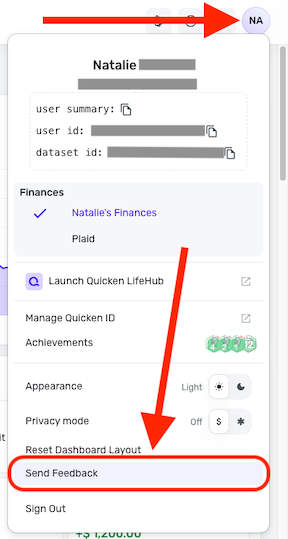
Please also submit your logs via the 'Send Feedback' option:
- Log in to the Quicken Simplifi Web App.
- Select the Profile icon in the upper-right corner of the screen.
- With the Profile menu open, hold down the Option key (Mac) or the Alt key (Windows), and then click Send Feedback.
- Leave all boxes checked, add a brief description of the issue, and then click Send.
We look forward to hearing back from you!
-Coach Natalie
0