Transactions missing from Spending report (edited)
I’m seeing a reporting issue in Reports > Spending.
My April 2026 transactions for category CRED CRD RECD PYMNT are present in transaction search, but they are not appearing in the Spending report.
These are the 7 April transactions totaling $1,505.31:
- April 2, 2026 — $78.04 — Payment - Thank You
- April 6, 2026 — $400.07 — Payment - Thank You
- April 10, 2026 — $56.04 — Payment - Thank You
- April 15, 2026 — $101.04 — Payment - Thank You
- April 21, 2026 — $423.04 — Payment - Thank You
- April 24, 2026 — $300.04 — Payment - Thank You
- April 24, 2026 — $147.04 — Payment - Thank You
What has already been confirmed:
- The transactions do exist in my register/search.
- They total $1,505.31.
- At least one of these transactions was checked and is not excluded from reports.
- These entries used to appear in Spending reports before, ever since I began using Simplifi thru March 2026. I also checked March and February. It is no longer in the report, even tho they were when I did EOM balancing for those months.
- This started after a recent issue where my March and April SSA deposits and other entries were lost and later restored.
Please check whether the category CRED CRD RECD PYMNT is now being treated differently in Reports > Spending, because the transactions are present but missing from the report.
Comments
-
@Pat H., thanks for reaching out to the Community!
It does not appear that "CRED CRD RECD PYMNT" is a built-in category in Quicken Simplifi, so we wouldn't be able to check whether it is now being treated differently in reports. Instead, this category appears to be custom-created and is unique to your data.
With that, I have some questions to better understand the issue:
- When you say the transactions are missing from the Spending report, do you mean they are not displayed in the categories/transactions list below and are therefore not being included in the report at all? Or are they just missing from the report graph, the report total, or something along those lines?
- What type of category is "CRED CRD RECD PYMNT", i.e., an income category or an expense category?
- Are the missing transactions in the report all in the same account? If so, are any other transactions from that account using a different category missing from the report?
Additionally, you mentioned social security deposits missing due to the issue that popped up last week. Social security deposits would likely show up in the Income report, so I'm not sure how this piece of data relates to what you're now seeing in the Spending report. Can you please elaborate on this?
We look forward to your reply!
-Coach Natalie
0 -
Bug Report
I need this escalated to a human. After the March/April 2026 restore issue, transactions that appear in Transactions are no longer appearing in Reports > Spending. This affects my May 4, 2026 items for $13.41 and $9.82, and similar April 2026 credit transactions. I am not requesting a workaround; I want this reviewed as a likely reporting defect.
A few days ago I reported that **March and April 2026 SSA deposits and other transactions were lost, that is not showing. You fixed that glitch, restored the items, and apologized and that the system error had been fixed. Now there is another glitch. Did that fix create another problem? Below is a long description and a Kevin gave me a long set of instructions for me to do. I am not the one who screwed up so I shouldn’t have to do all the work he suggested. Both on my desktop and phone, in green for May 4, are the items 13.41 & 9.82. They show in transactions but not in Reports > Spending. These type of transactions in April and before always showed in spending, which makes sense because they are adjustments to expense and not income. Now they have disappeared from Spending for April and March at least, even though the April ones were there when I did EOM for April a day or so ago.
It should be simple, look at my two items, 13.41 & 9.82, and see why they are not in Reports > Spending.
Below is the long explanation.
## Support message draft
**Subject:** April 2026 Spending report is misclassifying `CRED CRD RECD PYMNT` and related credit card credits
I need this reviewed by a human.
My **Reports > Spending** is no longer handling my credit card transactions the way it did before.
Here is the issue:
- My **April 2026** transactions in category **`CRED CRD RECD PYMNT`** are present in transaction search/register.
- There are **7 April transactions totaling $1,505.31**.
- They do **not** appear in **Reports > Spending**.
- At least one of these transactions was checked and is **not excluded from reports**.
- These same kinds of transactions **did appear in Spending reports before**, from when I started using Simplifi through **March 2026**.
- The problem started **after** a prior issue where some **March and April 2026 SSA deposits and other transactions were lost and later restored**.
The 7 April 2026 transactions are:
- **April 2, 2026** — **$78.04** — *Payment - Thank You*
- **April 6, 2026** — **$400.07** — *Payment - Thank You*
- **April 10, 2026** — **$56.04** — *Payment - Thank You*
- **April 15, 2026** — **$101.04** — *Payment - Thank You*
- **April 21, 2026** — **$423.04** — *Payment - Thank You*
- **April 24, 2026** — **$300.04** — *Payment - Thank You*
- **April 24, 2026** — **$147.04** — *Payment - Thank You*
From what I can see, **`CRED CRD RECD PYMNT`** is now being treated as **income** in reporting, which is why these transactions are missing from **Spending**.
I am also seeing the same kind of problem with my **credit card cash back**. That also appears to be treated outside of Spending, as if it is simply income rather than a credit related to spending activity.
Because of that, I am concerned that **store returns or refunds** may also be treated incorrectly. If I return an item and receive a credit, I do **not** expect that to be treated as new income. I expect it to **offset or reduce spending**. Right now it looks like the reporting logic is acting as though expenses never have credit entries, which does not reflect real credit card activity.
My question is:
**Why did this category treatment change after the restore issue, when it was previously reporting correctly before March 2026?**
Please investigate whether:
1. the restored transactions were reassigned to a different internal transaction type or category behavior,
2. `CRED CRD RECD PYMNT` is now being treated differently in **Reports > Spending** than it was before,
3. credit card cash back and other credit entries tied to spending are also now being treated differently,
4. refunds/returns to a credit card would now be treated as income instead of offsets to spending,
5. this is a product/reporting defect rather than a user data-entry issue.
I do **not** want a workaround that requires manually recategorizing each transaction or creating rules for behavior that previously worked correctly.
Please have someone review the reporting logic and explain what changed.
0 -
If I return an item and receive a credit, I do not expect that to be treated as new income. I expect it to offset or reduce spending.
I agree with you that returns should work that way and, fortunately, it appears that they do.
I just checked my spending report for last month. One of the categories had 3 returns in it and they all showed up in the spending report as positive amounts (thus offsetting other spending expenses).
DryHeat
-Quicken Classic (1990-2020), CountAbout (2021-2024), Simplifi (2025-…)0 -
I balance daily and what I am describing is true on both phone and desktop. I have in transactions two entries in green dated May 4, one for $13.41 (CRED CRD RECD PYMNT), the other for $9.82 (CASH BACK). These two categories are no longer showing in reports > spending. I created these expense categories well before Jan 2026. When I did my EOM balancing at the time for JAN, MARCH, & April both of these categories showed in reports > spending. When I checked today on both the desktop and phone reports > spending these categories are no longer appearing there. Why were they there JAN, March, & April but not now? Which would answer my initial question, why are those categories no longer in reports > spending. I believe my question is simple, why are these two May entries in transactions but no longer in reports > spending as they were in the past and why those that were in that report in the past have now disappeared from report > spending for previous months when I now run the report for JAN, March, & April?
0 -
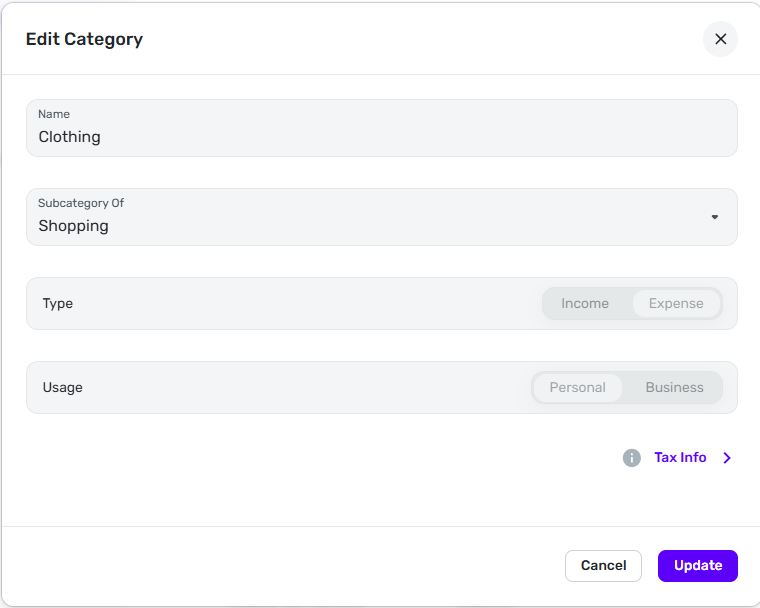
To help figure this out, can you post images of the "Edit Category" form for these two categories? I'm talking about the form that looks like this:
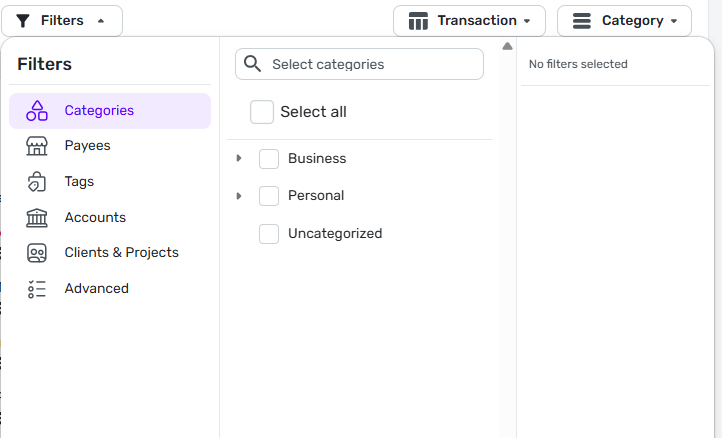
Also, can you post an image of the Filter dialog on the Spending report? The one that looks like this:
That will help rule out some of the issues that might be causing this problem.
DryHeat
-Quicken Classic (1990-2020), CountAbout (2021-2024), Simplifi (2025-…)0 -
I have already spend too much time on this. forget it. I have a much more simple workaround that doesn't waste hours.
0 -
Ok. I understand why you wouldn't want to spend more time on this. Although I remain curious about why your results were so different from mine.
Anyway, if you have future questions, consider that posting images is often quicker than writing long descriptions. And it sometimes reveals details that help solve the problem.
DryHeat
-Quicken Classic (1990-2020), CountAbout (2021-2024), Simplifi (2025-…)0 -
Guess what? They are all back now, including those in FEB, MARCH, & APRIL and organized differently that before. Before they were in everything else. now they are separate. Next time I will just wait a week when there is a problem.
0