I am using Quicken Simplifi. Starting early last week, I have been unable to connect to Unitus CCU to update my accounts. I tried to reset the connection, and have been unable to sign in to make the connection. When I try, I get a FDP-101 Care Code.
Hello @trlambert1,
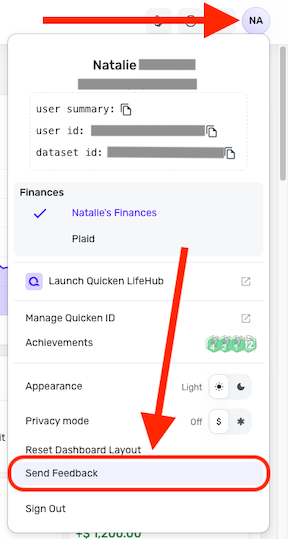
Thank you for letting us know you're encountering this issue. Since you're unable to reconnect the accounts, and I can see the issue has been ongoing for more than 48 hours, please send logs to help our teams investigate. To send logs, please follow these steps:
Please let us know once the logs are sent!
Thanks for reaching out! I would also have you try the following steps to verify if they help resolve this issue for you:
Let us know how this goes!
I just tried this, to no effect. Still getting the FDP-101 error when trying to connect to Unitus.
Logs were sent in.
Thanks for verifying! Please also provide the following information so we can look into investigating this issue further:
Be sure to let us know once this information has been provided. Feel free to DM me this information if you prefer!
As of now, the issue is resolved. I was able to make connect and link the accounts properly.