Robinhood FDP-101 (edited)
Robinhood has worked well for me, but about a week ago stopped connecting and updating. I tried resetting the connection, and ultimately made all of the accounts manual and tried a new connection. It connects to Robinhood, has me okay the connection by authenticating with a tap on my Robinhood app, but then fails. It's giving me this error:
We are unable to connect to Robinhood at this time.
Care Code: FDP-101
Comments
-
@Rick_B, thanks for posting to the Community with this issue!
I checked my Robinhood accounts, and they seem to have updated fine this morning. I can, however, see the FDP-101 error when checking your connection attempts with Robinhood from our end.
Please follow these steps to establish a completely fresh connection with the bank and gain a new access token:
- Navigate to the bank's website, sign in, and remove Quicken's access from the bank's third-party linked apps.
- Navigate back to Quicken Simplifi and make all of your Robinhood manual by following the steps here.
- Once you see the account(s) listed in the Manual Accounts section under Settings > Accounts, go back through the Add Account flow to reconnect to the bank.
- Carefully link the account(s) found to your existing Quicken Simplifi account(s) by following the steps here.
Let us know if this works for you!
-Coach Natalie
0 -
I'm still getting the same error. I removed all of the Quicken linked apps (there were about 6 of them), but am still getting the FDP-101 error before it pulls up the accounts for me to link to existing accounts in Simplify.
Just a note that a new "linked app" for Quicken appears in my Robinhood settings, so it thinks it has connected even though Simplifi displays a cannot connect message.
0 -
@Rick_B, thank you for giving those steps a try and posting back!
To get this issue escalated, please provide the following data:
- The name of the account(s), as it appears in Quicken Simplifi.
- The name of the account(s), as it appears on the bank's website.
- Has there been any activity in the account(s) in the last 90 days?
- Are you the owner of the account(s)?
- Have there been any recent changes made to the bank's website or its sign-in process?
- A screenshot of the Accounts Summary page from the bank's website that has a wide enough scope to show the full page URL. This is the landing page after signing in, and typically lists all accounts and balances. You will want to take this from a web browser and not a mobile browser, as well as redact any private info such as account numbers.
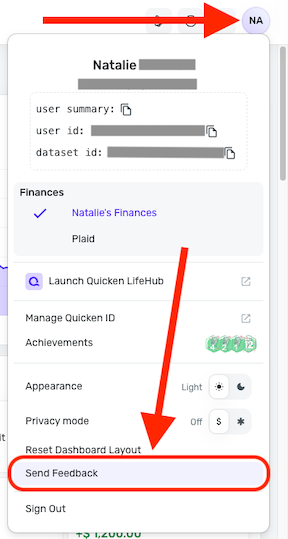
Please also submit your logs via the 'Send Feedback' option:
- Log in to the Quicken Simplifi Web App.
- Select the Profile icon in the upper-right corner of the screen.
- With the Profile menu open, hold down the Option key (Mac) or the Alt key (Windows), and then click Send Feedback.
- Leave all boxes checked, add a brief description of the issue, and then click Send.
Much appreciated!
-Coach Natalie
0