E*TRADE stocks are missing from the portfolio view (edited)
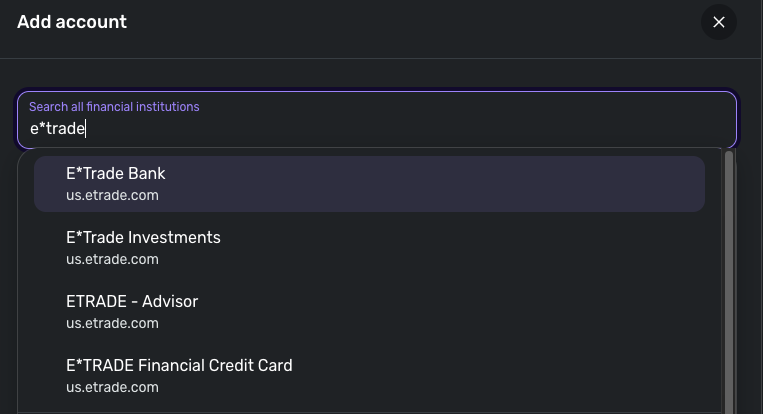
I can get my E*TRADE Investments account to sync in Quicken Simplifi, but none of the stocks appear in the Investments tab, only the cash balance. I've tried resetting the connection and re-syncing. At one point, E*TRADE Financial Credit Card somehow showed the investments, but that doesn't work anymore.
Comments
-
Hi @vladinator,
Thank you for reaching out and for outlining the steps you’ve already tried.
To help us better understand the issue, could you please let us know when it first started occurring?
In addition, could you please submit your logs using the Send Feedback option? This will help our team investigate further.
- Log in to the Quicken Simplifi Web App.
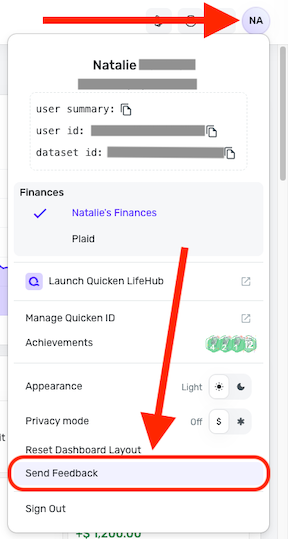
- Select the Profile icon in the upper-right corner of the screen.
- With the Profile menu open, hold down the Option key (Mac) or the Alt key (Windows), and then click Send Feedback.
- Leave all boxes checked, add a brief description of the issue, and then click Send.
I've also sent you a direct message. Please check your messages in the upper-right corner.
I look forward to your response.
-Coach Laura
0 -
This issue has been happening since February 2026.
I just sent the logs via the feedback in Simplifi.
I didn't see the direct message, by the way.
0 -
Hello @vladinator,
Thank you for the reply and logs! Let's also have you try the following steps to see if they resolve the issue you are seeing with the missing securities you mentioned:
- Make all of the accounts with the bank manual by following the steps here.
- Once you see the account(s) listed in the Manual Accounts section under Settings > Accounts, go back through the Add Account flow to reconnect to the bank.
- If the connection is successful, carefully link the account(s) found to your existing Quicken Simplifi account(s) by following the steps here.
You also mentioned that the securities used to show up in Investments. Did they just disappear one day after resetting your connection? Have you tried the other E*Trade instances available in Quicken Simplifi to see if they bring the missing securities over?
Let us know!
-Coach Jon
0 -
I made the accounts manual, re-connected to E*TRADE, re-added the accounts, and still saw no Investments.
The securities disappeared one day in February 2026 after a sync. I happened to get the securities back when I connected to E*TRADE Financial Credit Card. But that doesn't work anymore - FDP-102 error - and neither do any of the other E*TRADE instances.
0 -
@vladinator, thank you for giving those steps a try and posting back!
To review this case for escalation, we will need the following data:
- The name of the account, as it appears in Quicken Simplifi.
- The balance for the account in the Accounts List in Quicken Simplifi (this is the list of all accounts and balances on the left side of the Dashboard on the Quicken Simplifi Web App, or the list of all of your accounts when you select "Accounts" from the Quicken Simplifi Mobile App).
- The balance for the account in the Investments Portfolio in Quicken Simplifi (if you have multiple investment accounts, you'll want to filter the page to just this account).
- The balance for the account as displayed on the bank's website.
- A screenshot of the holdings section for the account in Quicken Simplifi (if you have multiple investment accounts, you'll want to filter the page to just this account).
- A screenshot of the holdings on the bank's website for comparison.
- A screenshot of the Accounts Summary page from the bank's website that has a wide enough scope to show the full page URL. This is the landing page after signing in, and typically lists all accounts and balances. You will want to take this from a web browser and not a mobile browser, as well as redact any private info such as account numbers.
Much appreciated!
-Coach Natalie
0 -
- Trust Brokerage
- $31,166.37
- $1,554.10
- $31,164.14
6.
7. [removed - privacy]
0 -
@vladinator, thank you for the information!
I did get a ticket filed for this, but we still need #7 from you:
- A screenshot of the Accounts Summary page from the bank's website that has a wide enough scope to show the full page URL. This is the landing page after signing in, and typically lists all accounts and balances. You will want to take this from a web browser and not a mobile browser, as well as redact any private info such as account numbers.
The screenshot you provided didn't show the URL at the top of the page. Please provide this as soon as possible so I can complete the ticket! Also, since partial account numbers were showing in your last screenshot, feel free to DM this to me for privacy.
CTP-17470
-Coach Natalie
0 -
I sent you a DM.
1