Bills to income percentage notification is wrong (edited)

RobI
RobI Member ✭✭
edited 6:23PM in Troubleshooting

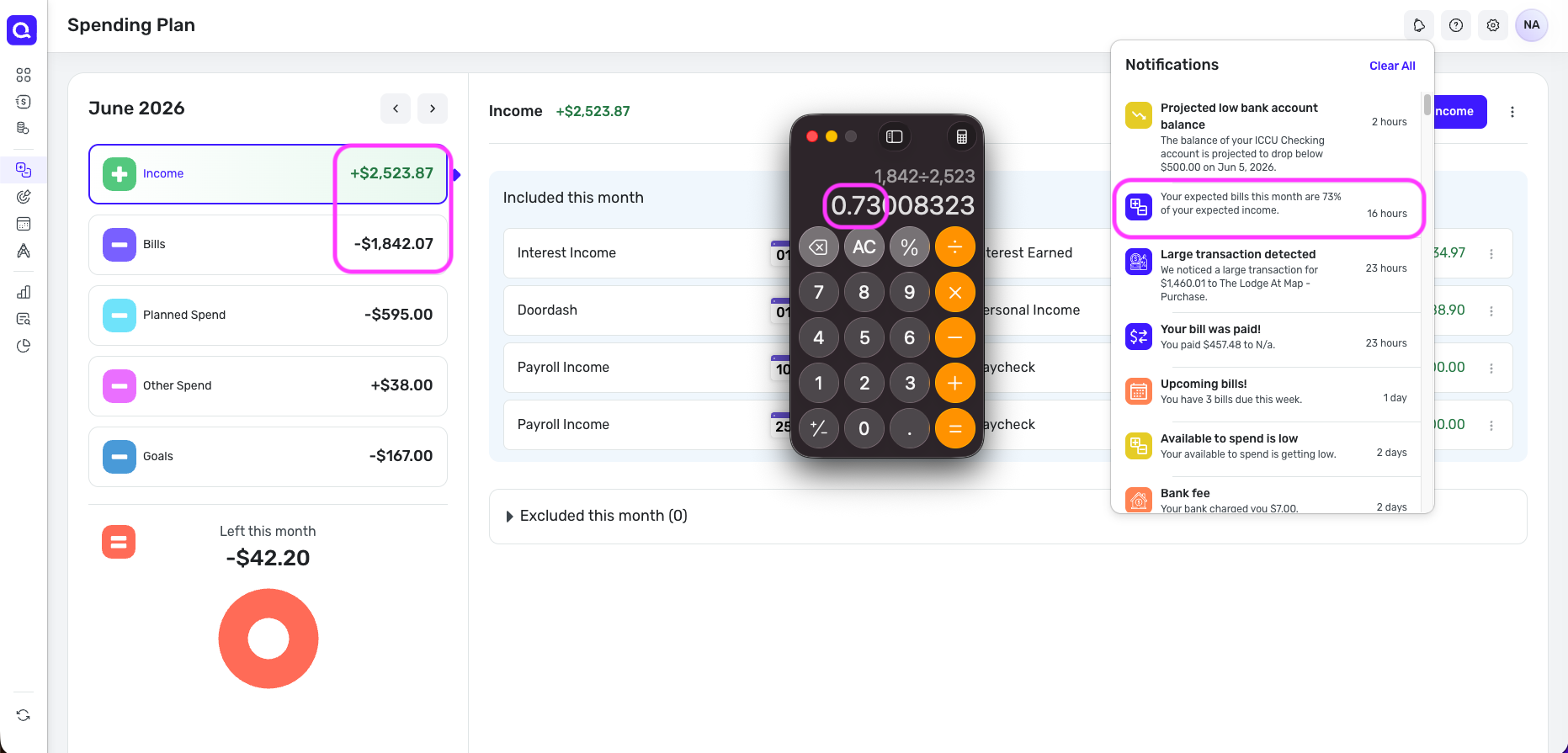
My total income and spending for June notification is not correct. Its showing the incorrect income total. When I subtract that notification income number from the total income number showing in spending plan, the missing income amount is from one item that is a split transaction.

I can see nothing else unique to indicate why the notification might be ignoring that particular item in calculating total income value.

Aside- I'm beginning to feel prediction style notifications are hallucinating since they seem prone to calculated prediction errors. I'm going through settings to disable some

Comments

  • SRC54
    SRC54 Superuser ✭✭✭✭✭

    I don't see a notification for income and spending other than the Monthly Report and I don't get that notification for a few days. That monthly summary highlights the Spending Plan and excludes regular bills and subscriptions.

    If there is a one item from a split that is missing, check the exclusions in the transaction.

    Is this a report that you created? Or perhaps you are using QBP, which probably has different notifications?

    Steve
    Quicken Simplifi (Safari & iOS) Since 2021
    Quicken Classic (MacOS) Since 2009
    Dollars & $ense (DOS) and MS Money (Windows) 1987-2009

  • RobI
    RobI Member ✭✭
    edited June 2

    This is the notification for Bills to Income percentage. The email version of this notification

    "Check out some interesting details we found for you:"

    It then lists its estimate of income and bills in spending plan. Income value is incorrect when I compare to actual Spending Plan. I checked and this income item has no exclusions listed in the split line.

    Aside from that, I also noticed there is a projected spending item that IS marked as excluded from Spending Plan but is being added into the notification calculation of projected bills.

    Spending Plan and this bills and income notification are not just counting the same apples, even though it then suggests I 'See Spending Plan' for the details

    I'm regular Simipfi user

  • SRC54
    SRC54 Superuser ✭✭✭✭✭

    @RobI Thanks for the reply. I have found it and have now enabled it, so I will see how it works for me. I'll check for irregularities. In the meantime, maybe some other user will tell us how that works for them.

    I don't turn on many notifications in any app because I hate dealing with them. Mail and iMessage are about the only two I allow.😀

    Steve
    Quicken Simplifi (Safari & iOS) Since 2021
    Quicken Classic (MacOS) Since 2009
    Dollars & $ense (DOS) and MS Money (Windows) 1987-2009

  • SRC54
    SRC54 Superuser ✭✭✭✭✭
    edited 5:16PM

    @RobI This morning after turning on the notification, it told me that my Bills to Income Percentage was 88%. My calculation for the month including bills and planned spending is about 50%. I save half my income. So I don't know what that means.

    Anyhow, I turned it back off. This was the in app version of the notification. I'll turn on the email version.

    Reminds me that nothing lies more than statistics. . .

    PS I just asked "Ask Assist" what is my projected bills to income percentage for June, and he answered 21%. Which is about right if you just take into account bills and not planned spending. When I add Planned Spending, Ask Assist says 48%, which is also correct.

    So I can confirm that this is a bug!

    Steve
    Quicken Simplifi (Safari & iOS) Since 2021
    Quicken Classic (MacOS) Since 2009
    Dollars & $ense (DOS) and MS Money (Windows) 1987-2009

  • Coach Natalie
    Coach Natalie Administrator, Moderator admin

    @RobI, thanks for reaching out to the Community with this issue!

    When checking in my own Quicken Simplifi, I am seeing the correct data for the bills-to-income percentage notification, at least in the in-product version.

    Screenshot 2026-06-03 at 12.17.55 PM.png

    I don't think this notification looks at anything as complex as splits; it just looks at your Bills total and your Income total in the Spending Plan. Exclusions would only matter here in the sense that any income or bills being excluded would not be counted toward the total for that section.

    With that, I'd recommend disabling and re-enabling the notification to see if that clears things up the next time it's generated. If not, please send a screenshot like the one I sent above so we can review the totals and the calculation against the notification.

    Let us know how things go!

    -Coach Natalie

  • RobI
    RobI Member ✭✭
    edited 11:09PM

    Spending plan is showing bills to income of 38%

    Notification is showing 226%!!

    The difference is explained by 2 things

    1. Income from a recurring transaction which happens to be split to remove tax and health insurance. Its missing completely in the notification but is part of Spending plan income. This feels like a bug.
    2. A large one off tax expense in June which I have excluded from my Spending plan. Its real spending so maybe not a bug. Just a difference from my Spending plan view.

    I turned the notification off, logged out and then turned it back on again after logging in to see what happens

    Ask Assist pulled the numbers from Spending plan correctly

    I will PM a screenshot