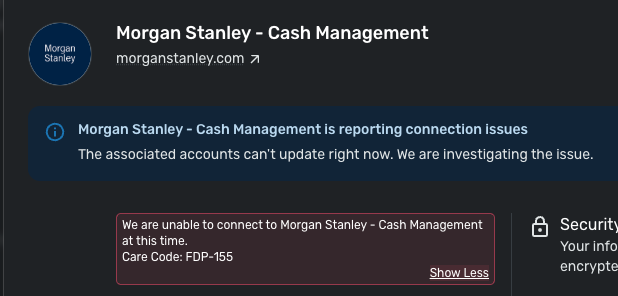
This has been working for months, but now it's not. Seeing an error: Care code: FDP-155
Is this currently being worked on?
Hello @jbaker5400,
Thanks for reaching out! I can see from our side that you have been experiencing this FDP-155 error since 6/1/26. Generally, this error appears when the financial institution blocks access to its servers, preventing Quicken Simplifi from retrieving data to download into your file.
I can also see that Morgan Stanley - Cash Management is reporting connection issues in Quicken Simplifi at this time. This means that we are currently investigating the issue.
I am not sure of an ETA at this time, but I would remain on the lookout for when that banner disappears and try connecting again at that time.
Thanks Jon… hoping not much longer for a resolution. Still same error as of early Friday.
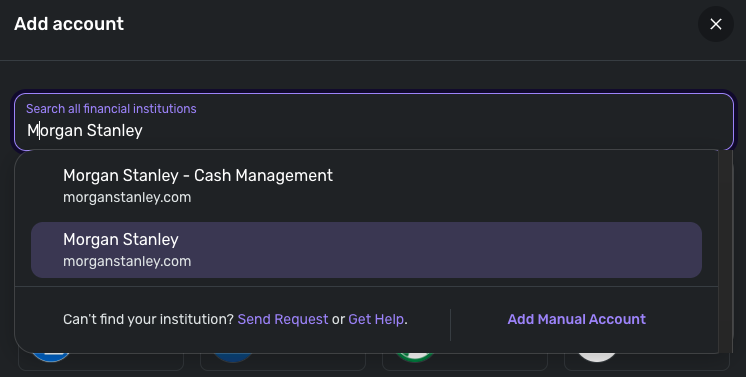
Thank you for the reply! Let's have you try connecting to the other Morgan Stanley instance available in Quicken Simplifi:
Let us know if you are able to connect, or if the same error appears there as well.
Thank you!
I'm having the same connection issues with Morgan Stanley Cash Management. Any ETA on when it will be fixed?
Hello @SVance,
Thanks for reaching out as well. If you also previously had this account connected in Quicken Simplifi, then I would try the above steps I shared previously as well:
Jon,
I tried connecting my CashPlus with the regular Morgan Stanley connection. This worked but shows $0 value. I tried connecting it as a Cash account and a Brokerage account with the same result.
Minor update… Using just the Morgan Stanley connection, it eventually showed transactions (the is for the cash management account type.) However, this seems to treat payees as only securities…
I use this for our daily spending, so a payee might be some coffee shop down the street. However it treats it like a stock which isn't the case.
Also, having my cash mgmt account treated as a brokerage seems to prevent new downloaded transactions in such a way that they don't show up in the recent transactions list… which is how I monitor ins/outs…
I really need the previously existing cash management stuff working as it was the main reason I'm trying to move to Simplifi from Quicken Mac.
Thanks for the update! I am glad that the account was at least able to be connected and transactions to be pulled in. To help clarify the situation you described further, can you provide screenshots showing how these transactions are appearing for you within Quicken Simplifi? This can be sent via DM if you prefer. Can you also verify if the account balance is correct in Quicken Simplifi?
I was able to connect to the other instance and change the type of account from brokerage to checking. It was a little annoying, because I then had to update all of my previous anticipated transactions to have them coming from the new instance of the account (it wouldn't let me link to the already existing version of the account). But all-in-all, I think it's now resolved.
Thank you for letting us know! I am happy that you were able to resolve the issue you were seeing. Be sure to let us know if this issue pops up again so we can troubleshoot further at that time.
I tried the method used by SVance and that seemed to work..
At least it downloaded all the transactions. However, even after I changed the account to either 'Checking' or 'Cash Management', when trying to type in a Payee, it wanted to match up to an existing stock or create new one.
In other words, the Payee field didn't behave like it should but more like a Security/Payee field.
I also noticed that if I use the 'Edit Transaction' approach, it seems to work with being able to enter a Payee (1st screen shot,) however the account page shows the payee I entered shows up as a Category instead (2nd screen shot.)
Thank you for the replies! I wonder if the account/transactions are coming over from the bank categorized as investments. How do these transactions appear on your bank's website? Can you also try the following steps to see if this helps resolve the issue with this account?
Let us know!
Jon… that seemed to work. I had added the Cash Mgmt account previously and that was no longer downloading anything for the past week or 2. So I just made it manual and deleted the new one that was treating payee as stock. Then I made the other 4 MS accounts I already had manual.
Then I reconnected to MS (not the Cash Mgmt) version and matched the 5 manual accounts as you explained. That worked… the 4 that weren't causing me issues reconnected with no issued. And the cash mgmt account (now using Morgan Stanley and not Morgan Stanley Cash Mgmt) also connected and downloaded the past couple of weeks transactions.
So thank you for the suggestion. This was a bit painful, but it appears that I'm back up and running.
this error started a few weeks ago. Is there any update on resolving it?
Hello @mketner,
Thanks for reaching out! I can see the FDP-155 error from my end as well. This error generally occurs when the bank you are trying to add is blocking us from establishing a connection.
I would have you verify if the following steps work to resolve the issue:
You can also try connecting to the other Morgan Stanley instance available in Quicken Simplifi to see if that works better for you:
Let us know how this goes!
I am having the same issue. I tried your suggestion and I did get my CashPlus account connected… but only as an investment account. This type of account has both investments AND checks/ATM/BillPay/etc. in one MS account.
What I'd like would be for the normal MS connection to show the investment and the MS-CM connection to show the cash part. However, the MS-CM connection doesn't work with the 155 error, and the MS connection does, but treats the account as only an investment account. I'd even take just getting the cash part and not tracking the investment part of the account if it were possible.
What this means is that, say it downloads an ATM transaction, it shows it as an investment. I have to manually edit the download, change it to 'Payment/Deposit', change the Exclusion settings so that it counts against my budget, etc.
Thanks for reaching out as well! I remember you stating earlier this month that you were able to get connected via the Morgan Stanley instance and that it seemed to fix things. Are you now stating that this instance does not work for you due to the account being treated as an investment account? If you follow the steps above once again and choose the Morgan Stanley - Cash Management instance during the Add Account flow, does the error still appear for you?
I thought I saw an update from the team on this topic, but there aren’t any comments anymore. Did you have instructions to follow? I tried to mark the account as manual and reconnect, but I received the same error. I also tried to connect via the other Morgan Stanley connection option, but it did not connect. This is a checking account as well, and the only options were brokerage, IRA, etc, which would be an odd way to categorize these transactions.
Please let me know how best to resolve this issue. Without linking my checking account, it’s difficult for me to use the app for any kind of planning.
Thank you for reaching out! When reviewing your account activity on our end, I do not see an error for your most recent attempt. Were you able to get connected with Morgan Stanley in Quicken Simplifi?
If the account does connect, does it only bring it over as one of the accounts you listed above? Is this just a checking account, or does it have some investment abilities on the bank's side?
It never successfully connected the other day, it just hung waiting to connect. However, I just tried again this morning and it’s now working again. Seems like whatever issues there was with cash management is now resolved. Hopefully it stays this way!