FDP-102 error when connecting to T. Rowe Price Retirement Plans (edited)
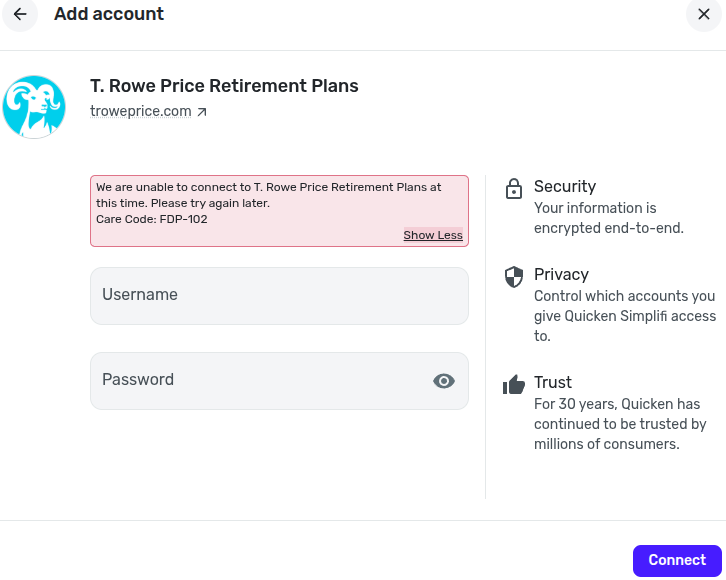
I’m getting the following error when trying to connect T. Rowe Price Retirement Plans: “We are unable to connect to T. Rowe Price Retirement Plans at this time. Please try again later. Care Code: FDP-102.” I first started seeing this in May 2026, and it is still happening as of June 3, 2026.
I’ve already tried reconnecting the account and deleting/re-adding it, but the error persists. After I enter my username and password, it spins for about 20 seconds and then returns FDP-102 (screenshot below). Is this a known/open incident, and is there any recommended workaround besides waiting?
I have a single T. Rowe Price account. This is happening in the Android App and on the web site (Chrome Version 149.0.7827.53 (Official Build) (64-bit)).
Comments
-
Hello @jwadd001,
Thank you for reaching out! I can see that you have been experiencing an FDP-102 error for some time now from our end. Users will typically receive error code FDP-102 when our connection to the bank is throttled, limiting the number of successful connection attempts, or due to a server outage.
If you have already tried reconnecting the account by setting it to manual/re-adding the account, and you are still receiving this error, could you please provide a screenshot of the Accounts Summary page from the bank's website that has a wide enough scope to show the full page URL? This is the landing page after signing in, and typically lists all accounts and balances. You will want to take this from a web browser and not a mobile browser, as well as redact any private info such as account numbers.
We will also need you to submit logs, please:
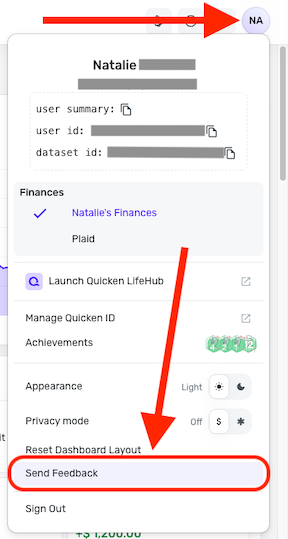
- Log in to the Quicken Simplifi Web App.
- Select the Profile icon in the upper-right corner of the screen.
- With the Profile menu open, hold down the Option key (Mac) or the Alt key (Windows), and then click Send Feedback.
- Leave all boxes checked, add a brief description of the issue, and then click Send.
-Coach Jon
0