How do you manage planned spend without having to subtract bills?
In my scenario, I have a major category called Auto. Within Auto, I have sub-categories for Gas, Ownership, and Service/Parts.
My monthly loan payment is captured as a Bill series.
When I build a spending plan, the monthly loan payment is captured in the Bills section.
Now, in the Planned Spend section I want to capture the rest of my Auto spending. I try to use the entire Auto category but that duplicates the monthly loan payment that's already captured in Bills.
How do you handle this kind of situation?
Comments
-
Now, in the Planned Spend section I want to capture the rest of my Auto spending. I try to use the entire Auto category but that duplicates the monthly loan payment that's already captured in Bills.
@bobbiesmith It's not supposed to do so. Are you sure?
All my auto expenses except gasoline are in Bills. Gasoline is in Planned Spending, but I just use the Gasoline Sub-category.
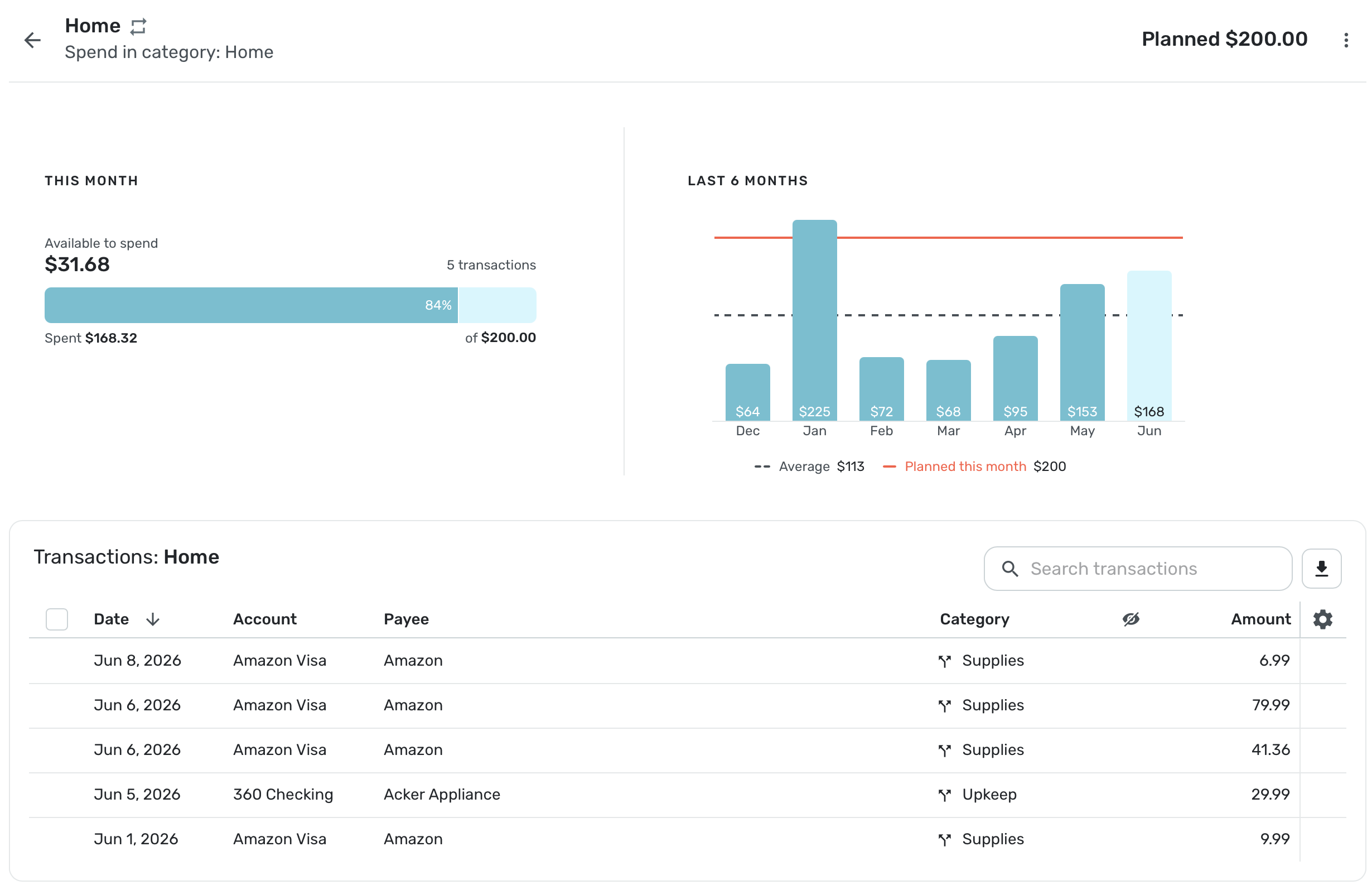
However, all of my utilities are in Bills, which is under Home:Utilities. The rest of my Home Expenses vary according to our needs, and I put that under Planned Spending. I've already paid the Gas bill and Phone Bill this month. Here is what Simplifi shows for my Home expenses:
Notice my Home:Bills don't show up here.
I assume your auto loan payment is under Ownership? And you have that set up as a monthly bill? Does this transaction show the Recurring symbol? Make sure it's linked.
Of course, your auto loan could be set up as a loan and the payment would be mostly a transfer with an interest expense. You could do it that way although using a bill with a category expense is fine. If it is a monthly bill, it should not be included in your Planned Spending category.
The coaches may ask you post a screenshot like mine. Hope this helps.
Steve
Quicken Simplifi (Safari & iOS) Since 2021
Quicken Classic (MacOS) Since 2009
Dollars & $ense (DOS) and MS Money (Windows) 1987-20090 -
I think everyone is going to be different, but the gist is that bills are going to be co-mingled with non-bills within the same sub-categories and categories. For example, my auto loan (a bill) and my periodic emissions testing and registration (not bills) will be categorized as Car Ownership.
So to plan for them in a Spending Plan, we either have to put them in separate categories, or mentally do the subtraction (Car Ownership minus auto loan bill) when doing the Planned Spend, with Auto Loan being captured under Bills.
It doesn't seem convenient to either have to artificially separate things in categories or have to mentally do subtraction. Am I missing something?
Here's a visualization:
Car Ownership sub-category:
- Auto loan (bill)
- Emissions testing
- Car registration
Spending Plan:
- Bills: Auto Loan
- Planned Spending: Average monthly spending of Car Ownership sub-category minus cost of Auto loan bill
0 -
You shouldn't need to mentally subtract on an ongoing basis. When setting up the Planned Spending series amount for the Auto category, set it for the total you usually spend on Auto MINUS the transactions that will be marked as Bills. That's a one-time subtraction you can do using a calculator. The reason is that the Bills will be subtracted from your Income in the Bills section of Spending Plan, and won't be accounted for in the Planned Spend section (or they would be double counted).
0 -
@bobbiesmith Everything in your Spending Plan will be accounted for in reports, of course. So everything goes together according to categories and subcategories. This is the gist of accounting.
But if you have a transaction marked as a bill (one-time or recurring), it will not show up in your Planned Spending. You can look at your dashboard spending to see it all put together or open the connected Spending Report. So you don't have to mentally subtract or add.
Your spending plan really is how you budget your money and you can see how much you are spending and saving. Your reports show you the whole picture unless you have excluded expenses on purpose from them. I do this by making transfers out of things I don't want included in spending reports.
Yep, I am very particular about my categories too, and I agree that everyone will do it somewhat differently. I can see the logic in your categories.
Did you get the bill for your auto loan out of your planned spending? Is this a simple recurring transaction or is it split? You know now you can decide what parts of a split to include in the spending plan and what parts not to.
Oh, and just for comparison sake, here is my Automobile category:
Automobiles and subcategories:
Insurance
Gasoline
Maintenance
Licenses
Vehicle TaxAll of these expense are handled by bills in the Spending Plan except for Gasoline, which varies so I use a Planned Spending category for it.
As you say, there is no wrong or right way. It's all personal preference.
Steve
Quicken Simplifi (Safari & iOS) Since 2021
Quicken Classic (MacOS) Since 2009
Dollars & $ense (DOS) and MS Money (Windows) 1987-20090 -
Yeah but this is a computer program with the sole purpose of simplifying things. Seems like a simple step could be included
0 -
You're right! Just tested it out. If the bill exists and is accounted for, the "average spending" amount it shows to you under Planned Spending already subtracts the Bill. Great! Thank you
1 -
Oops. Now it didn't. Seems inconsistent.
0 -
That is strange. It has always worked consistently for me. You may need to make a bug report so the coaches can check it out.
Steve
Quicken Simplifi (Safari & iOS) Since 2021
Quicken Classic (MacOS) Since 2009
Dollars & $ense (DOS) and MS Money (Windows) 1987-20090