Unable to connect to D.A. Davidson. FDP-102 or FDP-105
D.A. Davidson started to fail to connect a few weeks ago. Was FDP-102 at the time. Removed connection and tried starting new and currently getting FDP-105. D.A. Davidson thinks it connecting as it send email stating a new connection. MFA supplied a pin and then errors after returning the pin.
Comments
-
Hello @mwatson,
Thanks for reaching out! I can see the FDP-105 error you are experiencing from our end. Error code FDP-105 typically indicates that the specific bank is temporarily blocking us. This typically happens when the selected bank is performing server maintenance or is blocking third-party aggregation to avoid site saturation. In most cases, users can still log in to their bank's website even when they receive this error in Quicken Simplifi.
Can you please supply the following information so we can better assist you with troubleshooting?
- Have there been any recent changes made to the bank's website or its sign-in process?
- The name of the account, as it appears on the bank's website.
- The name of the account, as it appears in Quicken Simplifi.
- What is the exact URL you use to log in to your account on the bank's website?
- What type of account(s) are you attempting to connect in Quicken Simplifi?
- A screenshot of the Accounts Summary page from the bank's website that has a wide enough scope to show the full page URL. This is the landing page after signing in, and typically lists all accounts and balances. You will want to take this from a web browser and not a mobile browser, as well as redact any private info such as account numbers.
We will also need logs to be submitted:
- Log in to the Quicken Simplifi Web App.
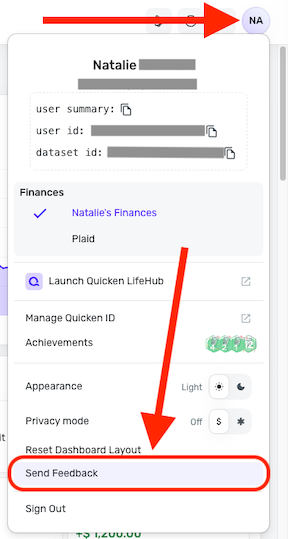
- Select the Profile icon in the upper-right corner of the screen.
- With the Profile menu open, hold down the Option key (Mac) or the Alt key (Windows), and then click Send Feedback.
- Leave all boxes checked, add a brief description of the issue, and then click Send.
-Coach Jon
0